What's New in Wrike - August 2026
This month is all about working smarter! AI Agents level up with expanded actions and dynamic mentions, Dashboards get more powerful filtering, and there's plenty more across Gantt, Boards, and Whiteboards. Let's dive in!
- AI Agents: Expanded Actions, Dynamic Mentions, and Enhanced Reliability
- New Gantt Chart: More Feature Parity Improvements
- Board View: More Flexible Columns and Swim-lanes
- Dashboards: New Filters Are Now the Default in All Chart Widgets
- Dashboards: More Powerful Filtering in Calendar Widgets
- Wrike Whiteboard: Wrike Whiteboard - Presentation Content Importing & Unified Experience
-
[Wrike Labs Release] Templates: Configuration Mapping Just Got Better
AI Agents - Expanded Actions, Dynamic Mentions, and Enhanced Reliability
Available on Business and higher plans
AI Agents continue to get smarter and more capable with new prebuilt agent templates, dynamic user tagging, deeper custom field support, and enhanced execution logging.
New Prebuilt AI Agents
You can now enable three new ready-to-use default agents instantly or clone and customize them to fit your team's workflow:
- Revision Tracker: Automatically updates custom fields and posts comments when a status changes.
- Project Coordinator: Automatically assigns subtasks and sets due dates on newly created items.
- Missed Deadline: Posts notifications to Slack and sends emails whenever a due date passes.
Dynamic @-Mentions in Comments
Agents can now resolve role-based references dynamically at runtime, such as "notify the author" or "mention the assignees." Instead of tagging static users every time, the agent automatically adapts to each work item’s specific author, assignees, approvers, and followers to issue clickable, direct mentions.
People and Duration Custom Field Support
- People Fields: Agents can now read and act on People-type custom fields (e.g., "Assign this task to whoever is listed in the Project Lead field"), supporting both single- and multi-user fields.
- Duration Fields: New action support for Duration custom fields enables automated tracking for workflows like SLA counters.
Logging, Email Scope & Performance Improvements
- Run-Grouped Logs: Agent execution logs are now organized by run for easier behavior tracking and troubleshooting.
- Subitem-Scoped Email Actions: Email actions now support subitem scopes and generate fully working links.
- Reliability & Guardrails: Faster agent response times, improved timeout handling, and extra guardrails around subitem scopes.
New Gantt Chart - More Feature Parity Improvements
Available on Team and higher plans
We're continuing to bring the New Gantt Chart closer to full parity with the Old Gantt Chart, with new ordering options and enhanced assignee visibility now available.
What's new?
- Item Type Ordering: You can now choose how item types are ordered in the New Gantt Chart. A new setting lets you display tasks and milestones on top, matching the Old Gantt experience. The default view remains projects and folders on top, but your selected preference is saved for future use. This ordering option is also available in Table View.
- Assignee Avatars on Canvas: Assignees now appear as avatars directly on the Gantt canvas for easier visibility. When multiple assignees are present, the chart shows a few avatars plus a count for the remaining assignees to keep the view clean.
For more details on Gantt Chart, see our Help Center article.
Board View - More Flexible Columns and Swim-lanes
Available on all plans
Board View now offers greater flexibility, making it easier to organize and visualize work based on your team's processes in a Kanban-style layout.
What's new?
- Custom Swim-lanes: Create horizontal groupings (swim-lanes) using any single-select or multi-select field, not just assignees.
- Custom Columns: Create columns using any single-select or multi-select field, in addition to workflow statuses.
- Other Workflows Column Repositioned: The Other workflows column now appears on the left to help prevent an empty board experience.
- Smarter Filtering: Filtering now displays only the columns and swim-lanes containing items that match your criteria. Empty groups and swim-lanes are automatically hidden when filters are applied, resulting in a cleaner, more focused board.
Read more in our Help Center article & Community post.
Dashboards - New Filters Are Now the Default in All Chart Widgets
Available on Team and higher plans
New filters are now the default experience across all chart widgets in Dashboards, completing the migration from classic filters.
What's new?
- New Filters as Default: All chart widgets, both new and existing, now use new filters by default.
- Automatic Migration: Existing widgets that were still using classic filters have been automatically migrated.
- Classic Filters Removed: The option to switch back to classic filters has been removed, and the migration banner previously shown in chart widgets is no longer displayed.
Learn more about Dashboard Widgets in our dedicated Help Center article.
Dashboards - More Powerful Filtering in Calendar Widgets
Available on Team and higher plans
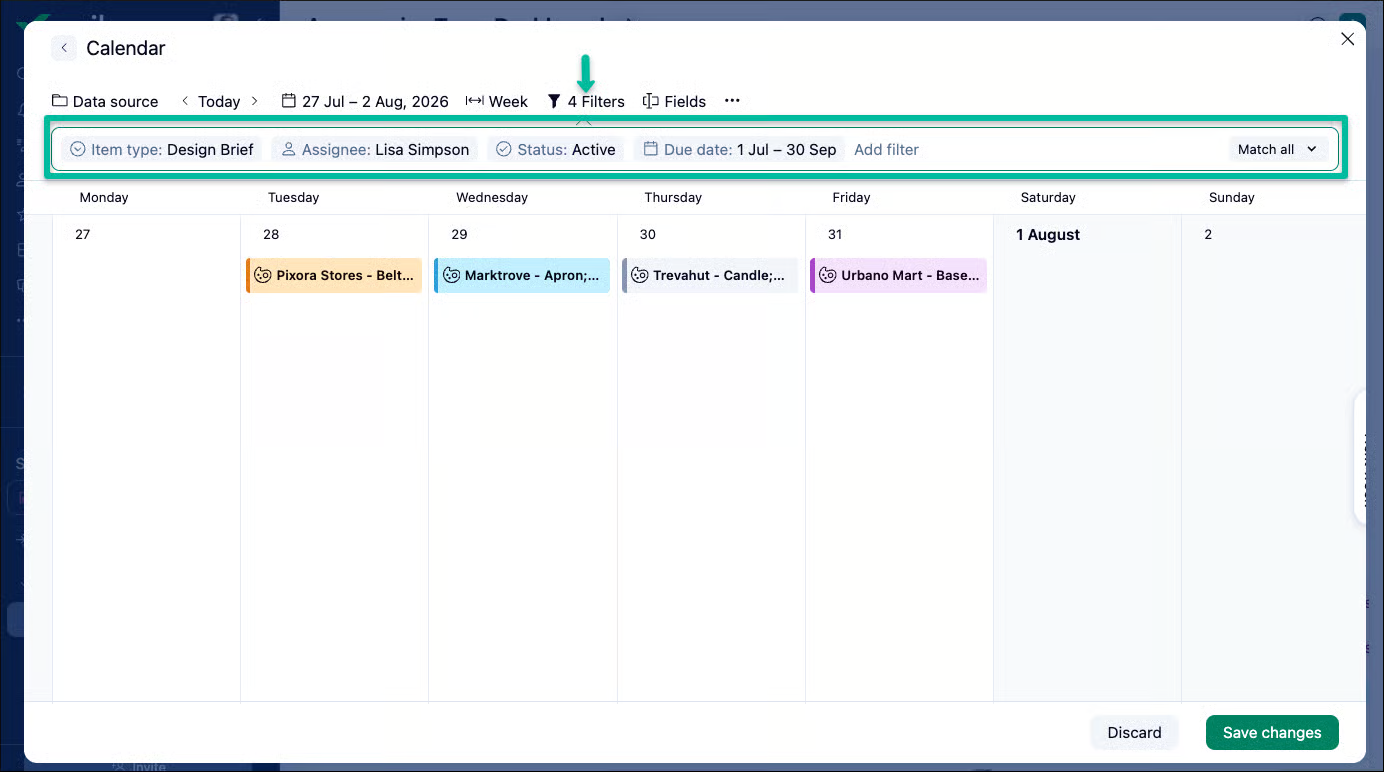
Calendar widgets now use the same filtering experience as other Dashboard widgets, providing a consistent and flexible way to customize the information displayed.
What's new?
- Expanded Filter Options: Filter by Parent, Item type, Assignee, Status, Start date, and Due date.
- AND/OR Logic: Combine filters using AND/OR logic for more precise or flexible criteria.
- Tasks and Projects Together: Display both tasks and projects in the same widget, consistent with Calendar View.
- Automatic Conversion: All new and existing Calendar widgets now use the updated filtering experience. Existing widgets are converted automatically while maintaining the same results.
Learn more in our Help Center article.
Wrike Whiteboard - Presentation Content Importing & Unified Experience
Available with Visual Collaboration add-on (Paid or Trial plans)
Wrike Whiteboard receives major updates to streamline visual collaboration from seamless deck importing to a fully integrated full-screen workspace view.
Presentation Content Importing
Facilitators can now transition from presentation decks to interactive whiteboard sessions without manual extractions or stickies workarounds.
- Automatic Slide Conversion: Uploaded PDF and PPT files are automatically converted into ordered slides with auto-generated zones and zoom capabilities.
- Preserved Formatting: Slides maintain their original order and scale, ready to present immediately.
- Host Access: Currently available for session hosts.
Unified Native Wrike Experience
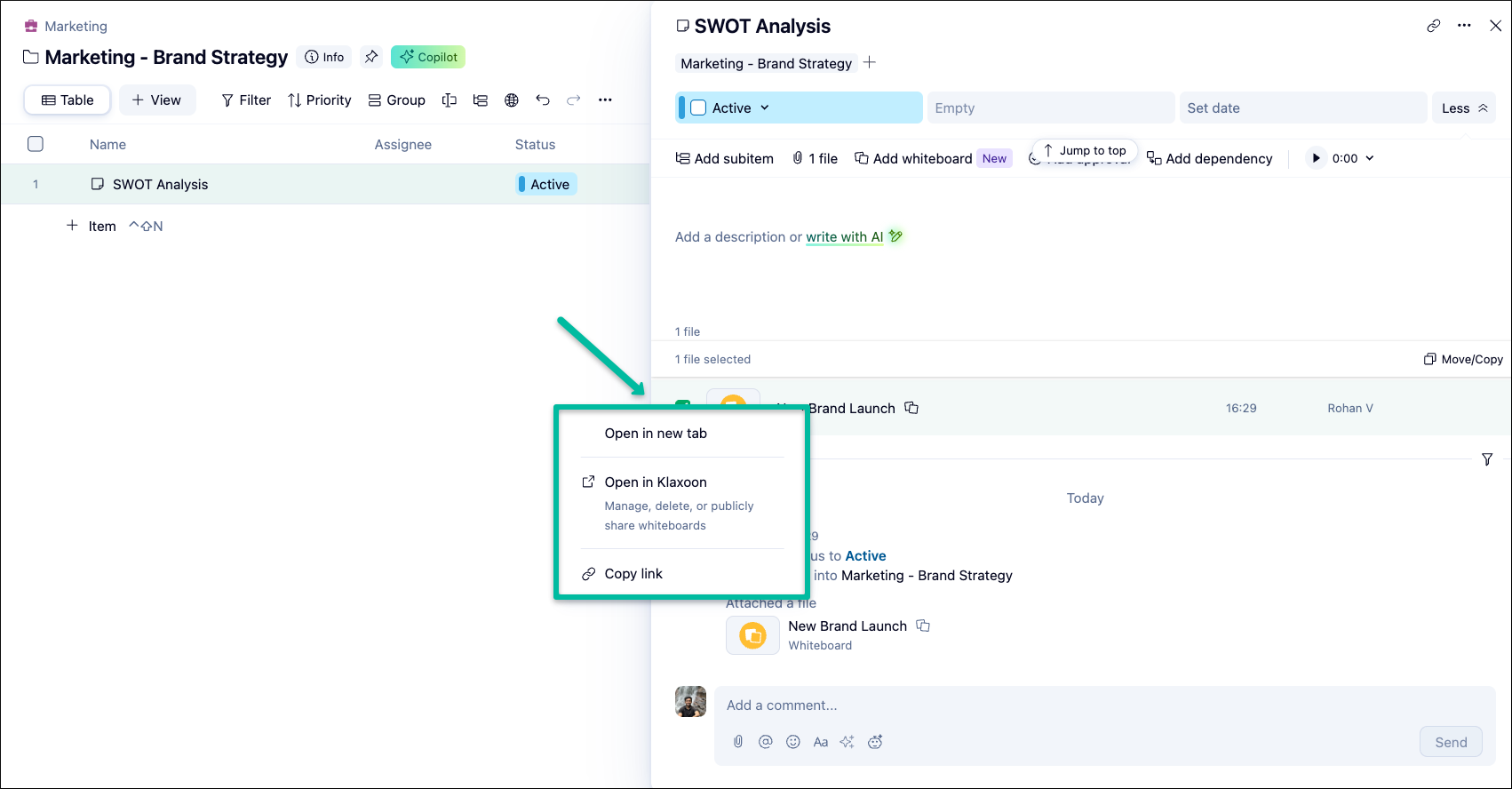
Opening a whiteboard from a task or project attachment no longer launches a separate browser tab. Whiteboards are now natively embedded directly within Wrike.
- Unified Full-Screen View: Dedicated full-screen view maximizes screen real estate whether launched from the Whiteboard Hub or as a task/folder/project attachment.
- Contextual Navigation: Effortlessly return to where you started using the X button, or copy-paste the URL to share the exact view with teammates.
- Updated Native Design: Clean layout displaying up-to-date titles directly within Wrike.
- Secondary Menu Access: The full whiteboard interface remains accessible as a secondary option via the attachment's context menu.
Note: The unified experience is rolling out in waves and will be available to all accounts soon. When accessed from the left menu as a Space Tool, whiteboards retain the left navigation panel as expected.
Templates - Expanded Configurations Mapping
Available in Wrike Labs
Configurations Mapping for Templates in Wrike Labs has been expanded beyond Custom Fields to give Space Admins even greater control during solution setup.
What’s new?
- Workflow & Custom Item Type Mapping: Space Admins can now map.
- Workflows and Custom Item Types alongside Custom Fields during Template installation into existing Spaces.
- Avoid Duplicates: Match template configurations to existing elements in your target Space or account to eliminate duplicate custom fields, workflows, or item types.
- Faster Adoption: Streamlines solution template setup while preserving your workspace data structure and governance.
Account owners can enable this feature today through Wrike Labs. For full details, read this Community post.
Was this article helpful?
Thank you for your feedback.
Thank you for your feedback.