5 Simple Steps to Creating the Best Knowledge Base for your Team!

We have over 1,000 users in Wrike, this makes it a challenge to provide training and support unilaterally across all our domains, so we have set up a unique space to handle training, reference and support materials. This is the foundation of our Wrike Knowledgebase
Step 1 - Create a space and share it with My Team - this ensures all new users added to your account, will automatically have access to this folder
Step 2 - You will have a lot of questions from your users, naturally, so why not compile them into a Master FAQ Folder in your Knowledge base. Keep them organized by topics - so that users can easily find what they are looking for. They also may see other FAQs that will be helpful while they are exploring a topic.
*Bonus - Create a Suggestions & Feedback Request form - If a question seems like a good candidate for FAQs, cross tag into the FAQ Topic Folder

Step 3 - Organize and Categorize your Training Documents, PowerPoint Decks, or Guides into a Resources or Training Folder! *Bonus Tip - Cross tag these into the FAQ, or Permalink them into related FAQS.
Step 4 - Be sure to include snapshots, videos, links or examples in your FAQ Tasks - this will guide your users a thorough understanding of the process or protocol
Step 5 - As you comb through new tips and tricks in the Wrike Community - Add the link to appropriate On-Demand Webinars, or other Training / Reference & Support Materials into Related FAQ Topics
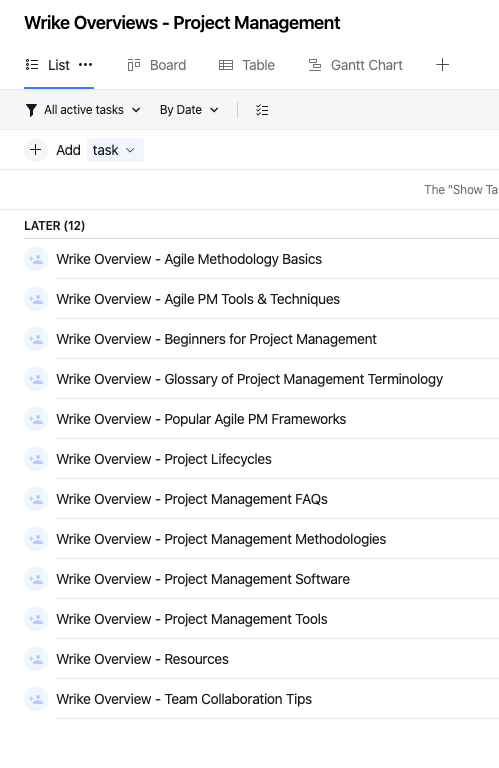
*Bonus Tip - Wrike has an excellent Project Management Guide, with many useful links for the novice to experienced Project Managers - Break out these topics into Tasks - supply the links in each topic and share with your PM teams!
Thank you so much for posting such a useful post with easy-to-follow steps Sherrie Besecker! 🤗
Lisa Community Team at Wrike Wrike Product Manager Become a Wrike expert with Wrike Discover
Lisa Wrike Team member Become a Wrike expert with Wrike Discover
Bonus tips:
- create a custom worklflos status named "documentation" or similar and use it for these tasks
- assign the tasks to a dummy user to avoid appearing on the to do list of the assignee, as it isn't scheduled work
We have a Best Practices folder in our account that we point all new users at. This folder has Wrike 101 video links to Discover, plus a bunch of our organization-specific best practices.
This is one of the first folders we created during our onboarding process from the Wrike team. Every team member we add to our account gets added to a group to ensure they have access to our knowledge base. Thanks for the additional tips and ideas.
The template was an extremely helpful place to start, and then I modified it from there to fit the needs of my team.
I can see how this would be useful for 1000 users!
Debbie Brownlie I guess it's useful for even 50 users, too!
Cracking idea Sherrie!
Nice to see you're company's football team utilities Wrike too! ;)
We’ve just started doing something similar. These are great tips!
Florian Kislich Great suggestion. We also use a custom "Resources" workflow for our COE - all Resources tasks remain active, backlogged, and unassigned, and are linked to in actual tasks that require training/reading of the entry. (The Completed status is called "CHANGE BACK TO RESOURCES" and auto-assigns me in case of accidental completions.)
Lisa For this use case, it would be nice to have the flexibility to create a workflow without status requirements.
This is brilliant! I will definitely be adopting this idea for my team. I normally have onboarding sessions for new Wrike members once a month, but I think this idea would be much more beneficial.
We have a knowledge base in Wrike as well as in our documentation repository! We actually have templates linked to Wrike from our documentation repository for seamless training.
Thank you for sharing! I love the idea of adding the links to any helpful items for easy access!
Thank you for taking time to share this detailed step-by-step process! This is a fantastic idea!
Great idea! We are in the process of creating a blueprint for new user training for our enterprise. Some of this will be useful for that project! Thanks!
Great idea, thanks for sharing!✌️
Amazing, another dream internal project. I've been toying with the idea of using a "dummy" account for these types of initiatives. Happy to see other people have thought about it too.
Howdy all
specifically Lennyroy Robles and Florian Kislich
Can I suggest you upvote these Virtual Dummy User (no email address) requests?
https://help.wrike.com/hc/en-us/community/posts/360030720934-Dummy-users?input_string=Dummy
https://help.wrike.com/hc/en-us/community/posts/360033310913-Dummy-Virtual-Users?input_string=Dummy
Thanks for sharing. Very helpful to create our own knowledge base. 👍