[Wrike Labs Release] Introducing Custom Templates in Wrike 👨🏼💻🧪
注目の投稿
Hey Wrike Community! 🙋🏻♀️
We’re excited to introduce an easier, faster way to set up your next project or team in Wrike: Custom Templates!
Custom Templates let account owners and admins on Business, Enterprise, and Pinnacle plans save Spaces as templates. Now, whether you’re building out marketing campaigns, onboarding workflows, or product launches, you can create new Spaces with all your proven configurations in just a few clicks.
How to Create and Use Custom Templates 🔮
1. Saving Your Space as a Template
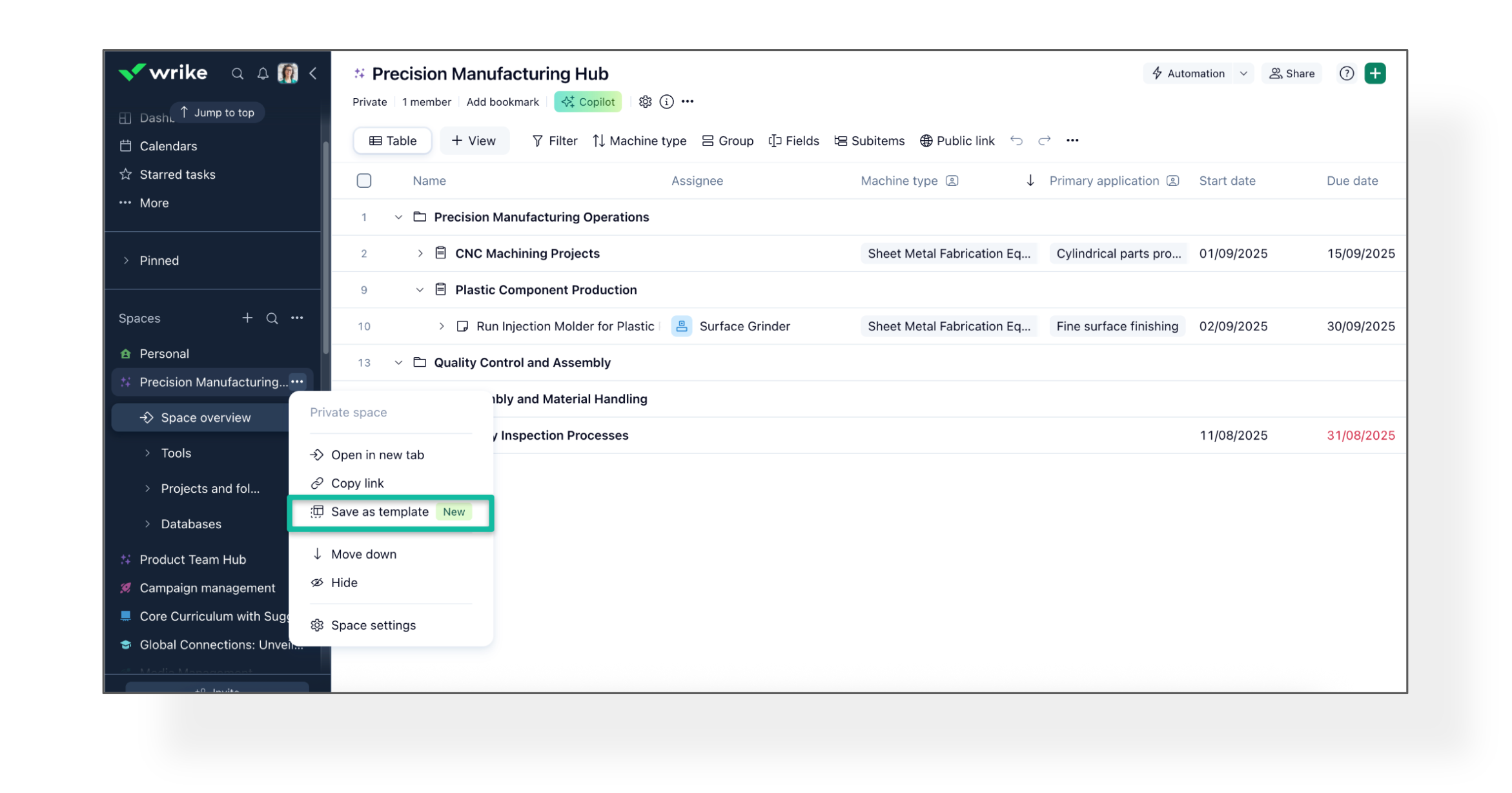
- Open the Space you want to save as a template (it must be unlocked and active).
- Click the three-dot menu in the Space header and select "Save as template."
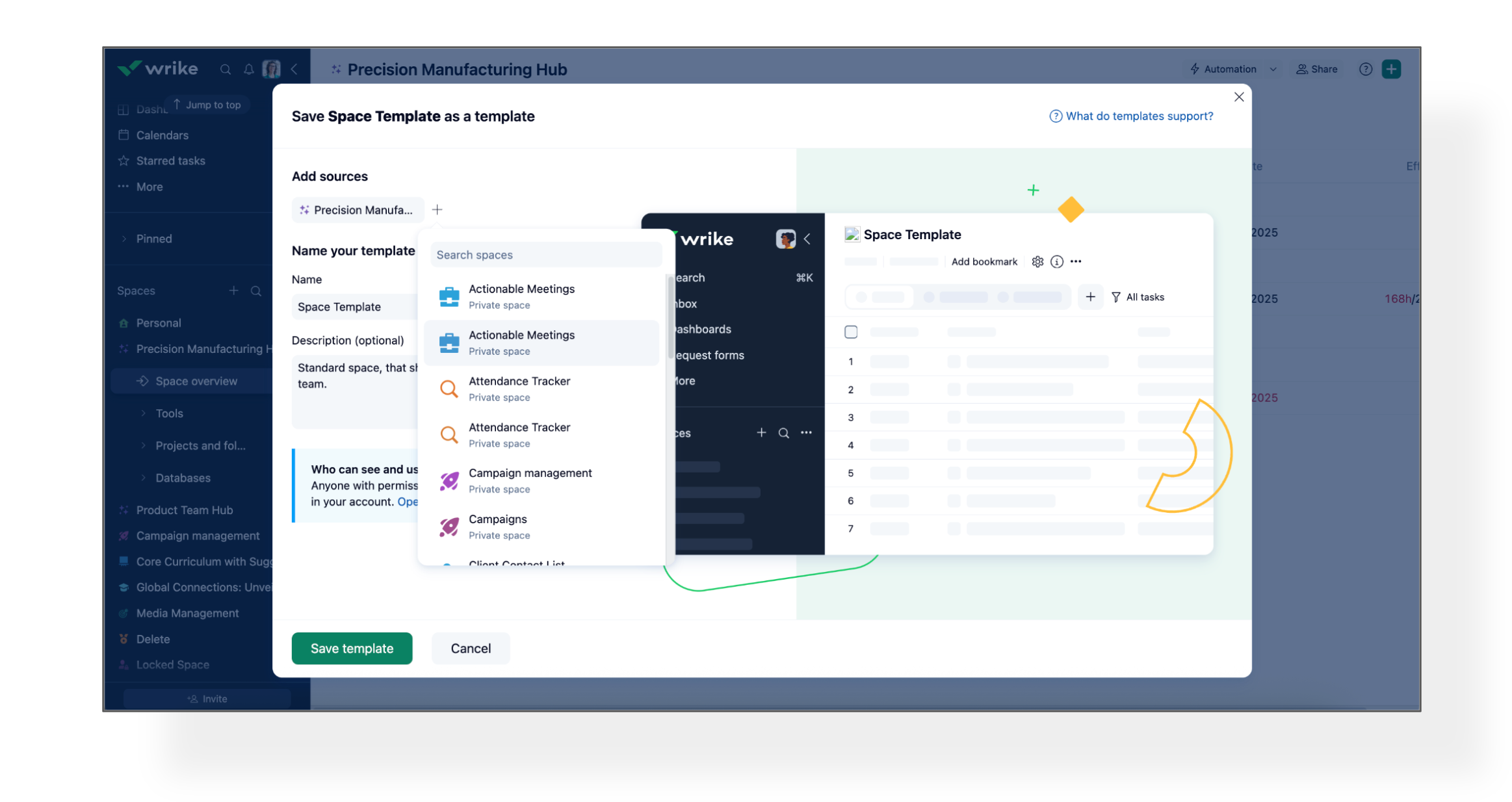
- Alternatively, you can go to the Templates Gallery, click "+ Custom template," and you can choose up to 5 Spaces.
- Give your template a name and description, then click Save.
- You’ll see a confirmation and your template will appear in the Gallery!
2. Launching a New Space from a Template
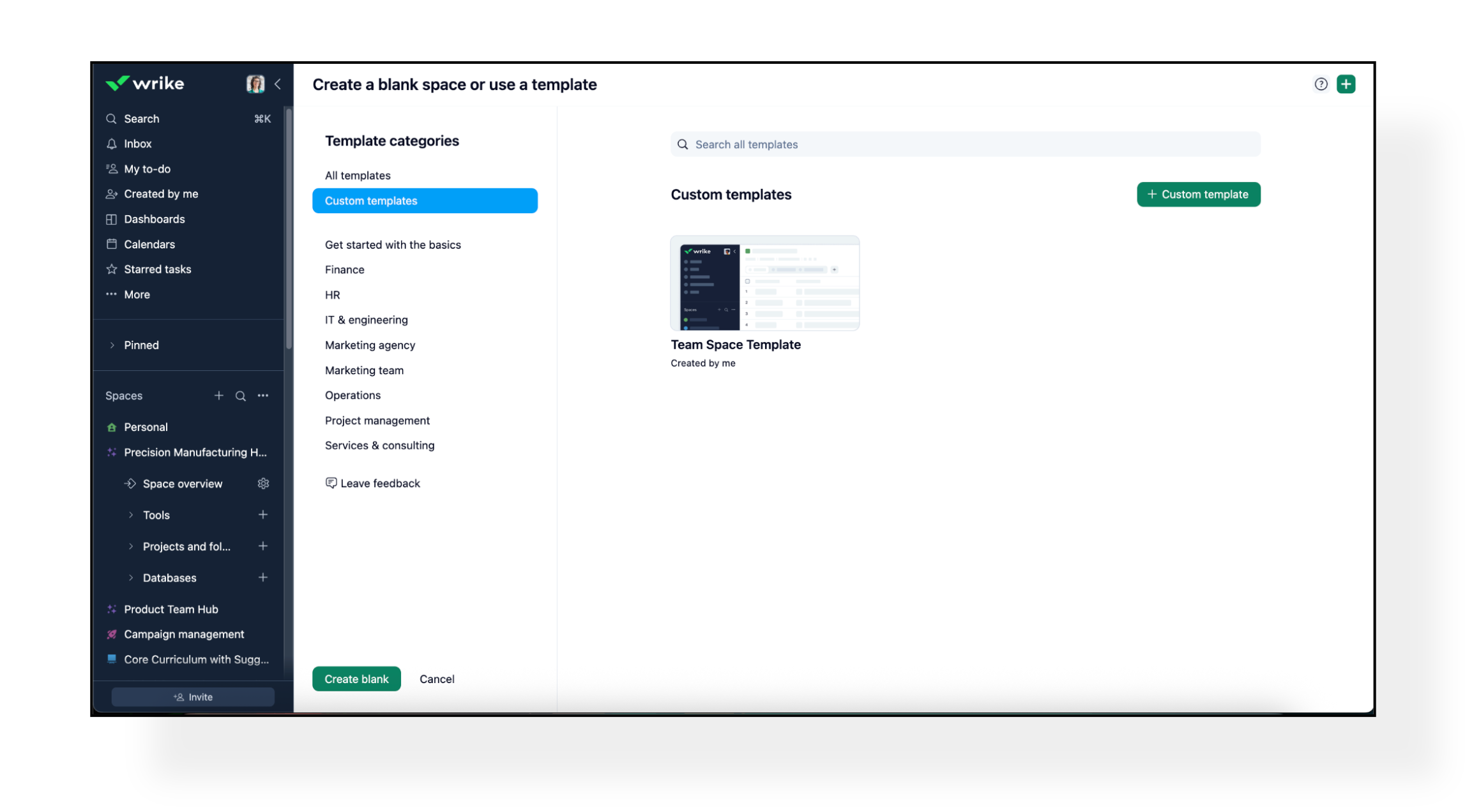
- Click “Create new space” and browse to the Custom templates category.
- Select your template, review details, and click to create!
- You can edit the name/description, and if you have permission, edit or delete templates you’ve created.
Here’s What Gets Saved! 📥
Wrike captures almost everything you need to rebuild a workspace:
- Configurations:
- Custom Item Types (CITs)
- Custom Fields
- Workflows
- Space-level Blueprints and Automations
- Content:
- Projects & Folders
- Tasks & subtasks
- Task and project descriptions
- Attachments
- Values in custom fields
📝 Please Note: Assignees are not copied when you create a template, so your new Spaces start with a clean slate!
How It Works 👥
- For Account Owners and Admins:
You can save any space (except locked, personal, or archived spaces) as a template, if you are a Space administrator. Templates are stored in your account’s Templates Gallery and can include up to 5 spaces at once. When saving, if a template with the same name already exists, Wrike will automatically add a number to the new template’s name.
- For Regular Users:
Owners and admins can allow regular users to create templates by enabling the appropriate permission in the User Type settings. Once this permission is granted and the feature is enabled for their account, regular users can create new templates. The template gallery displays all available custom templates, along with the names of their creators.
Please Note 📌
- Templates copy current Space-level settings. Any changes made to the original Space later won’t affect the template.
- For account-level settings, the template always re-uses an existing configuration and doesn't create copies.
- If your tasks, projects, or folders have links (cross-tags) to other spaces, they will be removed automatically from the Template. If you want to keep the cross-tags, you should include other spaces to the template, while saving it.
- Approvals, Databases, Workload Charts, and Job Roles aren’t supported yet.
- Locked, personal, or archived Spaces can’t be templated.
We’d love to hear how you’re planning to use Custom Templates, and any feedback you have - let us know below! 👇
Basudha Sakshyarika Community Team at Wrike Wrike Product Manager Wrike Discover で Wrike のエキスパートになろう
Basudha Sakshyarika Wrike Team member Wrike Discover で Wrike のエキスパートになろう
What a great idea to use a whole space as a template!
Definetely have to try this out!
Florian
This wouldn't work for our main space but I can see this being useful for some of our more custom spaces. However at the moment we have cutdown on the number of separate spaces we have except for necessary private spaces. So for campaigns etc we have all of this within our main space and utilise blueprints. But I can see how useful it would be to have a templated space which copies the workflows, custom fields and blueprints especially if you have a lot of different teams using different spaces in Wrike. Loving all the updates and features coming up in Wrike at the moment! :)
Thank you for sharing your thoughts, Florian Kislich and Amy Hunter! 😊
Basudha Sakshyarika Community Team at Wrike Wrike Product Manager Wrike Discover で Wrike のエキスパートになろう
Basudha Sakshyarika Wrike Team member Wrike Discover で Wrike のエキスパートになろう