Introducing Folders for Tools for Organized Workspaces! 🗂️

Hello Everyone! 🙋🏻♀️
We’re excited to introduce a feature that will transform how you organize and manage your tools—Folders for Tools! This update aims to bring order to your side panel, especially if you have complex structures and higher reporting needs.
We know that many of you have been looking forward to having this feature - thanks a lot for sharing your feedback with us 🤗
Here’s what’s new and how you can make the most of it:
🔍 Feature Overview
With enhanced folder management, you have the power to organize your tools more efficiently. Here are the details:
1. Folders are available for all tool types.
2. No special permissions are required to organize tools.
3. Folders are sorted alphabetically for easy navigation.
4. Unlimited nesting allows you to customize your folder structure with limitless depth.
5. Easily drag and drop Tools and Folders to move around and organize effortlessly.
📝Please Note: Deleting a folder removes all contained items. Also, folders are excluded from the pinned section.
🛠️ How to Get Started
This feature is accessible to all users on Team plan and above. If you have the rights to manage tools, you can start organizing right away!
1. In the Tools section, click on the + and add a Folder.
2. Give the folder a name.
3. You can drag and drop tools under folders and/or create nested folders for organization.
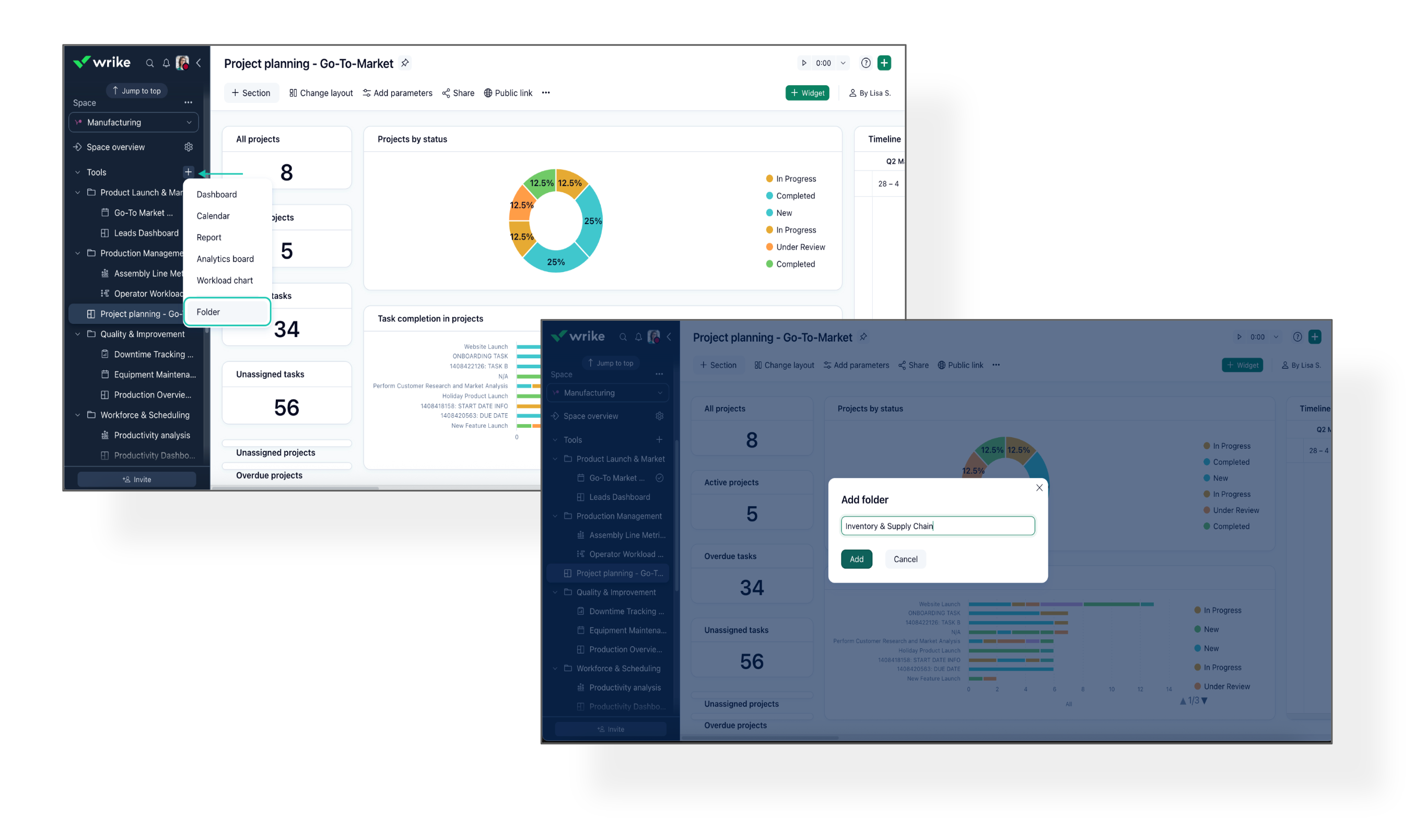 Better tool organization gives you quicker access to what you need, minimizing search time and keeping your focus on what’s important. For more information, check out our Help Center article.
Please feel free to share your feedback and let us know how this feature will impact your daily operations! 👇
Basudha Sakshyarika Community Team at Wrike Wrike Product Manager Become a Wrike expert with Wrike Discover
Basudha Sakshyarika Wrike Team member Become a Wrike expert with Wrike Discover
This is awesome!
Btw I had to clear my cache before I was able to drag'n'drop tools into a folder.
Great enhancement. Thank you!
This is such a great step! Thanks team! Can't wait for the option to organize request forms into folders, too!
So excited about this! I just got so organized!
Yahoo! Time to clean up the side menu :D
Is there a plan to add folders to Pinned work as well to keep that tidy? My pins are getting out of control!
Love this enhancement! I'd appreciate the folders for my pins and automations.
Very excited for this. My Sidebar needed this greatly.
OUTSTANDING!
This is a huge improvement! Can't wait to get organized!
This is an excellent addition! I second Sarah Dungey - look forward to folders for request forms one day!
Yesss!!!!
Thats great!
This is wonderful! I have a habit of making different versions of reports and tables and now I can keep them all grouped together!
Basudha Sakshyarika great update! We have encounter a bug however. Every time we make a new folder we have to refresh the page in order to drag&drop tools. Using Wrike for Desktop 4.5.2 (latest version) and google Chrome.
Clearing the cache like Florians helped won't work for me
Basudha Sakshyarika maybe as a request for future Improvements -> Maybe transfer the Share Settings to the folder? (So we can have different Acess levels for certain Dashboard folders)
This would be amazing for us! Then we could finally move many Admin Dashboards outside of the personal space!
Great feature update, Wrike team! 🙌
Just adding that this will greatly impact my day to day work in a positive way! I am the Wrike admin for all our teams and often create dashboards, reports and calendars for other team members which means I have a huge list of these. Being able to group them in folders is excellent!
I agree with the idea of folders for the pinned section - I have so many they get lost...
Hello everyone,
Michael, PM for Analytics here. Excited to hear how much you like the new feature. I have started an inquiry into the bugs you mentioned. We will fix that.
As for permission - yes, I know this would be useful. Let us see what we can do about it :)
Mike
This has been a great help for our organization in streamlining the tools section, which could have started to become overwhelming.
This is a great addition. However, I am still frustrated that the actual Reports section still has no folder structure. I totally agree that the tools section needed folders to organize long lists of tools. But the same limitation still exists for the main Reports area. I have a long list of reports and not being able to organize them here is still a problem. I am not going to jump from space to space to use the Tools section in each space to go through my reports. I go the main Reports section and access them all from one location. It's just that this location is not able to be organized.
Hi Jason Pontius, thanks for detailing your use case and sharing your feedback. I’m forwarding it to the Product Team now 👍
Rohan V Community Team at Wrike Wrike Product Manager Become a Wrike expert with Wrike Discover
Rohan V Wrike Team member Become a Wrike expert with Wrike Discover
Just chiming in to echo the desire for folders in the Pinned section, as well!
Are we able to restrict access to folders in the tools section the way we can restrict access via selective sharing in the Projects & Folders section of our space?
Sure, Alex Boyd, that would be a good enhancement. 👍🏽
Janice Iglesias, this is currently not possible, since the update for folders in the Tools section is meant to help organize, manage, and easily navigate the tools created in Spaces. 😊
Basudha Sakshyarika Community Team at Wrike Wrike Product Manager Become a Wrike expert with Wrike Discover
Basudha Sakshyarika Wrike Team member Become a Wrike expert with Wrike Discover
Jason Pontius
Do you feel the same problem with dashboards? Because Dashboards have that single entry point like Reports, right? But it is also not organized.
We will first enable more reporting use cases in dashboards, mainly multi-grouping which is coming in October I hope.
Then we can think about better organisation there if the current folders do not suffice. E.g. we could expose the space/folder structure in that single entry point, e.g. Dashboards in the left-hand side menu bar. You would still have to follow the space/folder logic tools have but you could browse it all from a single place.
Best,
Michael,
PM for Analytics
@... For me, I don't have the same issue with dashboards because I don't have that many dashboards. Others may, but I don't. I have more reports than dashboards by far. Fundamentally, I feel that any area that presents a list of what could be an indefinite, or at least a very large, collection of items should have a way to organize it.
I have a folder within the "tools" section of one of my spaces. However, I don't have the ability to edit said folder. I'm simply trying to rename the folder within the "tools" section of a space, but cannot. Any guidance?
Hi Evan Bleecker 🙋🏻♀️. A screenshot would have been great. For Space owners and admins, the rename option should be visible when you click on the three dots next to the folder.👇🏼 Does it look different on your end?
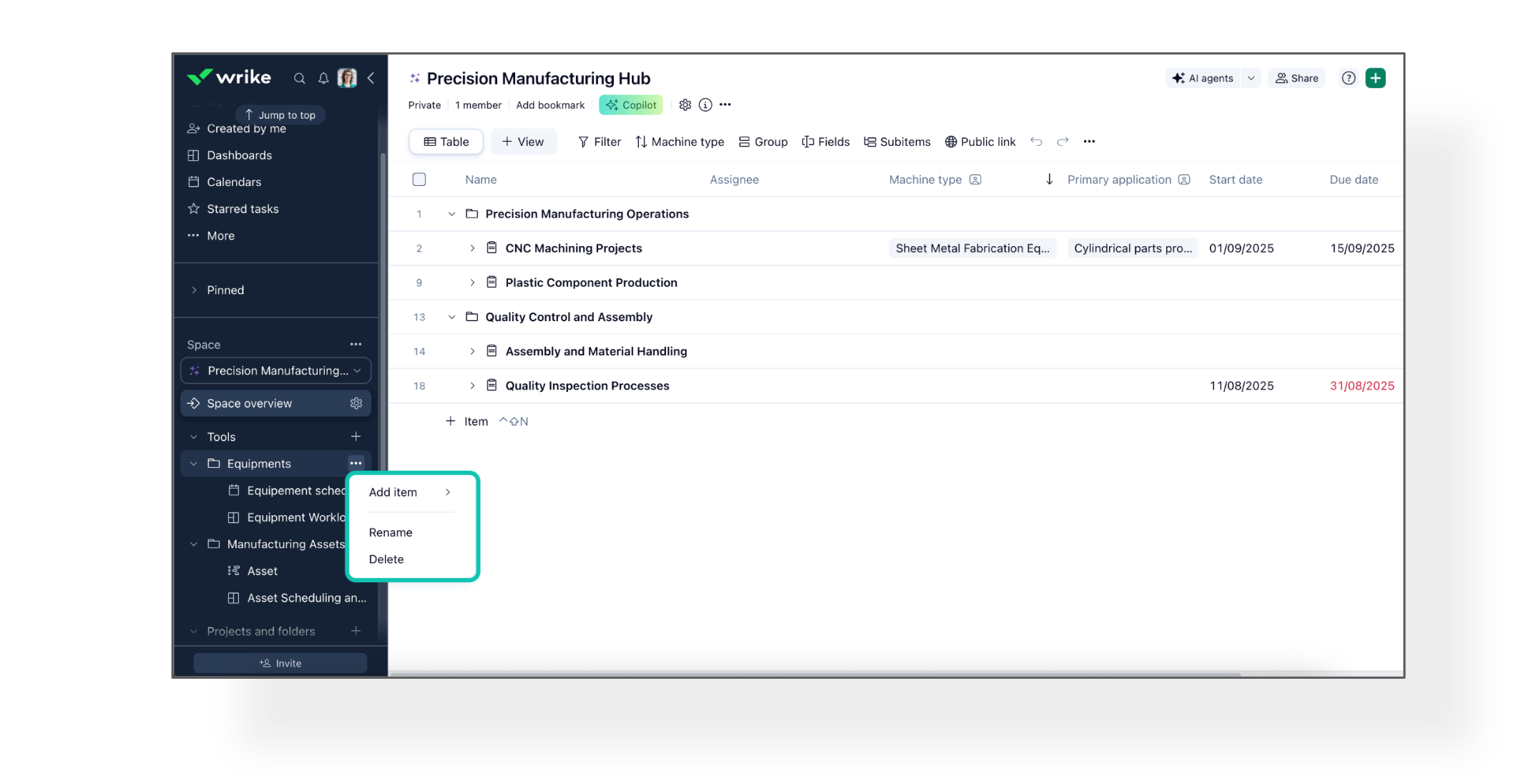
Basudha Sakshyarika Community Team at Wrike Wrike Product Manager Become a Wrike expert with Wrike Discover
Basudha Sakshyarika Wrike Team member Become a Wrike expert with Wrike Discover
Thank you, Basudha. Yes, I am an Admin (both of my whole Wrike account and I confirmed of the space that holds the tools folder I'm trying to rename). I only have the "Add Item" and "Delete" options. Here's a screen shot: