Introducing Folders for Tools for Organized Workspaces! 🗂️

Hello Everyone! 🙋🏻♀️
We’re excited to introduce a feature that will transform how you organize and manage your tools—Folders for Tools! This update aims to bring order to your side panel, especially if you have complex structures and higher reporting needs.
We know that many of you have been looking forward to having this feature - thanks a lot for sharing your feedback with us 🤗
Here’s what’s new and how you can make the most of it:
🔍 Feature Overview
With enhanced folder management, you have the power to organize your tools more efficiently. Here are the details:
1. Folders are available for all tool types.
2. No special permissions are required to organize tools.
3. Folders are sorted alphabetically for easy navigation.
4. Unlimited nesting allows you to customize your folder structure with limitless depth.
5. Easily drag and drop Tools and Folders to move around and organize effortlessly.
📝Please Note: Deleting a folder removes all contained items. Also, folders are excluded from the pinned section.
🛠️ How to Get Started
This feature is accessible to all users on Team plan and above. If you have the rights to manage tools, you can start organizing right away!
1. In the Tools section, click on the + and add a Folder.
2. Give the folder a name.
3. You can drag and drop tools under folders and/or create nested folders for organization.
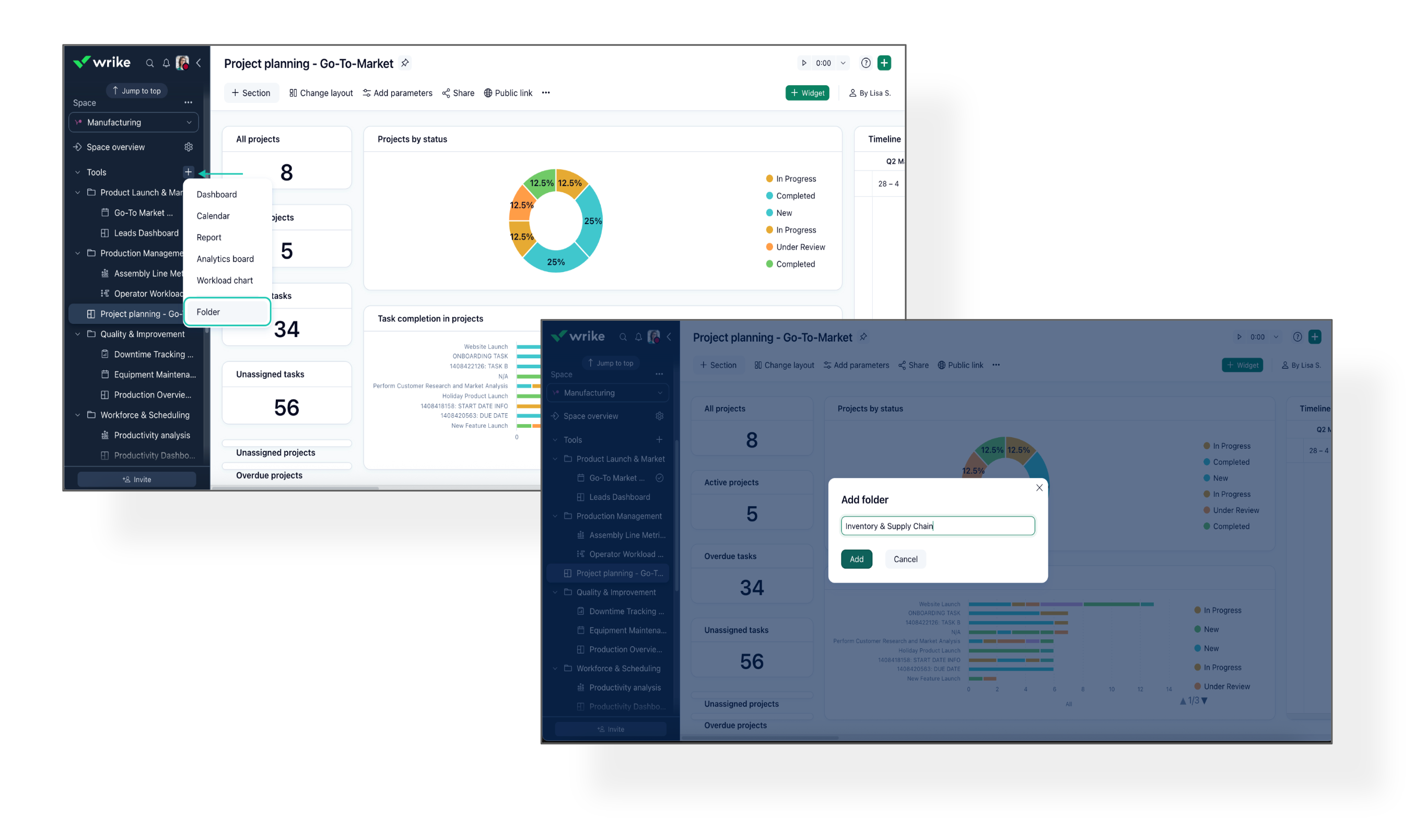 Better tool organization gives you quicker access to what you need, minimizing search time and keeping your focus on what’s important. For more information, check out our Help Center article.
Please feel free to share your feedback and let us know how this feature will impact your daily operations! 👇
Basudha Sakshyarika Community Team at Wrike Wrike Product Manager Become a Wrike expert with Wrike Discover
Basudha Sakshyarika Wrike Team member Become a Wrike expert with Wrike Discover
Thanks for sharing the screenshot, Evan Bleecker. I am looping in our support team, as they will be able to help figure out why the Rename option isn't available. Expect to hear back soon. Thanks! 😊
Basudha Sakshyarika Community Team at Wrike Wrike Product Manager Become a Wrike expert with Wrike Discover
Basudha Sakshyarika Wrike Team member Become a Wrike expert with Wrike Discover