Automation option Duplicate Item/Subitem - cannot duplicate SOURCE as manual duplication does

Can I ask about the two new automations mentioned here: https://help.wrike.com/hc/en-us/community/posts/14113011750295--Releases-Wrike-Lightspeed-Automation-New-Table-View-Custom-Item-Types-and-a-BIG-Thank-You-for-your-Feedback-04-24-2023-
Action: Duplicate - I read about it there a while back and then went to use this feature for the first time and discovered they do not actually "do what it says on the tin" afterall - very frustrating discovery and would LOVE to hear about workarounds or if this will be fixed anytime soon...
Basically, up until now, duplication of any kind performed manually on a task/project/CIT or whatever really does what is says on the tin - it duplicates whatever the SOURCE is that you are choosing to duplicate. Kinda why it is called "duplicate" right?!
So my question is, if I set an automation to "duplicate" tasks/CITs whenever a certain trigger is met, why does the automation force me to specify WHICH single non-dynamic task to duplicate?? With no option to duplicate the SOURCE task/CIT that has met the criteria set for triggering the automation?
Essentially, this is NOT duplication at all - if the item being created must be a specified fixed source not a dynamic source, then it is just a (misleading) way to "create new item/subitem from blueprint/template" or "create new item from existing specific task".
Am I doing something wrong here? How is this called duplication, if it does NOT have any option for us to duplicate the source?
Lastly, another pain point, it also asks to specify a fixed non-dynamic resulting task title as well - again, for a duplication, the option for it to inherit the title from the source should be possible, ideally with option to add a prefix or suffix as well.
Look forward to hearing of workarounds, or if this will be solved soon, or if anyone has used this and somehow made it actually duplicate the way duplication has worked manually until now 🙏 Thanks!!
Hey Angela Kennewell, thanks a lot for the detailed post! I've asked our Support team to llok into your questions about duplicating through automation 👍
Lisa Community Team at Wrike Wrike Product Manager Conviértete en un experto en Wrike con Wrike Discover
Lisa Wrike Team member Conviértete en un experto en Wrike con Wrike Discover
Thanks Lisa! I look forward to hearing from them, it’s an issue for us at the moment with a collab between two departments I am trying to bring together in Wrike, one of which was not previously using Wrike so until now it wasn’t a problem but now that I am bringing them into Wrike this has cropped up as a significant roadblock.
The second department needs to action work from copies of the original task but with some additional/different Custom Fields, so automation that duplicated and then changed location and task type (from Department 1 CIT to Department 2 CIT) was going to be the solution, but it isn’t working :( I hope they can help me get this figured out 🙏
I just want to add my voice to this: I'm facing the same issue as well. Specifically, I'm looking to duplicate the task as a sub-item of itself. This will let me bundle different regions' progress on the task together. The inheriting titles with a prefix/suffix would also be useful.
Has there been an updates on this since then. I'm also encountering this roadblock. I want the automation to duplicate a task, but with a prefix identifier. I need the Source name to follow the duplicate.
Hi Kyle Preish, welcome to the Community! At the moment we don't have updates to share about this option, but I've passed your feedback on to our Product Team 👍
We'll keep you informed in case there are any improvements implemented. In the meantime, allow me to mention that you can visit our New to Community forum to get the most out of your experience with our Community 🙂
If you have any other questions, please let us know.
Hello, any update about this topic? I don't see a significant difference between actions 'Create item from blueprint' and 'Duplicate item'...
Hello, Any developments on this? Also is there an option for a workaround such as creating a new task however allowing the "Name" on the new task to be $currentTaskName so that it creates a card with the same name or even parent folder name? I feel that enhancing the the duplication capabilities or allowing to create a new card with a title or link field that speaks to the task that is being automated or even to the parent folder/project would be a gamechanger in our workflow.
Thanks folks. We don't have updates at the moment, but we'll let you know if there are any changes in the future.
Andrew Shelnutt Perhaps the action to add prefix/suffix/change name could be helpful in your case?
Lisa Community Team at Wrike Wrike Product Manager Conviértete en un experto en Wrike con Wrike Discover
Lisa Wrike Team member Conviértete en un experto en Wrike con Wrike Discover
We have found a solution that works for our current workflow.
Instead of using a "Duplication" action we are using "Change Location" action. When this is selected as "Add to specific..." it does not remove the original from the main workflow. Therefore we end with two cards of which one is a copy located on an alternate workflow location.
I feel that this issue is a product of the language of the "Change Location" implies that copy is not an option for this action when that is just not the case. This action may be more appropriate to label "Move or Copy" so that it is not overlooked.
Thank you for your time on this matter.
--Andrew
Andrew Shelnutt is that copy just another linked task to the original task (ie if you make a change in the original location it updates both) or an independent duplicate?
I'm playing around with it now to test but thought you might save me 1 calendar day!
after playing around with the options I have to agree with Angela Kennewell - we need a duplication method that is dynamic not static.
Hi James Ackerly, thank you for your feedback! Please, feel free to upvote the original post at the top 👍
Hello, any word on adding the option to duplicate the dynamic item that triggers the automation, instead of a static one?
Hello Laura Lysaght 👋 At this time, there are no further updates on this feature request. I will reach out to you if there is any progress in the future. Thanks for your patience!
Rohan V Community Team at Wrike Wrike Product Manager Conviértete en un experto de Wrike con Wrike Discover
Rohan V Wrike Team member Conviértete en un experto de Wrike con Wrike Discover
Hello, Any update on this topic?
Click here to check out our in-depth product feedback guidelines article. Thank you!
Rohan V Community Team at Wrike Wrike Product Manager Conviértete en un experto de Wrike con Wrike Discover
Rohan V Wrike Team member Conviértete en un experto de Wrike con Wrike Discover
Hello, we need the ability to duplicate the task that triggered the rule incl. task title to keep track of regular asset maintenance.
Wrike's 'Make recurrent' feature is too limited for our use case as well, because the recurrences lose all the custom field entries and attachments. https://help.wrike.com/hc/en-us/community/posts/360018917274--Status-Not-planned-Custom-fields-for-recurring-tasks
This is very frustrating!
Upvoted! Agree with everyone here. The duplication action is not a true duplication. In our use case, we are trying to duplicate a task that lands in a project via form submission. The initial task is shared with our external partner, and we need to duplicate the fields captured for our internal teams to complete the deliverable requested without them seeing the comments of our internal team. Looking forward to an update on this!
Rohan V Community Team at Wrike Wrike Product Manager Conviértete en un experto de Wrike con Wrike Discover
Rohan V Wrike Team member Conviértete en un experto de Wrike con Wrike Discover
True duplication is needed - I just ran into this today and will now have to deploy a product development workflow in a different PM tool.
Related feedback, from 2018...
[Status: Backburner ⏳] Data entered into custom fields rolls down to subtasks – Wrike Help Center
This would be an essential upgrade for our company.
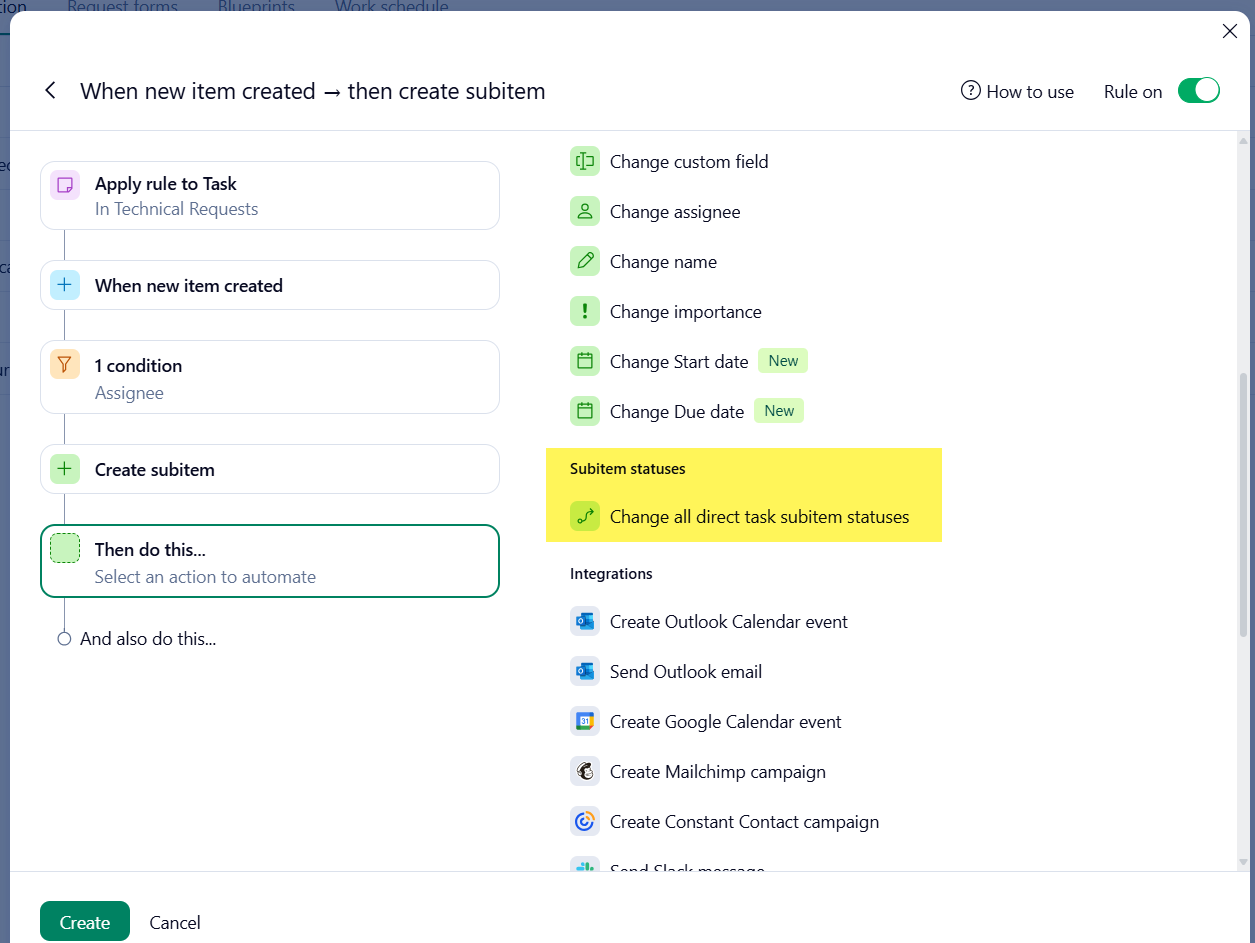
I was hoping that I could at least make a workaround by creating a duplicate of CIT and then creating a second automation that says if any custom field changes, then the subitem fields would be updated as well. There seems to be the architecture in place for this, since there's already an automation for "Subitem statuses > Change all direct task subitem statuses". So why not build on that and let us change all direct task subitem custom fields/assignees/dates?
Thank you, Aaron Cunningham and Soraya Jung, for adding your voices here and sharing your feedback. I have forwarded this to our product team. 👍🏽
Basudha Sakshyarika Community Team at Wrike Wrike Product Manager Conviértete en un experto de Wrike con Wrike Discover
Basudha Sakshyarika Wrike Team member Conviértete en un experto de Wrike con Wrike Discover
I wanted to share a feature request that would make a huge difference for our graphics and VFX workflows in post-production.
Right now, when an automation duplicates a task or item, it doesn’t carry over the original task name. Instead, it creates a new, untitled task, and we have to manually copy and paste the name from the original.
As of now, we have pivoted to a modified workflow, but it would be great to have an automation feature that is able to duplicate the item name directly to another location.
We’re tracking hundreds (sometimes thousands) of assets and asset ingest requests a week, and revisions across multiple shows, so it really adds up fast and leaves room for errors.
For us, keeping that original task name in the duplicate is key for:
Asset tracking and version control
Clear linkage between the source and the duplicate
Cutting down on unnecessary admin work
A functional duplication system that copies the original name within Wrike automation would seriously boost efficiency and accuracy for creative teams like ours (and honestly, any asset-heavy workflow).
Thanks for considering this! It’s a small change that would have a big impact for teams juggling high-volume, detail-driven projects.
Hi Tin Escandor 🙋♂️
Welcome to the Community Forums, and thanks a lot for taking the time to share your suggestion, plus your use case, here. We are forwarding your comment to our Product Team now and will post if there are any updates to Automation.
Rohan V Community Team at Wrike Wrike Product Manager Conviértete en un experto de Wrike con Wrike Discover
Rohan V Wrike Team member Conviértete en un experto de Wrike con Wrike Discover
1000000% agree with everyone. Just starting to use the automation and I'm used to tools like Power Automate which is so much better! I run into this issue with all the automations in Wrike--we should be able to use elements / components / details of the trigger in subsequent steps. If I'm truly duplicating an item then the details of the triggering item should be available in the actions. Would love to see a more detailed response than "Upvote this..." or "We'll let our so-and-so people know".
Are there any updates from the Production Team on the ability to copy task names when attempting to automate duplications?
Thank you :)
It is now November 2025 and customers have been asking for a workaround or for this upgrade since June 28, 2023. Can we have an update as to when this could be an option in Wrike? Working with in a creative team and project management team this option is fast becoming a necessity.
Any update? Maybe an early Christmas present? 🎁