[Status: Launched 🚀] Cascade Custom Field "Value" from Folders/Projects to Sub Projects/Folders/Tasks

If we had a custom field that would cascade down it's VALUE to child tasks/sub-folders/projects, that would solve a few key challenges we run into.
Perhaps it's adding a Boolean setting called "cascade value" and then which items it cascades to is dependent upon what's been determined in the "Apply to:" section, just below that.
Here's a screenshot of the settings idea.

Hi Amanda Juneau, welcome to the Community 👋
Thanks a lot for bumping this thread! Our team is currently investigating this suggestion, so I've changed the status here to reflect that. We'll let you know how this research goes 👍
If you'd like to know what this Community has to offer, please check out our New to Community forum.
Lisa Community Team at Wrike Wrike Product Manager Become a Wrike expert with Wrike Discover
Lisa Wrike Team member Become a Wrike expert with Wrike Discover
Lisa
Oh awesome! Give them a pat on the back and tell them we say pretty please!! lol
Will do Dustin Beaty 😁
Lisa Community Team at Wrike Wrike Product Manager Become a Wrike expert with Wrike Discover
Lisa Wrike Team member Become a Wrike expert with Wrike Discover
Hi Lisa,
Bumping this thread again to see if there's an update or beta that may be available to check out. The use case for our team would be receiving a project submission via intake, and needing the details captured in the project custom fields to also display in each task as our team works the request.
Thanks!
Hey Peter Freeby, sorry for the delay here.
We're checking this out at the moment and will be back in touch with an update ASAP 👍
Elaine Community Team at Wrike Wrike Product Manager Become a Wrike expert with Wrike Discover
Elaine Wrike Team member Become a Wrike expert with Wrike Discover
Hi everyone, apologies for the late reply here!
We've checked with the Product team - after spending a considerable amount of time researching this suggestion, the team couldn't prioritize this proposed functionality and at the moment, the status here is changed to 'Backburner'. We do understand this would not be a welcome update for you here, but please rest assured that your feedback here has been heard and researched. We'll keep this idea on the team's radar and we'll continue to pass on your feedback here.
Thank you for sharing your thoughts with us!
Lisa Community Team at Wrike Wrike Product Manager Become a Wrike expert with Wrike Discover
Lisa Wrike Team member Become a Wrike expert with Wrike Discover
Yes please!
Lisa
Upvotes for this topic:
60 = 100% and 120 = 200% we had upvoted this with 147
Why ist this suggestion not as PRO 1 ? How many upvotes are needed for Prio 1?
Hi Ronald Otmar Theil, hope you don't mind me jumping in for Lisa here.
As outlined in this Community post, the Product team looks at a wide range of data, user feedback, and Community suggestions/votes to determine what next to work on. The team always aims to focus on implementing the functionality that will have the widest impact and benefit for the most users, and it's for this reason, that we can't implement all of the suggestions we receive via our various feedback channels.
That being said, the Product team is still interested in this idea and they're paying close attention to the feedback here with plans to review it in the future.
Again, thank you for your continuous support for this suggestion and as always we'll make sure to update you here if there are any changes.
Hi there,
Our company too would find this very useful! It seems there are a couple other threads with same/ similar requests - see below ones I've stumbled upon but there could be more as well.
https://help.wrike.com/hc/en-us/community/posts/360014354413-Inherited-Custom-Field-Values
https://help.wrike.com/hc/en-us/community/posts/360001342405--Status-Investigating-Data-entered-into-custom-fields-rolls-down-to-subtasks
Surely with all the upvotes combined this must be enough to get this one off the backburner?
Cheers,
this would help our team very much as well! please
Thank you for these links Mark Owen, it would be great to get more feedback on this topic to demonstrate its popularity to our Product team. Although they aren't committed to working on all or even most of the suggestions, we continue to send them this feedback and we'll let you know how it goes in the future 👍
Lisa Community Team at Wrike Wrike Product Manager Become a Wrike expert with Wrike Discover
Lisa Wrike Team member Become a Wrike expert with Wrike Discover
Hi, we are doing the deployment just in these weeks. The lack of this functionality is very heavy for us and we are at an empasse. We have a lot of custom field that we set at the first level and need to inherit into the projects and tasks below.
Are there any news about it?
Thanks
This would be helpful for us also. We have custom fields that we assign resources to at the project level. Those custom fields carry through to the tasks within the project and it would be great if once assigned in the project, those custom fields would automatically be populated in the associated tasks.
For our teams this would be very helpful also for reporting.
Thanks a lot for your continued feedback here, folks! I'm now checking with the team to see if there are any updates for this suggestion, and I'll let you know if there is any news 👍
Lisa Community Team at Wrike Wrike Product Manager Become a Wrike expert with Wrike Discover
Lisa Wrike Team member Become a Wrike expert with Wrike Discover
Really keen to see this as a feature still. But for anyone still struggling with this I have made a bit of a work around (all be it not too stable at scale) using Wrike integrate / Workato. The Workato recipe below uses some custom actions. In this example when a "lead task" is updated in a project in finds the parent folder (project) and cascades the selected custom field values throughout the project. This could be easily be re-worked to trigger from an custom field update to a project.
Please bare in mind when reading this this is massively oversimplified recipe just to explain the concept. The real one I use has all sorts of checks to handle where tasks are tagged to multiple folders & projects. You may also have to build a load of IF ELSE statements to skip certain tasks you may not wish to be updated like I have to.
For anyone looking for a slightly more in depth explanation of this:
Step 1 - Trigger via a webhook when a custom field is updated.
Step 2 - Get the task information from Wrike (including all custom field values) from task ID in step 1.
Step 3 - Custom action to get all tasks within the parent folder (project)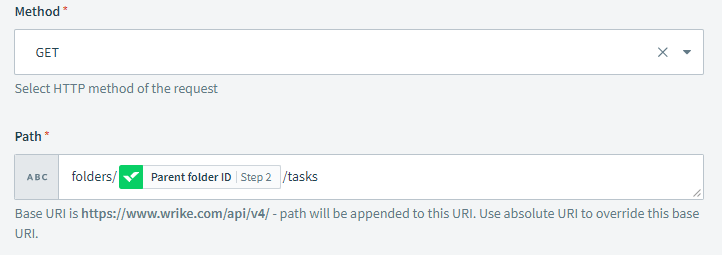
*Note: you will need to add a schema reference to use this data in step 4
Step 4 - loop through each task collected by the custom action.
Step 5 - Update each task in the loop with selected custom field values mapped from the task data pulled in step to each of the tasks collected in step 3 via the loop.
The main issue with this is that it is very slow / falls over at scale due to lack of batch processing in Workato. i.e. you have to get each task and update one at a time rather than in batch's of say 100. This makes it slow when updating a project with 100's of subtasks and uses a lot of Workato jobs (1 to grab each task, 1 to update each task and a few extra ones for checks I have in our full version of the flow), still beats doing it manually though!
In our case where we mass load ~800 projects a year from blueprints with ~120 tasks in each if I try trigger this recipe on mass against all these projects it falls over. We are currently working on a custom script to try resolve this which I will post here if we manage to develop a solution.
Lisa Aware this is not so simple to implement, and don't know the complexity but enabling batch processing on the Wrike API MAY be a quicker sticky plaster for this issue. I have been in a few calls with Workato and believe they are bringing this as an agenda point to their next meeting with Wrike.
Hi @...
Thank you for getting back! :) However that only works to aggregate number Custom Fields, so not quite the same issue in this thread.
For anyone interested I have figured out a solution for batch processing which I will post soon but will take a little time to write up as it's not so simple.
Looking forward to your post Ryan Molloy 🙌
Lisa Community Team at Wrike Wrike Product Manager Become a Wrike expert with Wrike Discover
Lisa Wrike Team member Become a Wrike expert with Wrike Discover
Please please make this one happen. I am so tired of not being able to pull dashboard widgets based on custom field values in tasks, because it doesn't pull the value through from the project. It's a really annoying blocker for our team. We work on hundreds of project each month, each with a group of multiple tasks, it's not efficient to have to update all the values on each task. Really, very frustrating and surely quite a simple thing to achieve...?
Lisa, Here is our improved solution. Apologies for the war and peace but this is not simple and took 10's of hours to develop as a solution. Hopefully it helps to emphasise the importance of this request as this is not something the average Wrike user will be able to implement. Also hopefully someone else out there finds this useful!!
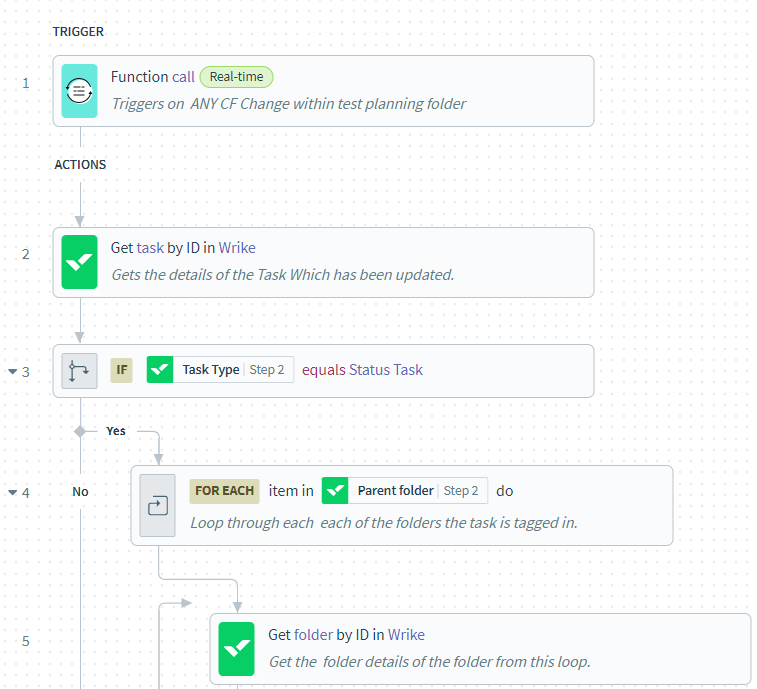
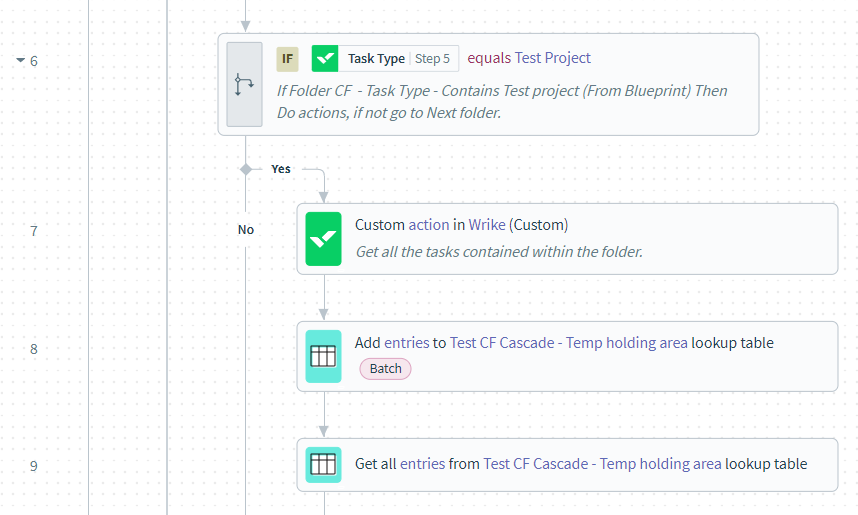
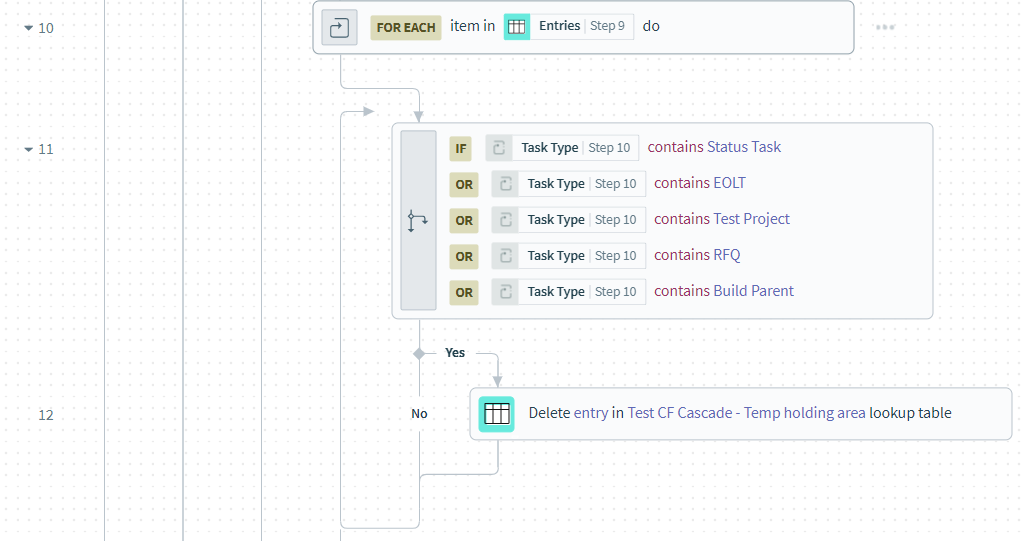
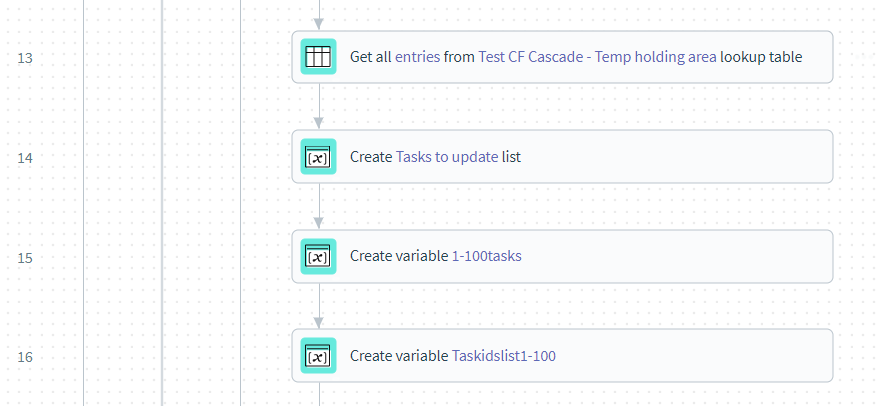
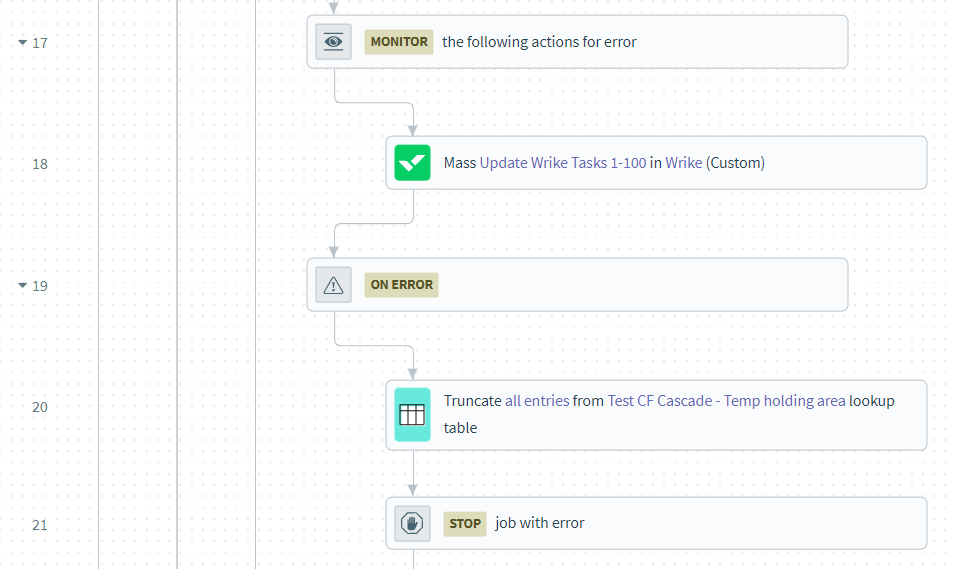
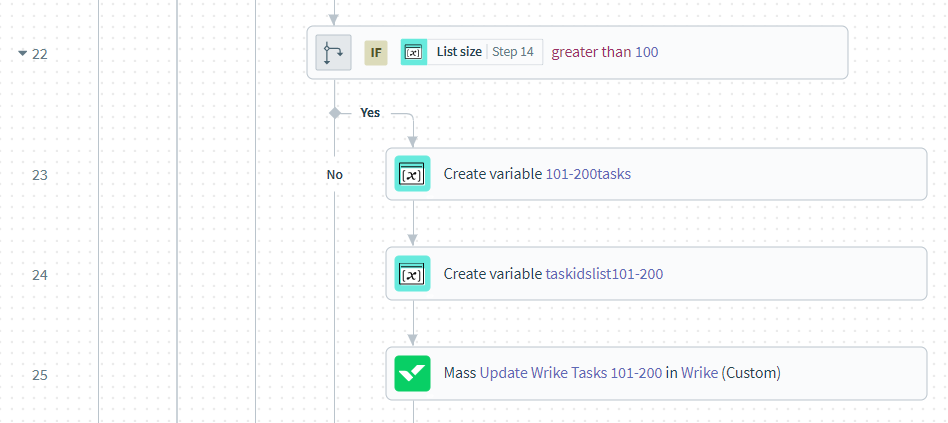
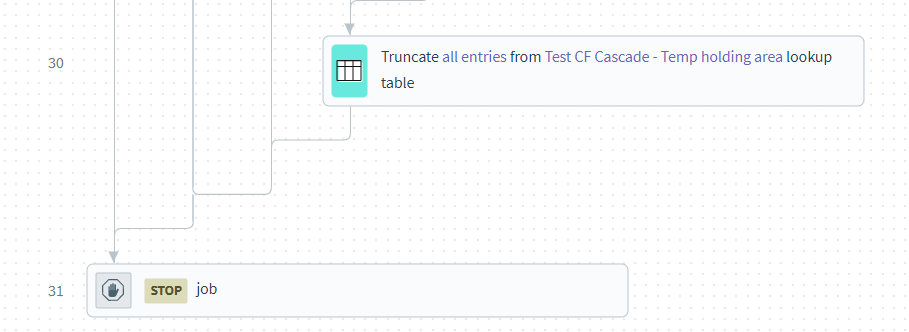
Just a follow up to my pervious message here is the batch processing solution for cascading custom fields through a project. There is still plenty of room for improvement but is a massive upgrade on the previous solution I posted. Full workato flow bellow with explanation of each step underneath
Step 1 – Triggered from a webhook every time a custom field is updated on the task we use as a parent. Could easily be switched to a project.
Step 2 – Gets all the info on the task which has had the Custom field updated.
Step 3 – Error handler just to check the task is the one we wish to monitor and not a random someone has added to the folder which is being checked for updates (we use a custom field called Task Type to easily identify which is which)
Step 4 – Loops through each of the parent folders of that task
Step 5 – Gets the parent folder details.
Step 6 – Checks the folder we just grabbed to see if it is the one, we wish to cascade the custom fields in. Again, we are using the Custom Field Task type to identify which this is. This prevents the cascade happening on another folder which the task is cross tagged to that we may not want to cascade in.
Step 7 – Custom Action to get all the tasks in the folder (or project) identified and their Custom field values.
Step 8 – Adds all the tasks to the and the Custom field Task type to a temporary look up table.
Steps 9 -12 - Retrieves all the entries from the look up table and removes any which have a task type which we do not want to cascade custom field values too. We have certain tasks tagged into projects where we do not want to overwrite the custom field values.
Step 13 – Retrieves the updated look up table with tasks not be cascaded to deleted.
Step 14 – Creates a list of all the tasks to be cascaded to from the lookup table.
Step 15 – Gets the first 100 items from the list. This needs to be done as custom actions in Wrike can only update a maximum of 100 tasks at a time. Batches of 100.
Step 16 – Turns the list into a Variable and cleans up the string of text to just the ID of the task.
Steps 17 -21 – Using the variable from step 16 custom action to post changes to Wrike. The syntax used in the snip bellow is:
‘ Tasks/ *List of task ID’s to be updated from step 16*?customFields=[{“id”:”*Custom field ID to be updated*”,”value”:”*Value to put in Custom field from Project or task in step 2*”}]@
Repeat the following section inside the square brackets separated by commas for each custom field you wish to cascade:
{“id”:”*Custom field ID to be updated*”,”value”:”*Value to put in Custom field from Project or task*”}
There are a number of characters that will cause this to fail the snip bellow shows an error handler for dealing with & symbols as this is the most common one we see which will cause the flow to fail.
Step 17 - Monitors if there is an error and if there is Step 20 will clear the lookup table ready for the next job and step 21 will stop the job
Steps 22-25 – Checks if the list is longer than 100 if no finishes the job if yes the repeats the same steps above minus the error handler as we are using the same data so if it passes the first time it will not fail the second time. Step 23 gets the next 100 in the list as bellow:
Repeat steps 22-25 as many times as you need to make sure you can cascade to all tasks in your worst-case project. For ours we do not see over 300 tasks per project, so I only do this loop 3 times
Step 30 – Clears the look up table ready for the next job.
Have been running this for about 6 weeks now with zero issues. Average Job time for the pervious solution was ~53 seconds and used 230 Workato tasks. This new workflow takes around 12 seconds and only uses 18 tasks.
Ryan Molloy Wow, thank you so much for posting your solution here!
Hopefully it would be helpful to some of the users here. And I'll make sure to pass on your thoughts to the team internally.
Lisa Community Team at Wrike Wrike Product Manager Become a Wrike expert with Wrike Discover
Lisa Wrike Team member Become a Wrike expert with Wrike Discover
I would also like to share my solution in Workato (if you only need to cascade one level):
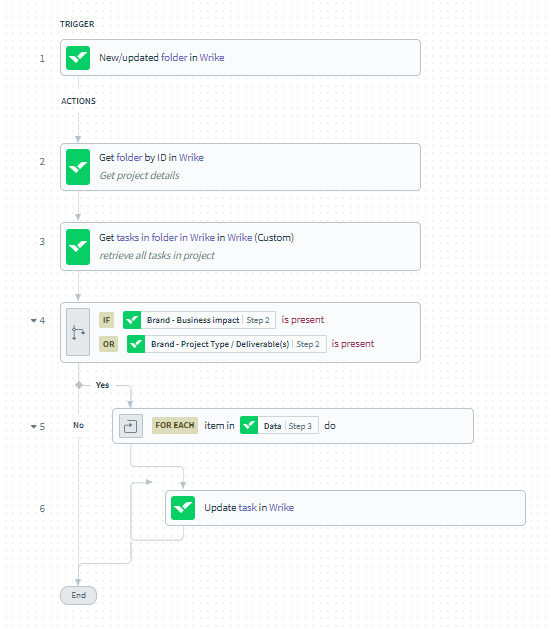
1) Trigger: New/ Updated Folder in Wrike
2) Get Folder ID from Step 1
3) Get the Tasks using a Custom API call referencing the Folder ID from Step 2: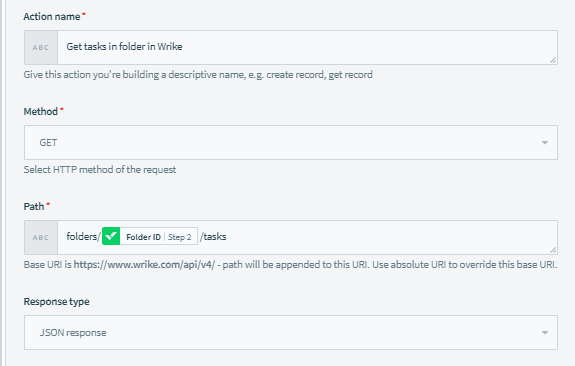
4) Conditional check for specific custom fields, if applicable
5) For each Task in the Task List from Step 3
6) Update the Task in Wrike
Hi Florence Cao, thank you very much for sharing your experience with the Community!
Is this on the radar at all? I find myself adding the same information to custom fields that show multiple times in the same project. Is there a way to cascade these down to sub-tasks or sub-projects?
Hey Bethany Spaeth, thanks for reaching out! We don't have an update from our Product team currently in relation to this suggestion. We'll share your feedback with them 👍
Lisa Community Team at Wrike Wrike Product Manager Become a Wrike expert with Wrike Discover
Lisa Wrike Team member Become a Wrike expert with Wrike Discover
Adding my voice to the crowd! For all the reasons people have mentioned, but especially to help improve efficiency and reporting.
Same! this is a feature that would improve reporting and efficiency!