Important Update: Transition from List View to Table View 🔍
Pinned
Hi everyone!
We have an important update for you regarding a change happening soon: the transition from List View to Table View.
Why the Transition?
As you may recall, the (New) Table View was designed with the objective of combining the features of both List and Table views, offering a comprehensive way to track and manage your work within Wrike. The move to a singular view aims to deliver a more unified and intuitive user experience, simplifying tasks and enhancing workflow efficiency.
The List View was built on older technologies we can no longer support. Sunsetting this view will help improve product performance and future improvements to the Table view.
Enhancements Based on Your Feedback
We greatly appreciate the feedback you’ve shared, and our team has implemented several updates to facilitate this transition:
- Public Links: Easy sharing and collaboration
- Mass-Enabling Project Progress
- Undo Button: Quick recovery from mistakes
- “Select All” in Mass Actions: Simplifies bulk changes
- Wrap Text: Improves readability
- Remembered Collapsed/Expanded State: Customizes your view settings
- Mass Actions: Switch assignees & shift dates easily
- Better visibility into custom fields with rich formatting options
- Grouping by any system or custom field
- Interactive Files column: allows to work with files right from the view: preview, download/upload, proof.
We’ve also made the Table View more user-friendly by supporting a compact, less cluttered display. You can now select between compact or default density, enable or disable any fields represented as columns, and choose between viewing tasks and subtasks hierarchically or in a plain list format.
Additionally, mass editing capabilities for projects and folders - previously unavailable in the old List View - have been added to enhance your workflow.
Transition Timeline
We aim to complete this transition by the end of March 2025, providing you with ample time to adjust to using the Table View exclusively. During this transition period, we encourage you to explore its functionalities and share any feedback you may have.
At the time of the transition, all existing List views will be migrated to Table views that will be configured in the same way as List to show the same information, in the same order, and keeping all the view settings like filters and sorting.
[Update from June, 2025 📌] Full sunset of list view will be completed in early Q3. Account owners will be receiving emails with the individual dates.
Please find more info about our team's plans for Table view enhancements as well as other useful info in this post.
We're Here to Help
Our team is here to assist and address any questions or concerns you might have during this transition. Our Product team is also working on more enhancements aimed at improving your experience with Table view even further.
We truly appreciate your understanding and support as we work to enhance the platform for everyone.
Lisa Community Team at Wrike Wrike Product Manager Become a Wrike expert with Wrike Discover
Lisa Wrike Team member Become a Wrike expert with Wrike Discover
Anna Giacobbe I completely disagree. I find the List View in the recycle bin to be completely worthless.
For example, how am I supposed to differentiate between these different items without clicking on every single one?
Anna Giacobbe Strongly agree with you.
Another issue with the Table view not being adequate for the To Do screen is how tasks with multi-day durations are displayed. In the old List View, if something was set to be from 4/2-4/7, it would appear on my list today, 4/4. Now I'm realizing that is NOT happening, and it's only showing up on the final day since I have to sort the Table in some way (due date makes sense) but maybe I want to work on that thing earlier and see it every day that it's still active... nope, can't do it in the Table View.
Like I really can't say enough how awful this change has been, and it's now making me nervous that I could be missing things since the new view has changed how task start and end dates function in the Table view on the To Do screen.
Hi everyone!
@..., our Product Manager responsible for this transition, has recently shared a comment here https://help.wrike.com/hc/en-us/community/posts/16278592714647-Keep-List-View?page=1#comments. Besides other things, he shared the plans for further developing Table view:
🔄 In progress or planned:
I hope these are welcome plans. Please read Slava's full comment and let us know if you have any questions!
Lisa Community Team at Wrike Wrike Product Manager Become a Wrike expert with Wrike Discover
Lisa Wrike Team member Become a Wrike expert with Wrike Discover
How can we get training on the table view?
Our company has NEVER used it and frankly don't want it or need it. This is going to destroy our ability to get work done. Probably going to look for a new product altogether. But will be forced into using this dismal new forced feature. Please help.
Kim
I appreciate hearing from the person responsible. Curious about his level of familiarity with project management in general and using Wrike in particular. Do the teams responsible for "managing" the product even use Wrike at all? Do they use it to manage invasive (risky) & unpopular product overhauls? The fact that you need your customers to tell you what functionality list view had that the new table view lacks, says everything.
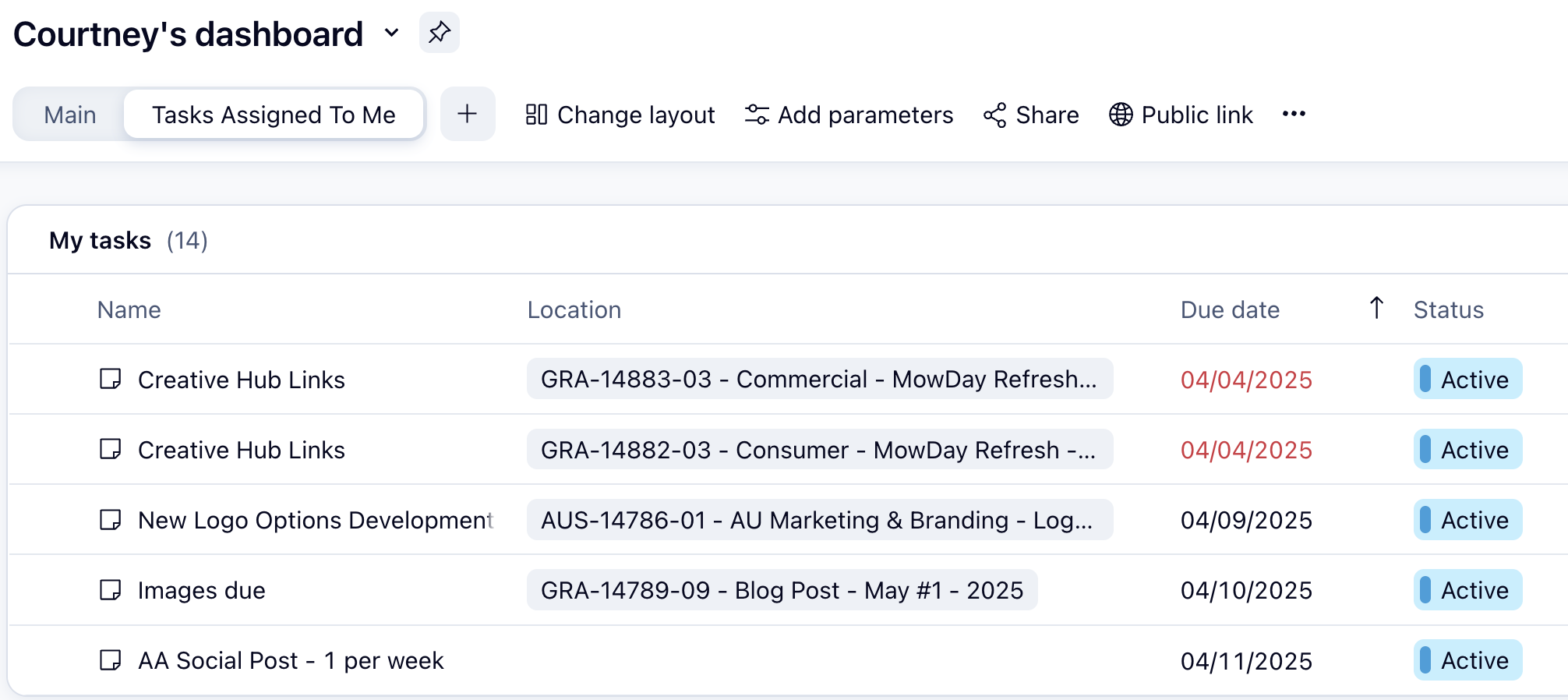
I'm having a similar issue Whitney mentioned above. On "My to-do" I am able to see all tasks I am assigned to even if they don't have due dates or start dates assigned to them. But if i go into my dashboard and use the "tasks assigned to me" panel, only a handful show up. I can't decipher why this would happen. Even jobs that are structured and assigned the same way are there while others are not. Whats really odd is it shows "My Tasks (14)" at the top of the widget but then only lists 5 below! What could be causing tasks to show up or be hidden in this view?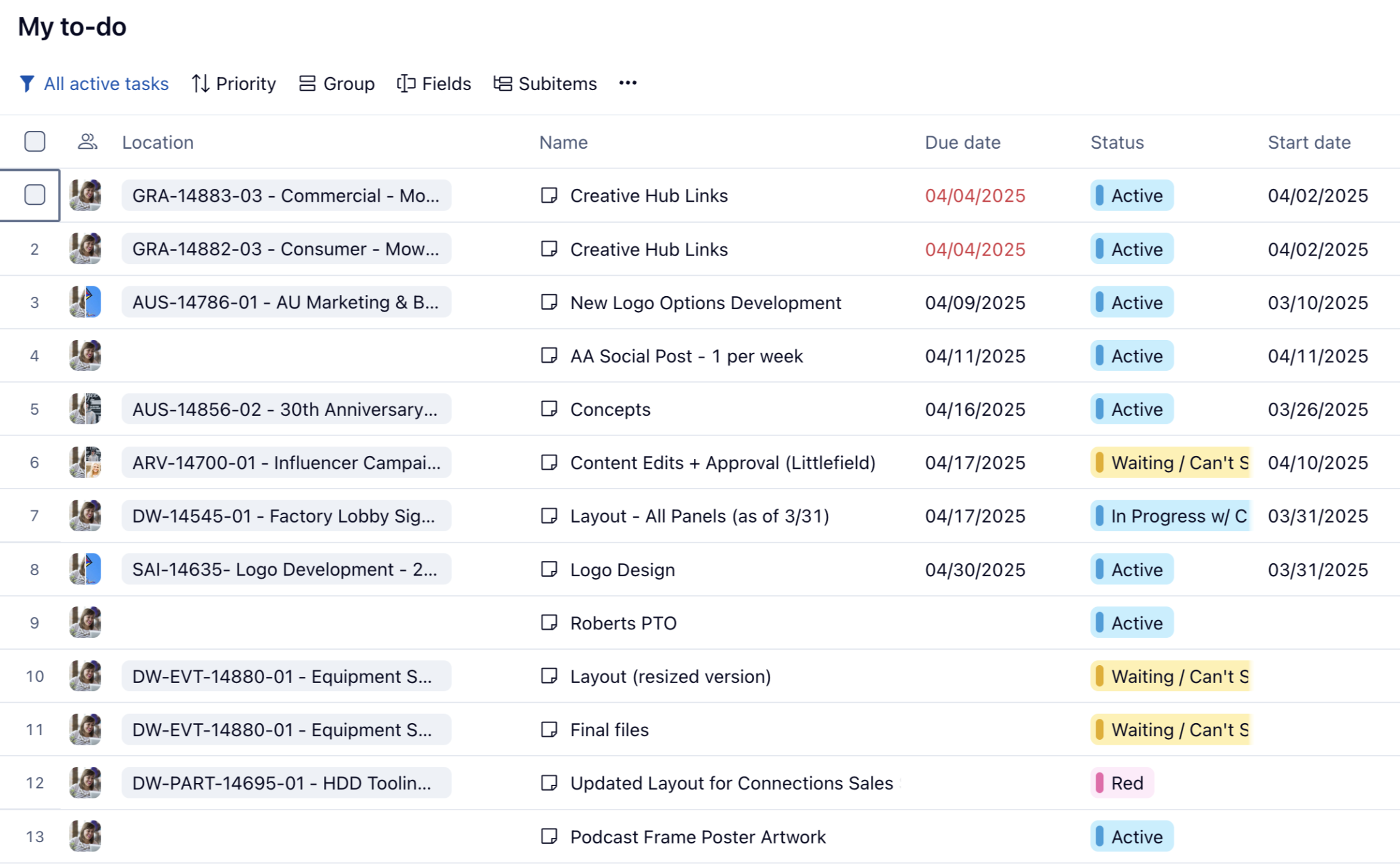
100% AGREE! Ellen Nunes It seems like they failed to do any UX research with this change and it's really disappointing
"Update from March, 2025 📌] We understand the challenges this may pose, which is why we've decided to extend the gradual sunset to June 30, 2025. This extension provides you with more time to adjust, and we encourage you to explore the functionalities of the Table view."
Today is April 9th, why was List View removed without notice from my account?
Alexander Numann :o!!
Could it be that you are in a location that didn't have the view added?
Have you tried clicking the + near your visible views to see if it was in the dropdown?
I noticed that it now has a little caution icon and brings up a message about the upcoming sunset. If it truly is gone for you, I'd flag that to your CSM immediately as that's so unfair!
Alexander Numann this happened to my coworkers and myself this morning as well. The Table View is a hinderance and in no way competes with the functionality the List View had for our team. We expected to have the List view until June 30th, is there a way to get the List View back to our accounts?
ANOTHER impact: the 'info' pane
List view provided navigational functionality for tasks, that is now completely absent from your product.
This is so disappointing. Our team transitioned to the table view today and it's terrible. We're having to reorganize just about everything. We chose Wrike for our Project Management solution because it was more user friendly than the competitors' tools we tested. This is no longer the case.
List view needs to be returned!
Hi Ellen Nunes,
I'd say you have to click on the iask name to see the item view of this task. I agree this is another difference to list view, but it was easy for me to adopt.
The other issue is a real problem, table view doesn't update status changes or similar imidiateley, sometimes you have to reload the view. I hope they'll fix this soon!
Florian
Lisa
It would be better if there was a transition period for example in labs or a switch to change to table view for todo, shared with me, recycle bin ect while still having list view. On the plus I like the filtering en grouping options for the collaborators. We have to see how this works for our employees in time.
We are missing the explanation mark when the importance is high and arrow down mark when the importance is low. Is this something that will be returning? Or is a better practice to emphasize this?
Abigail Johnson I chatted with support yesterday and was told basically "no, it's a one-way irreversible change."
Anna Giacobbe No, it's definitely gone unfortunately.
Jacco Stam to see the high / low importance you will add it as a column. Then select the option to show in the cell.
Unpopular opinion: List view is not nearly as usefull as table view. Table view allows for enhanced sorting, filtering, and surfaces all types of necessary info by adding columns. Change management is always a challenge, but I believe with time and coaching, table view will prove itself in the end.
But you removed mass unfollow (makes no sense) and changed the drop and drag to be more cumbersome by having to grab the left hand side box to drag and drop and it's proving to be less reliable in dropping to the folder you need. Stop taking away features and functionality your users depend on.
I do appreciate some of the new options, but our team really does not like the Table View. We would like the List View back. I also don't appreciate the fact that what Wrike thinks is a better way is the only we can now use it. I think it is best when you add new features you don't remove old features. Let the client choose to use the new options if they find it helpful. I agree with a few other comments on here when it comes to the subtasks, we now have duplicate Table Views. This is not convenient at all. We now have to go in and delete one of them in order for us to keep our internal communication in one place. We have remote employees that use Wrike AND I am now having to show them everything. Please bring the List View back.
Ali Moses But not everyone in Wrike needs more functionality. That is why List View an advantage compared to other project management tools, because teams that don't have to do any project management, like design, had a neat and clean view to use.
Which one is "better" is a subjective opinion.
I think everyone agrees you shouldn't force a change on a paying customer, especially one that slows down how they do their day to day work.
Ralph H Interesting. Our design team uses table view, but we limit the number of included columns. You're right that not every team needs to see all info at a glance. Alternately, I have considered switching them to a dashboard.
Personally, each of my favorite views serve different purposes.
List view: highlight reel - I just need a quick peek at what is going on
Table view: mass updates/detailed view
Gantt chart: dependencies/timeline
I'm able to get table view close to looking like list view but still get overwhelmed visually. List view was more compacted horizontally (having column titles really limits how narrow a column can get) and I appreciated the alignment and inflexibility of the "columns": They were standard and consistent in all projects/folders, nobody was able to rearrange or add columns. It showed bare essential information: name, due date/duration, task type and status. Same place, every time and everything fit on my screen without needing to scroll (yes, I understand that sometimes my full title didn't display, but that wasn't really an issue when I could hide the side panels).
I do not hate the table view by any means. It definitely serves a purpose for me, and I utilize it frequently. But I also toggle back to list view just for the reliability of knowing it will show me very quickly what it is I am looking for.
Hi folks, I wanted to follow-up on a couple of topics here: if List view has been disabled, we recommend reaching out to your Account team at Wrike as an option. They can provide help with training and working with your feedback directly. Also, we announced publicly that the sunset will be a gradual one, which means that some accounts are scheduled for an earlier sunset.
I'd also like to share this quick video that will hopefully help you with onboarding team members who may not be as familiar with Table view:
https://www.youtube.com/embed/Nm8nxZRfrFc
Lisa Community Team at Wrike Wrike Product Manager Become a Wrike expert with Wrike Discover
Lisa Wrike Team member Become a Wrike expert with Wrike Discover
It kinds of seems like the June 30th deadline is meaningless due to the gradual transition - meaning there's no warning or rhyme/reason to when the change is forced on an account. It's just a sword of damocles over everyone with no idea when the change is scheduled for. It seems like these things are always optimized for the Wrike devs rather than the paying customers.
Lisa, this does not address anyone's concern regarding us being forced to use Table View. Please bring back List View. Clearly there was no need to convert to Table View for most companies. Especially since there are a lot of mistakes in Table View. You are not reading everyone's concerns and frustrations on this forum. This change really screwed up a lot AND it seems like Wrike does not care. I personally have already been discussing with our team to go with another company. I'm sure after reading all of the comments I am not the only. Since we have to start over AND reorganize our systems we might as well go with a company that does not FORCE changes on us.
I have some concerns about table view in dashboards. I didn't read through all the comments - so if there is already covered somewehre please let me know.
1. I confirmed with the help AI bot that list view for dashboards will be retired as well - is that true?
2. The fucnctionality of hte list view in dashbaord is having a compact way to see your tasks. There is so much more scrolling now. the main issue is the locaiton tag for tasks. In table view to see the location is it takes up so much more space. If list view it is all condenced into one spot. Is there any ideas or fixes to keep dashboards more compact?
Bekah Coenen We asked this specific question to our Wrike reps back in November and was told "the List View and the widgets option "Display mode -> List" are separate features, so dashboard widgets won't be affected by the List View sunset." - I will be very disappointed if this is no longer the case