Additional information in email notifications

I'm a Software Engineer and a heavy user of Atlassian Jira. I get email notifications from Jira which are similar to Wrike, except Jira notifications include a project specific unique identifier; e.g. Project1-15. This means I can glance at a notification, and quickly decide if I want to follow the web link to see more information.
Wrike notifications include only the task name. I work on multiple Wrike projects, and typically don't create the tasks which are assigned to me; i.e. my project manager creates Wrike tasks, and then I derive low level Jira (software) tasks (I don't use an integration. Is there one?). So at this time I don't really use Wrike much; it's more used by my project manager.
The issue I have is I don't want to click on every notification I get from Wrike, unless I'm currently working on that project. But there is no way to know which project that task applies to. I guess we could manually add a project (folder?) number to each task, but that seems unnecessary. Can this information be added to the notifcations, or should we be creating projects/tasks differently?
Example Wrike notification. The task name is very vague.
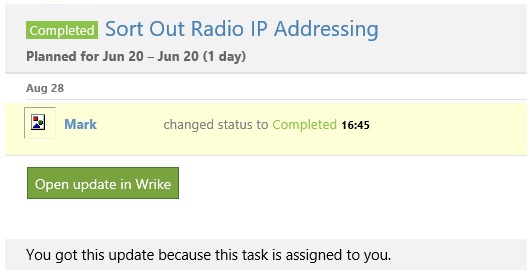
Hi Stephen, my mistake, that particular task turned out to have no parent Folder or Project. I've now corrected it.
I have gone through some of my other tasks, to find another example of what I'm seeing. Here is another example.
If I get an email notification, I would like to see the project name "10981 ..." and the task name "Gateway updates for ..."; i.e. Project Name - Task Name. Or even Project Name \ Sub Folder Name \ Sub Folder ... - Task Name.
Do I need to change any of the project structure to achieve this?
Hi there, is there no way to automatically add the parent folder/project rather than tagging the project in the sub folders each task?
Hi Claire, if you're looking to add tasks to other Projects or Folders, you can use mass editing. You can select multiple tasks and add them to another existing Folder using the side panel that appears. Take a look at the below GIF. Let me know if this helps and thanks for posting!