Discover the Power of AI Highlights in Dashboards! 🌟
Выделено
TL;DR: Discover how Wrike’s AI Highlights widget for Dashboards surfaces urgent updates and key details to keep your projects organized. Share your experience or tips in the comments!
Hey Community! 🙋♂️
Today we’re diving into one of our powerful AI features: AI Highlights in Dashboards.
✨ Wrike’s AI Highlights in Dashboards is a game-changer for keeping your projects on track. This smart feature scans your Dashboard and instantly surfaces key updates—like overdue tasks, blockers, progress, and more, so you have a clear overview without digging through endless lists.
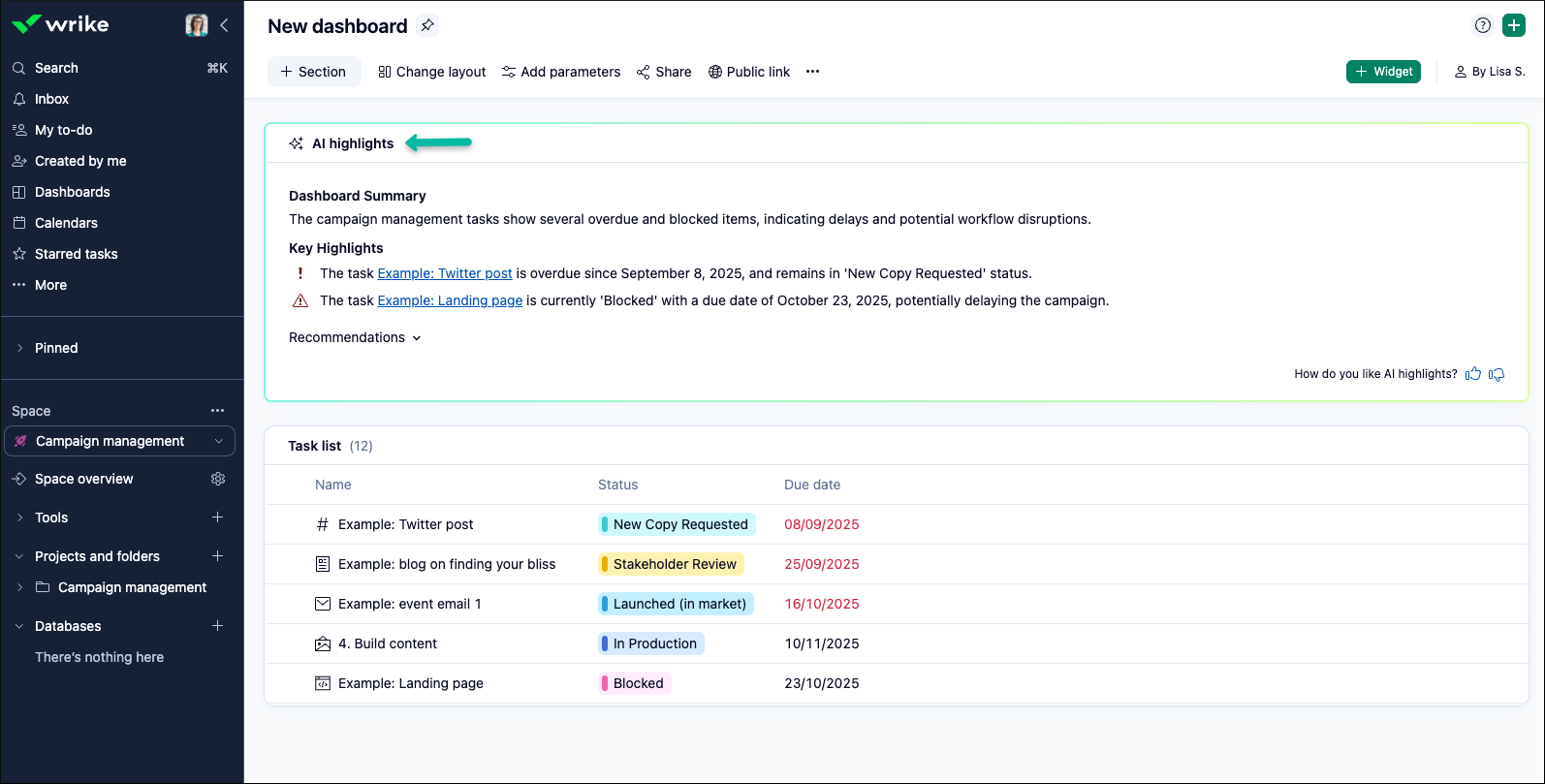
To get started:
- Go to your Dashboard
- Click on + Widget
- Select AI Highlights Widget and add it to your Dashboard
For more details, be sure to check out our Help Center article.
Tip: Kick off your day by checking your dashboard’s AI Highlights. You’ll immediately know what needs your attention and can quickly reprioritize if something urgent pops up.
Please Note: Access to AI features requires Generative AI to be enabled in your settings. For more information or setup instructions, please see our Help Center article.
Now, we’d love to learn from you!
How has AI Highlights in your Dashboards helped you catch important details, stay organized, or prepare for meetings? Share your best tip or story in the comments—we’re all about working smarter together! 💯
Rohan V Community Team at Wrike Wrike Product Manager Станьте экспертом в Wrike с Wrike Discover
Rohan V Wrike Team member Станьте экспертом в Wrike с Wrike Discover
At the moment we are not using Ai highlights in the team. But it's a super widget, can't wait to implement it!
I have started to look into the AI Highlights for an overview when starting my work day
With AI highlights, we can get an estimate of the workload in the upcoming months. We can simply review which team member is overburdened and redistribute the workload accordingly.
We are not using it. In Germany personal data safety is curtial and so the AI is not acticated for us.
Our Governance Committee is evaluating whether we should enable AI features since they open a can of worms for all users. However, after reading through the release notes, I see the value in the AI highlights; this is one of the driving features for enabling.
I have implemented the AI highlights widget on a few of our dashboards. So far we haven't found a great use for it, but I think we just need to experiment more.
I am not using AI Highlights but I will check it out!
We have not used AI Highlights yet but now I really want to look into it!
Interesting feature! Our dashboards and automation reminders do a great job at letting us know what needs attention, but adding this to our team dashboards could be great to help us see it all at a glance, as well.
We are still in the beginning phases of learning all that AI can do and how we can implement it. But I would LOVE to see more videos and ideas on what is working for others and the best practices for the customized set up.
I have implemented the AI Highlight widget in some of our shared dashboards and appreciate the call-outs for potential bottlenecks, however, it's not perfect and certainly not a replacement for critical thinking. It is really dependent on what widgets are used within the dashboard so it may take some work to get the result that would most benefit my enterprise.
My company is still in the process of developing its AI policy, so we haven’t integrated AI into Wrike yet—but hopefully soon!
We can't wait to implement more AI powered tools into our processes and work.
I've added the AI highlights widget to our "My Dashboard" to give end users a quick, comprehensive summary of their workload. Now they can easily see upcoming projects, task due dates, overdue items, and more—all in one place. It streamlines access to assigned project and task details at a glance, making it easier to stay organized and proactive.
I'm not currently using AI highlights, but am excited to get this implemented!
We aren't using AI, but this is neat.
AI Highlights has been great for quickly spotting overdue tasks and upcoming deadlines without digging through multiple widgets. It’s made my daily check-ins much faster and helps me prep for meetings with a clear overview of priorities.
When I oriented teammates to creating their own dashboards, the AI Highlights widget got the most interest. I've since added it to several of my own dashboards and love that I can position them consistently on sections that scope the analysis just right. Especially appreciate the highlighting of tasks with overdue or approaching deadlines, and suggestions for alleviating process bottlenecks or more task cancellations than expected.
We are in the midst of a Wrike cleanup to assist with the structure of our tasks. Once this is completed I can see the use of this being pretty good. Will have to wait and see
Unfortunately, we haven't been able to enable AI, but I would love to be able to easily digest complex data from dashboards, especially for leadership who needs to understand what's going on as quickly and easily as possible!
Ai highlights used for near due & overdue items
In the company we have it implemented for the summary of the ticket control that is generated and to have a daily summary of the SLAs
Th AI Highlights widget has improved since I first tried it. Now I can click on the tasks that need attention right from the widget, which is very convenient. Looking forward to further improvements.
We aren't currently using AI in Wrike, but this widget will be helpful when we begin to do so!
It helps us pinpoint roadblocks in a project, so we can keep things on track.
We've added to our global dashboard - so that everyone gets a quick summry of those highlights that are applicable to them!
We aren't currently utilizing the AI feature, but this will be great once we do!
Unfortunately, our governing body is writing a policy on AI use and until it is executed, we can't leverage the tool.
Haven't explore AI highlights yet but will dive more into it in the near future to inform our stakeholders!
AI highlights helps us show information quickly to our end users.