[Status: Launched 🚀] Order of custom fields in the folder/project/task view

When viewing details of folder/project/task custom fields are displayed ordering them alphabetically. Such an order most of the times is not logical. For example fields starting with "%" will be displayed before any field starting with a normal letter.
For example the fields "Planned Cost", "Actual Cost", "%Cost Allocated", "Planned Man-Effort", "Actual Man-Effort", "%of Man-Effort Spent" will be displayed in the order:
%Cost Allocated
%of Man-Effort Spent
Actual Cost
Actual Man-Effort
Planned Cost
Planned Man-Effort
It would more logical to be displayed in this order:
Planned Cost
Actual Cost
%Cost Allocated
Planned Man-Effort
Actual Man-Effort
%of Man-Effort Spent
or in this order:
Planned Cost
Planned Man-Effort
Actual Cost
Actual Man-Effort
%Cost Allocated
%of Man-Effort Spent
Please implement a feature to arrange custom fields manually and inherit it to the hierarchy below.
Thank you for the detailed feedback Taylor Roberts! Please rest assured it will be passed on to our Product team.
Lisa Community Team at Wrike Wrike Product Manager Become a Wrike expert with Wrike Discover
Lisa Wrike Team member Become a Wrike expert with Wrike Discover
Happy 3 Year Anniversary to this request!
Still hoping for this feature sometime soon.
Hi David Flood, welcome to the Community 👋
Could you let me know if you tried using custom item types? They allow you to do exactly what we've been discussing in this thread - changing the order of custom fields and hiding those you don't need.
Lisa Community Team at Wrike Wrike Product Manager Become a Wrike expert with Wrike Discover
Lisa Wrike Team member Become a Wrike expert with Wrike Discover
Hi Lisa:
When you look at an existing task or project (not a custom item, just the default Wrike tasks), you can see a group of custom fields at the top of the details view. These fields will only display in alpha-numeric order. I believe we are discussing how to get them to display in a logical order as defined by our team, instead of just alpha-numerically.
If I understand correctly, it seems like creating custom items just to get the custom fields to display in a user-defined order would mean reworking a lot of existing tasks and projects into a whole new project management system. I don't think this is the solution we are looking for, but others can correct me if I'm wrong.
Thank you for keeping an eye on this for us!
Here is an idea/possibility to group or sort the user-defined fields easily with on-board tools. The symbols can be inserted with the key combination "windows+dot" simply into the title of the field.
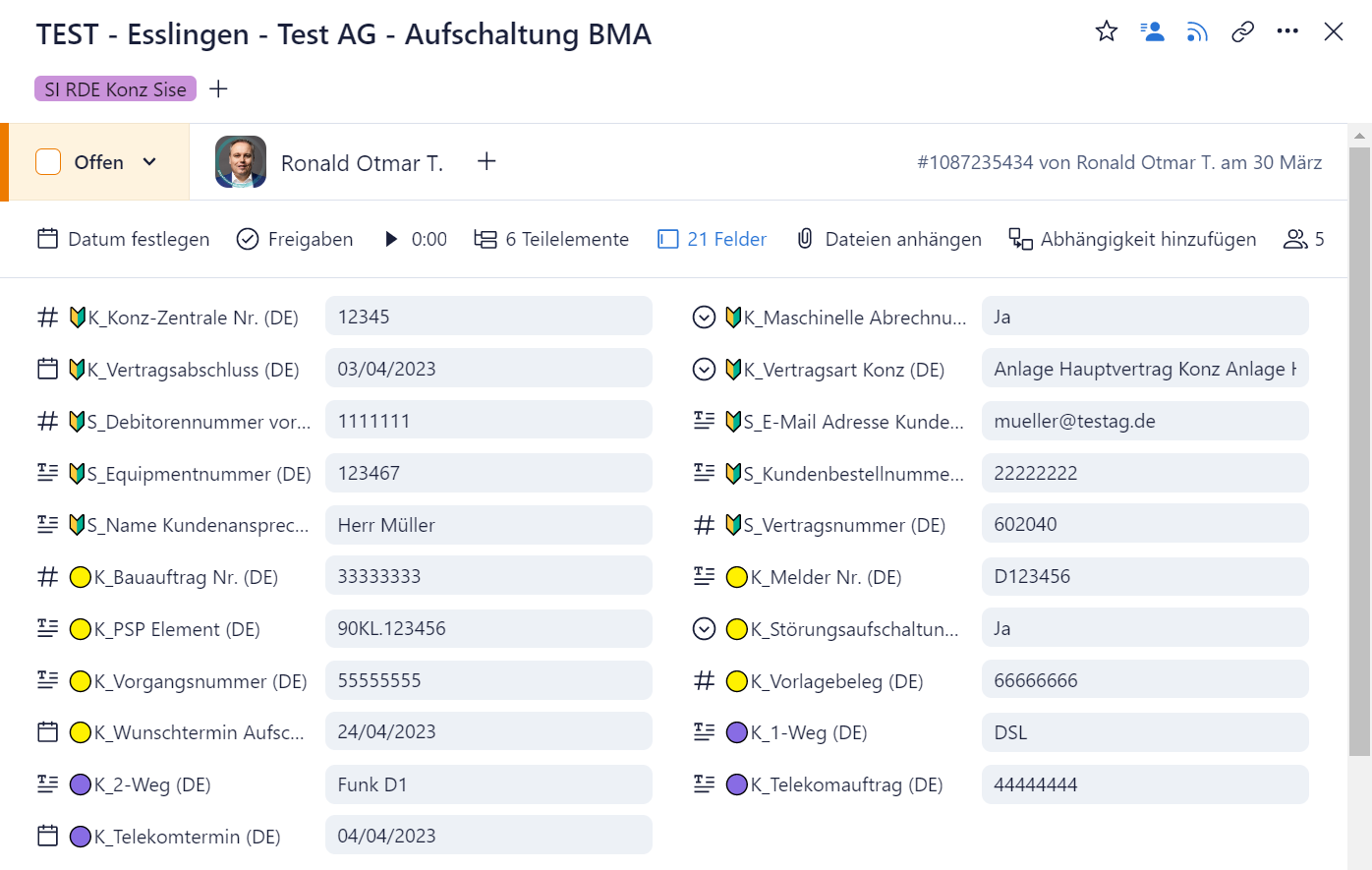
However, a correct solution should be aimed for this.
Hi Angela Rountree, thanks for adding your thoughts here. It's much appreciated and we've shared this feedback with the team. And thanks also Ronald Otmar Theil, that's a very interesting approach!
Noted on your ask around this functionality and we'll keep you posted here if there are any updates to share 👍
Elaine Community Team at Wrike Wrike Product Manager Become a Wrike expert with Wrike Discover
Elaine Wrike Team member Become a Wrike expert with Wrike Discover
Another vote for ordering custom fields for the standard project and task type.
@Wrike, please help us plan by sharing your intention/roadmap: Seeing many users here prefixing characters and symbols to get around this, is your roadmap suggesting we start planning around custom item types? Or, will custom fields eventually be sortable in the standard project and task?
Hi - any update on whether we can order custom fields or a work around to be able to do that?
@... the fact that you continue to consider this feature launched despite the continued and ongoing feedback from the community being that it in fact is not the solution we are looking for is infuriating.
Custom item types do not work for many users' applications, especially if they like us require many inputs then the visibility and usability of custom fields is severely diminished.
Please consider removing this from the Launched status because no one here in the community considers that to be the case.
Hi Jess Moran, thank you for sharing additional feedback with us! And I'm sorry to hear that custom item types don't work for you currently. It would be great if you could share more details on your use case, so we may be able to help you.
Lisa Community Team at Wrike Wrike Product Manager Become a Wrike expert with Wrike Discover
Lisa Wrike Team member Become a Wrike expert with Wrike Discover
We also can't really use custom item types.
One big reason is because the feedback I got from my team was they look so different from a regular task. And that's feedback I wouldn't even try to argue with because in project management, consistency really does matter.
Another important reason is you can't pre-populate a custom field on a custom item type. At least not that I've been able to find. My understanding is you can only tell the item type if you want that field visible or not. For us, since we're using custom fields to run reports, setup calendars, use dashboards, etc., we would have to manually update the fields for every single custom item you put into the system - which seems to completely defy the point of having an easy access work item. Sure you can add automation rules, but updating custom field values isn't an option...
Which brings us to either forms or blueprint tasks as the alternative, making the original request here still completely relevant.
I've been asking for this since 2017! At that time it was deemed a "backburner" issue. https://help.wrike.com/hc/en-us/community/posts/115003744545--Status-Backburner-Organizing-Custom-Fields
So glad a solution is finally released! We are excited to test the functionality!
Thank you for flagging the other thread Sam Pruyn! Although you mention being able to organize custom fields in List view, would it be OK if I changed the status there to "Launched" as well?
Lisa Community Team at Wrike Wrike Product Manager Become a Wrike expert with Wrike Discover
Lisa Wrike Team member Become a Wrike expert with Wrike Discover
I have a lot of folders, and I would like when I open a folder that contains many schedules, to see any of the schedules to view all the same custom fields and in the same order. I know I can re-arrange the order, and select the fields to see. But I waste so much time always selecting and re-organizing the order of the fields. Is there a way to have a personal default view?
Hi Fabienne Lignon, welcome to the Community 👋
Do you mean that there are other users who change the order so that's why you have to reorder again? Sorry if I misunderstood!
Lisa Community Team at Wrike Wrike Product Manager Become a Wrike expert with Wrike Discover
Lisa Wrike Team member Become a Wrike expert with Wrike Discover
Yes, because schedules are updated by various users, when I open one, it's not always in the order I had it and not the same custom fields.
Thank you for clarifying Fabienne Lignon! I'll now share your feedback with the respective Product team 🙌
Please let me know if there's anything else I can help you with!
Lisa Community Team at Wrike Wrike Product Manager Become a Wrike expert with Wrike Discover
Lisa Wrike Team member Become a Wrike expert with Wrike Discover
Please implement this!
Hi Phil Taylor, welcome to the Community. This feature is considered implemented because you can set the order of your custom field with custom item types. May I kindly ask you to elaborate on your case so we can provide you with an accurate reply?
Also, you can visit our New to Community forum to get the most out of your experience with our Community 🙂
I actually just ran into this issue recently while our team has started using table view more often. I found a temporary solution to this that may help some of you. While fields are organized alphabetically - you can organize their order by adding numbers or letters to the field title reference image attached. Hope this helps someone!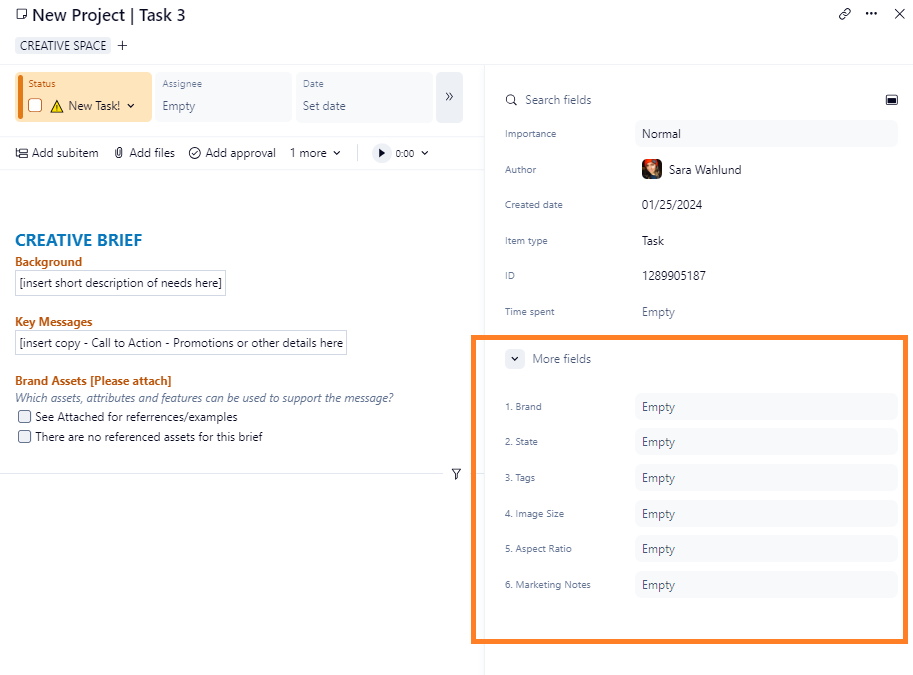
Hi Sara, I would advise caution with your prepending strategy. We tried this when we first adopted Wrike. It only works well in special cases. It quickly becomes a nightmare when you share custom fields across projects/spaces or revise your processes over time. I would recommend that you instead create a new custom item. You can set the order of the fields in custom item types.
Hello,
I see that this is considered launched because we can change the order of fields in custom item types. I would very much like to change the order of fields in the three non-custom item types: tasks, folders, and projects. Are there any plans to give us control over field order in the default item types?
Thanks,
Stephen
Hi Stephen Barnecut, thank you for your feedback! We don't have updates regarding this option at the moment, but we're passing all your comments on to our Product Team and we will keep you informed in case there are changes 👍
Please, let us know if there is anything else we can help you with.
We have been working with custom fields for some time now. As we need a lot of fields in some elements, we would like to be able to divide them into categories.
Rohan V Community Team at Wrike Wrike Product Manager Become a Wrike expert with Wrike Discover
Rohan V Wrike Team member Become a Wrike expert with Wrike Discover
Upvoting this!
Hi Brandon Gamble 👋 Thanks for the upvote! Could you please share your use case? This will help us understand your needs better and notify you if there are any possible workarounds.
Rohan V Community Team at Wrike Wrike Product Manager Become a Wrike expert with Wrike Discover
Rohan V Wrike Team member Become a Wrike expert with Wrike Discover
Hi Wrike team,
My team (and I) are requesting that you please do not sort fields alphabetically and instead use the top to bottom/bottom to top order set in the field settings. This is standard across most project management software and is a serious enough element of friction (among a few others) to cause us to consider moving away from Wrike.
You must know (based on the feedback in this thread alone) that the custom items workflow you are suggesting is not a reasonable enough work around to expect users to accomodate. Simply offering the option to sort alphabetically or by custom field settings order would be by far the prefereable solution.
My use case is simple enough and I understand the custom items work around you are suggesting well. I just fundamentally disagree that it is the ideal solution and respectfully reccomend you consider prioritising accomodating what users have been asking for in this thread for years now! These small, but regular friction items like this are what causes organisational users to churn and we'd hate to go down that path when you do offer other fantastic features we feel your competitors are lagging behind on.
Thanks for your consideration!