Discover the Power of AI Highlights in Dashboards! 🌟
Featured
TL;DR: Discover how Wrike’s AI Highlights widget for Dashboards surfaces urgent updates and key details to keep your projects organized. Share your experience or tips in the comments!
Hey Community! 🙋♂️
Today we’re diving into one of our powerful AI features: AI Highlights in Dashboards.
✨ Wrike’s AI Highlights in Dashboards is a game-changer for keeping your projects on track. This smart feature scans your Dashboard and instantly surfaces key updates—like overdue tasks, blockers, progress, and more, so you have a clear overview without digging through endless lists.
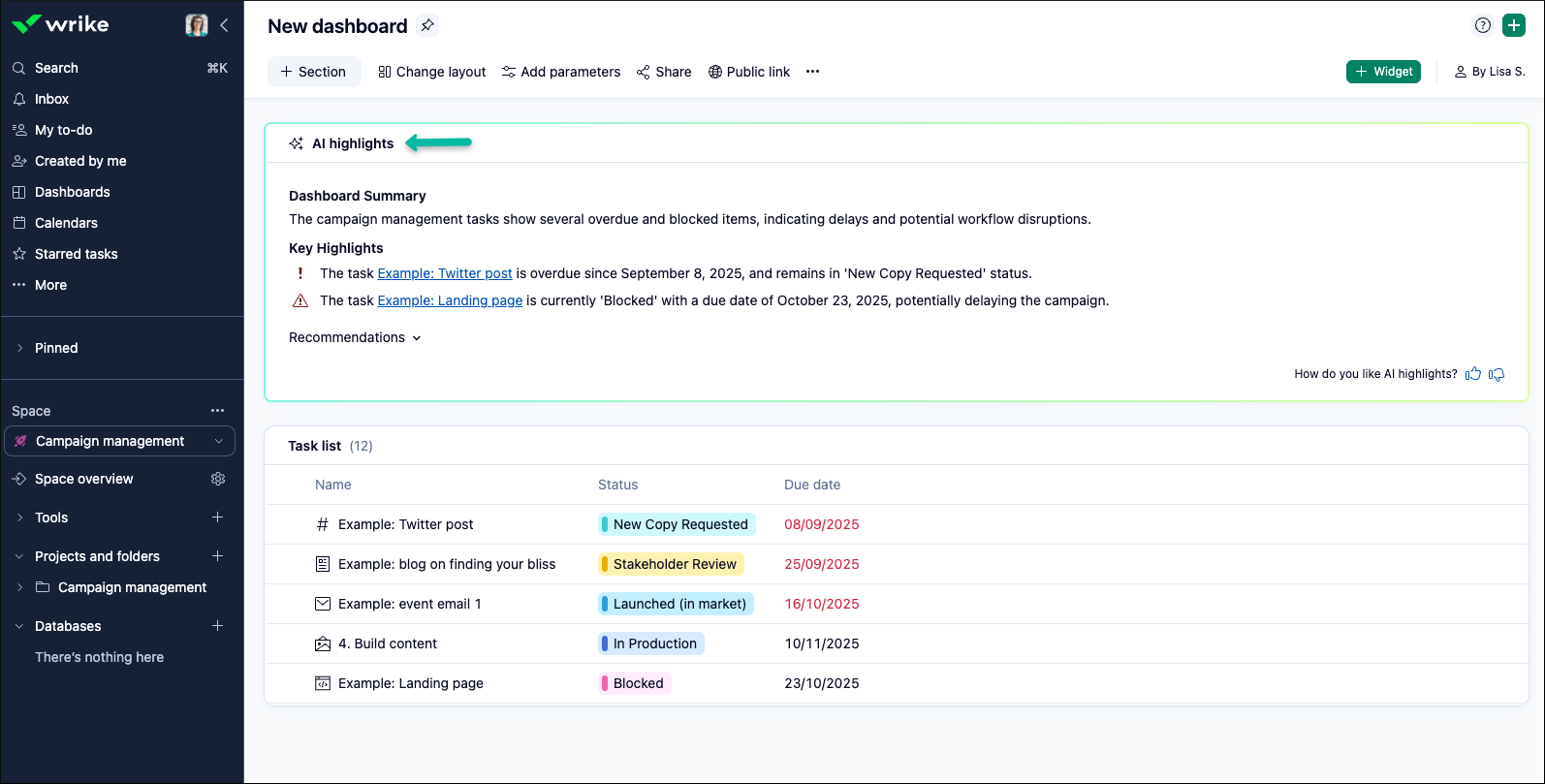
To get started:
- Go to your Dashboard
- Click on + Widget
- Select AI Highlights Widget and add it to your Dashboard
For more details, be sure to check out our Help Center article.
Tip: Kick off your day by checking your dashboard’s AI Highlights. You’ll immediately know what needs your attention and can quickly reprioritize if something urgent pops up.
Please Note: Access to AI features requires Generative AI to be enabled in your settings. For more information or setup instructions, please see our Help Center article.
Now, we’d love to learn from you!
How has AI Highlights in your Dashboards helped you catch important details, stay organized, or prepare for meetings? Share your best tip or story in the comments—we’re all about working smarter together! 💯
Rohan V Community Team at Wrike Wrike Product Manager Become a Wrike expert with Wrike Discover
Rohan V Wrike Team member Become a Wrike expert with Wrike Discover
Hi Rohan, I've tried adding the AI highlights widget to our dashboards a few times, but it's displayed inaccurate information more than I would like. For example, I added it to a Team Dashboard earlier today. It said that a specific employee on that team (it listed their name) had 12 overdue tasks. However, when I clicked on the Overdue Tasks widget (which did reflect the number 12), that person only had 3 overdue tasks assigned to them. The other 9 were assigned to other members of their team. I removed the widget.... came back in a few minutes later and added it again.. and this time it said that a different employee had 12 overdue tasks...which again, was not correct. Thus, that type of inaccuracy has prevented me from including the widget on our core dashboards thus far.
Great to hear about everyone's experience with the AI highlights widget!
Jason Pinto Thanks a lot for letting us know, I'll ask our Support team to look into this!
Lisa Community Team at Wrike Wrike Product Manager Become a Wrike expert with Wrike Discover
Lisa Wrike Team member Become a Wrike expert with Wrike Discover
It's a nice quick highlight to call out an imbalance in workloads or missed due date.
Just enabled it! Will report back
Only using it for task summaries, but looking forward to using it for more!
We're looking into AI highlights now, and identifying a few boards where we think it might be helpful. Looks like an interesting feature.
For now, the AI highlighted in our dashboard isn't showing convincing results. Perhaps this is because we have dashboards with a lot of different data. It would be helpful to be able to specify what we want the AI to look at in that dashboard.
Our IT team turned on AI briefly but now wants to conduct a more thorough security review. But I am very much looking forward to saving some "catch up on details" time with AI highlights, especially when returning from PTO.
I've used it to see what it would pull in but I mainly like to update manually so I can keep track of everything and not forget things!
Ditto what Pietro said.
It's consistent in letting me know we have too much work and we aren't great updating due dates. Which I already know. :) Sometimes it tells me an overdue task could be critical to meeting a deadline but in reality it's not at all. So maybe paired with using the right data points (like the built in High, Normal, Low "Priority" field), it could provide more useful results.
For now I've deleted the widget from our dashboards because the results aren't helpful and it tends to make the dashboards load much slower.
Thank you all for sharing your thoughts about AI Highlights! 🙌
Pietro Poli, Daisy Hibbard - this is helpful! I appreciate both of you taking the time to explain your perspectives and share your genuine input here. I’ll be forwarding your comments to the relevant team 👍
Rohan V Community Team at Wrike Wrike Product Manager Become a Wrike expert with Wrike Discover
Rohan V Wrike Team member Become a Wrike expert with Wrike Discover
This is not something available at this time. Thank you!
At the moment we are not using Ai highlights in the team. But it's a super widget, can't wait to implement it!
We are hoping to be able to turn on AI capabilities in 2026. We have been working with out R&S and legal departments to get the okay to turn them on. I can't wait until we are able to sure functions like this!
Currently, our team isn't using AI highlights, but it’s a fantastic feature and I’m keen to get it up and running soon!
Thank you all for your valuable feedback and comments! I really appreciate you taking the time to share your insights 🙏
Rohan V Community Team at Wrike Wrike Product Manager Become a Wrike expert with Wrike Discover
Rohan V Wrike Team member Become a Wrike expert with Wrike Discover