Keep List View

List view is the preferred view at my current company and previous company. It's just easier to see all of the items in a folder, project, or task in list view. PLEASE DON'T remove this view from Wrike.
It looks like we don't have the translated page you're looking for, but we do have other content in English and offer support in English.
What can we help you with?
Learn. Share. Discuss.
List view is the preferred view at my current company and previous company. It's just easier to see all of the items in a folder, project, or task in list view. PLEASE DON'T remove this view from Wrike.
Folllowing List for Post: Keep List View
[this list is visible for admins and agents only]
Lisa 100% agreement with Katrina Wong. It's also similar to the feedback I get from my coworkers about list view/table view.
100% agree with Katrina Wong. My team would like list view back.
Paul Long List view is still available, it isn't gone (yet)?
Ralph you must be using a different version or one of the lucky ones... I don't have list view anymore along with everyone else on my team.
Hi folks! We haven't discontinued the List view and it should be available for now. Paul Long I can look into this for you if you'd like me to, please let me know!
Overall, we continue to have internal discussions as our team is working on making the New Table view more powerful as a combination of the List and Classic table. Please rest assured we share your feedback with the responsible team on the daily basis.
Lisa Community Team at Wrike Wrike Product Manager Become a Wrike expert with Wrike Discover
Lisa Wrike Team member Become a Wrike expert with Wrike Discover
Lisa that would be great, thank you! Also, we definitely appreciate the internal work y'all are putting in.
I think you have a lot of organizations that have spoken up on this thread in favor of list view.
Lisas I really think your team is misunderstanding the user need, that is satisfied by list view. Users who prefer list view don't want a powerful view, they want a plain and simple list with as little distracting information as possible and no extra work to set the view up/optimize the presented info. A "powerful combined" view is the exact opposite of this. As stated before, from my perspective, new table view will never be able to be a suitable alterantive to list view.
Ralph your explanation is perfect! Thanks for adding that.
Thank you for the additional feedback, folks! I'll make sure to share it with the responsible team.
Paul Long I've asked our Support team to look into why you can't access the view 👍
Lisa Community Team at Wrike Wrike Product Manager Become a Wrike expert with Wrike Discover
Lisa Wrike Team member Become a Wrike expert with Wrike Discover
I'm here to give another vote for List View. It is clean and simple. The one feature that I haven't seen anyone else bring up: The right pane. When I click on a task to open up the right pane, the list view shrinks left to fit. When using the Table, the window overlaps it, and it can be just too much visual mess, depending on the project.
Gretchen... Agreed.
I'm a designer using this product (in a team of designers). I know not everyone has that same scenario, but all other views are chaotic to my eyes. Sounds dumb, but true. I guess where my confusion is in the whole removal of list view debate is, WHY was it removed to begin with? Clearly by this thread, it's pretty popular.
UPDATE: I received an email from Wrike support...
From WRIKE: Retiring this feature arose from the understanding that our New Table View represents a more robust and detailed working environment. However, I understand and empathize with your concerns. Change can be challenging, especially when it involves routine workflows.
This is the nice way of saying... deal with it.
Paul Long You're spot on with your scenario tho. All companies I've worked at (with Wrike) had teams of project contributors (usually creative departments like design) who usually have a natural dislike to spreadsheet views and don't need to do much in Wrike than finding their tasks.
Tbh, I am estimating the set up of and training on new table view for these departments to be a time consuming (and therefore money wasting) nightmare.
Ralph 100% It's a bit irritating how dismissive Wrike is in their email to me:
I've noticed more clarity surrounding the List View in Wrike is needed. The removal of List View is a definitive move and is no longer available in your account.
Retiring this feature arose from the understanding that our New Table View represents a more robust and detailed working environment. However, I understand and empathize with your concerns. Change can be challenging, especially when it involves routine workflows.
We're here to help you use the New Table View effectively. Please feel free to share more specifically what features you're missing from the List View, and we can give you tailored advice on how to achieve those.
I apologize for any confusion and appreciate your understanding as we move forward with these improvements, which we believe ultimately serve the best interests of all our users.
Paul Long Having worked at SaaS companies myself, support usually has no real leverage against those decisionsto. Albeit, it's a bit shocking, that List View is not available in your account anymore.
Lisa Please, another feedback to your product teams: Please do not sunset List View out of the blue! Please do not repeat the mistake from Lightspeed Launch! Please set a clear date and give admins and their teams at minimum 6-8 weeks preparation time. Removal of List view will cause extreme disruption in most workflows and Lightspeed Launch was already a very bad experience in these regards
Paul Long I apologize for the confusion here! From my understanding, some accounts may have individual Wrike Lightspeed rollout dates as well as List View sunset dates. We continue the internal discussions on how we can help with the New Table view and we continue passing your feedback to the responsible team as well. We will let you know if we have any updates to share. Again, apologies for the confusion.
Ralph H Thanks a lot for your continued feedback on this topic. As I just mentioned to Paul, we continue discussing this with the team internally. I'd also like to mention that Wrike representatives share the info about rollout & sunset with account admins. Please let me know if you'd like to discuss this with someone on our side.
Lisa Community Team at Wrike Wrike Product Manager Become a Wrike expert with Wrike Discover
Lisa Wrike Team member Become a Wrike expert with Wrike Discover
Lisa Thank you! I'll get in touch with my admin, so he can get in touch with your reps. (Hope, this won't end in a game of telephone 😉)
Ralph H Sounds good 🙂 But do let me know in case you need any help.
Lisa Community Team at Wrike Wrike Product Manager Become a Wrike expert with Wrike Discover
Lisa Wrike Team member Become a Wrike expert with Wrike Discover
List view does a nice job in our use case of hiding subtasks and distractions so is less overwhelming. We break up our project blueprint that contains ~100 tasks into project milestones with subtasks. See attached comparison in how much cleaner and simpler list view impressions.
In trying to mirror this in the new table view, I am unable to preconfigure the custom view to keep the milestones collapsed by default. After clicking collapse all, and returning to the project, it goes back to expand all. It is my understanding the whole point of custom views is everyone see's things exactly the same by default based on how the owner has it configured (Sorting, filtering, columns, etc.). Subitem configuration should be consistent with this and either stay in place like sorting does or prompt the blue notif on the view to save as default.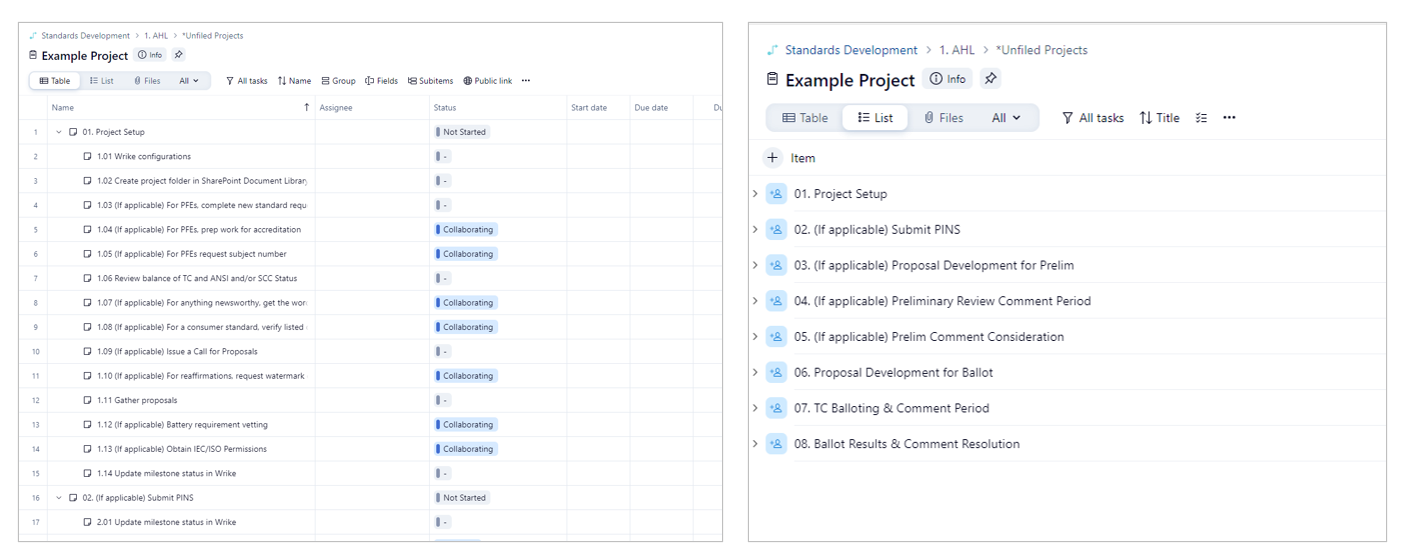
Hi Ross Wilson! Could you please confirm that those are tasks and subtasks on your screenshots? I'll share your feedback on the "Collapse all" option with the team now 👍
Lisa Community Team at Wrike Wrike Product Manager Become a Wrike expert with Wrike Discover
Lisa Wrike Team member Become a Wrike expert with Wrike Discover
Lisa Correct, these are tasks and subtasks. Thank you for passing along. You could replace my choice of wording of "milestone" with "parent task" if that makes it clearer.
Thanks Ross Wilson 🙌
Lisa Community Team at Wrike Wrike Product Manager Become a Wrike expert with Wrike Discover
Lisa Wrike Team member Become a Wrike expert with Wrike Discover
Hi Lisa,
after a couple of months of "hiding" from New Table View I worked with it again today.
Unfortunately, performance is still a huge issue in comparison to List View. Again, please do not sunset list view before the performance is comparable. Working with Table View, when not requiring the benefits of a table, is really tiresome and, honestly, frustrating :(
Hi Ralph H, thank you very much for giving a try to the Table view and for sharing your feedback with us. May I ask if you have reached out to our Support Team about these performance issues? If not, please feel free to let us know and we can create a ticket on your behalf 👍
Hi @..., I already had a chat with your support team about this a few months ago, so I assume another ticket would just be a waste of time. The delay is because of the additional features that are within the new Table view. Which makes sense, as the new table view has to load a whole lot more information anytime it's opened, so it can't deliver the same snappy, light weight user experience, list view can.
Which is an issue, if you're just navigating through your structure, not needing an overview or any additional information. Especially for contributing roles (e.g. Design), this will be/is a huge problem.
KEEP LIST VIEW! I use List View exclusively and avoid the Table View altogether. I work in the Wrike software on my laptop, not directly in a web browser. The List View works best for me because it puts all the information I need in a tighter more concise space than the Table View. I keep the list view open while I have the Info screen open as I need to access and reference multiple tasks for each job/project that I am working on. I need to see the task title, people assigned to the task, the due date, and the status of that task all at a glance. The List view does a better job of fitting this information in a smaller space than Table view. Table View has a lot more compartmentalized separation that makes the information look busier, more cluttered, and I can't fit all of the information in the same amount of space that I can with the List View. PLEASE KEEP LIST VIEW.
Even your AI has realized, that the users do not want to part with List View. Maybe that will change your mind ;)?
Since List View will be deactivated at the end of 2024 (according to the vague mail we received last week), we are starting to move the first users to table view and the feedback is desastrous.
100% agree with all comments here.
I have access to List View on our agency account and one of my client accounts.
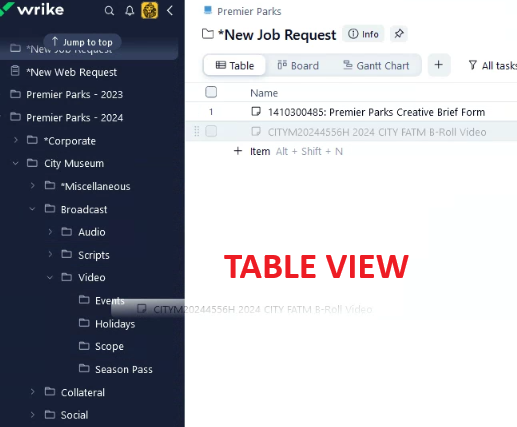
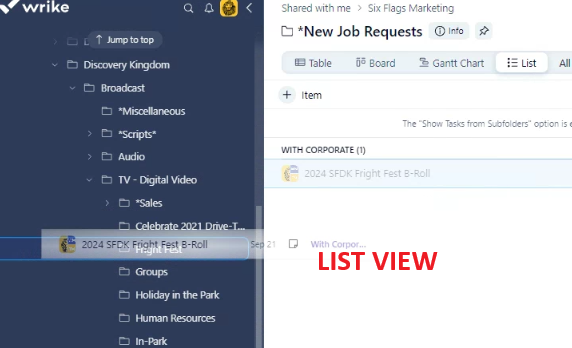
But the third account, a separate client, doesn't have List view as an option.
List view is easier on the eyes.
The reasoning behind eliminating List view and implementing Table view as a more robust feature is a moot point when those who use List view, used it for it's simplicity in the first place.
Of all the implementations over the last 11 years, this is the worst for our agency. I've been able to roll with the implementations for over a decade, but this one is slowing me down.
Additionally, Table view doesn't allow me to drag/drop tasks into different folders. List view does.
Let's go back to simplicity...
Tasha Hayes I agree with you! Are you trying to move the tasks in your pinned section or in your regular folders? You can't move tasks in pinned anymore.
Ralph H
The tasks I'm moving aren't pinned.
They're just in a separate folder for new job requests.
We'd like to be able to drag and drop them into the correct folder once we've began production on the job, but the only way I see to do it is by adding a location/moving locations.
This issue affects only the account that doesn't have List View. My other two accounts with List View, I'm able to drag and drop tasks without issue.
Hi Lisa, I just wanted to voice here for my team as well that we are also long-time users of the List View and definitely prefer it to the table view. I would not only love to keep the list view, but having the ability to set the list view as default for the entire space would be even more beneficial. That would be a much more beneficial customization feature for our team than what's currently being rolled out. Thanks so much for taking our feedback.