Keep List View

List view is the preferred view at my current company and previous company. It's just easier to see all of the items in a folder, project, or task in list view. PLEASE DON'T remove this view from Wrike.
It looks like we don't have the translated page you're looking for, but we do have other content in English and offer support in English.
What can we help you with?
Learn. Share. Discuss.
List view is the preferred view at my current company and previous company. It's just easier to see all of the items in a folder, project, or task in list view. PLEASE DON'T remove this view from Wrike.
Folllowing List for Post: Keep List View
[this list is visible for admins and agents only]
I'm glad to see that others share my concerns regarding the removal of the list view. The table view, in its current form, is clunky and inefficient. There is minimal visual distinction between parent tasks and subtasks, which makes navigating and organizing work more difficult. Subtasks often fail to appear within the parent task immediately upon creation without a manual page refresh—this presents a significant disruption to our studio's workflow.
My team was unexpectedly switched over this morning to Table View and not pleased. Issues we are experiencing:
- Instead of one click on a date to select a date range, it now requires multiple clicks between the Start Date and Due Date column. After changing one date the task will move, so you have to go find it again to change the second date.
- Adding assignees is frustrating because you need to keep clicking outside of the selection box to navigate away from accidentally adding more people.
- Like everyone else, unsure why there are numbers in the left most column
- Random switch back to "Priority View" which is not our default.
- Clunky, visually jarring view. Hard to quickly discern which task is active and where a project is in it's lifecycle.
Please bring back List View.
Vis ual l y cha oti c! It' s a n as s ault on m y ey es.
Unpopular opinion: List view is not nearly as usefull as table view. Table view allows for enhanced sorting, filtering, and surfaces all types of necessary info by adding columns. Change management is always a challenge, but I believe with time and coaching, table view will prove itself in the end.
I echo the latest sentiments here. Our team had list view removed yesterday, and trying to adapt to the table view is very frustrating. We're having the exact same issues that Janet Mendelson mentioned above. Please bring list view back.
Hi again, everyone!
In case you haven't seen it yet, please check out Slava's latest comment where he explains the team's next steps for Table view improvement based on your feedback.
The sunset is happening gradually and that's why List view may already be disabled for your account. If you have any additional feedback or questions, please let us know here or contact your Wrike representative.
Lisa Community Team at Wrike Wrike Product Manager Become a Wrike expert with Wrike Discover
Lisa Wrike Team member Become a Wrike expert with Wrike Discover
One enhancement I'd love to see with Table view is color-coordinating the high priority, low priority, and overdue task dates like in list view today. In list view, those are red and easily stand out. Is this on the roadmap at all? Also, would love to be able to have saved a custom view, and then all sub-projects and folders inherit that view, similar to custom fields. We have a very heavy folder/project structure and even saving them to the below is taking up a ton of time.
To the production team, this downgrade is undoubtedly not what I bought and wanted. When I chose to spend the extra money for Wrike it was based on their “customer service” and program being fun to work in. Now I despise this program, it is not fun to work, and not user-friendly. It’s extremely tacky. I have to click so many times to do something so basic from the previous model. I’m disappointed in the person or people who decided these changes should be made. I should have had the option. Why would you remove a dragging and dropping feature? Adding a task is now difficult under certain views. I wish you didn’t turn my lovely career into a nightmare.
I just have to point out...what was the purpose of this entire thread(s) if this company, program, community moderators were just going to gaslight us? Why go through the "comment process" if you were just going to ignore EVERYONE? Why not just say "the decision was made, we are getting rid of this feature, end of story", why go through this whole thing?
Agree with Paul Long.
I have tried to adapt to the new Table View for weeks now and it is visually jarring and lacks several key features that made List View so efficient. The most critical loss during my peak season is the ability to drag and drop tasks into folders. What used to take a second now takes far too many clicks and way too much time.
Drag/drop was a core functionality of List View.
The way this thread of feedback is being handled by Wrike is dismissive, scripted, and invalidating.
I love all the mansplaining by Wrike staff to let everyone know they are using Wrike incorrectly and according to them, not as efficiently. This certainly wasn't part of their onboarding process when they gleefully walked us through List View.
I echo most others here, it's not lack of knowledge that is the issue, it's everything else that makes it an inconvenience - load times, extra clicks, drag and drop...
In List view, I was able to see all the projects and folders at the top. I cannot do that in Table view.
Also in List view all the completed tasks regardless of workflow were at the bottom. In Table view, the completed tasks show up on the top, which is annoying because it is Completed and we don't want it coming up as the first thing we see. See image below.
Task importance does not show up as a default column. Which means there are team members who will not be aware of the task importance if I change it because they don't have the column in their Table view. In List View, the task importance was a RED exclamation mark that would show up regardless of view settings.
Following up on previous comments, as customers of Wrike, we need a good working product for our teams without delays. List view was working. If the technology it was built on was old, Wrike should have developed a new List view with new technology before getting rid of the old one. Wrike should be looking out for the convenience of their customers, not what is convenient for Wrike.
I'm really shocked and sad that you're sunsetting the List view. I was able to get so many creatives over the last 11 years to use Wrike specifically because the List view makes sense to them. I've been able to get companies to purchase Wrike because the List view was so simple to use. You're taking away your competitive advantage. The Table View is a mess—we need a clear concise list, not a spreadsheet.
Ae there any plans to recreate the List View on the new technology platform? You've received 2 years of people explaining they don't want this change.
I can currently add 11 views to see the projects I'm managing? How is sunsetting the one my teams have been using the most a good solution?
Meredith Lupa Totally agree! I'm a creative and everything BUT list view is chaotic to my eyes.
I am not looking forward to the complaints I will receive when list view goes away. I'm an admin for 80 Wrike users and am actively in Wrike the majority of my day. Unless the Wrike engineers use the tool in a real-world situation day after day, it's hard for them to understand why list view is so important to many of us. Meredith is right, working in table view is like working a spreadsheet. We researched multiple tools before making our decision to go with Wrike. We researched Smartsheet but didn't like the spreadsheet look and feel.
Hi. My team is struggling (like many) to work within Table view and missing List view, which was central to the way we work. That said, does anyone know if it's possible to see/add task descriptions in Table view? In particular, previously in List view, when we exported tasks, the resulting spreadsheet would include task descriptions, which business owners would use for planning purposes (e.g., referencing a year's worth of tasks and updating them for the upcoming year). This functionality appears to be missing in Table View. Thanks for any insights!
Hi everyone!
You are invited to a live session dedicated to Table view where our Product team, as well as a Wrike expert, will be talking about upcoming features and useful tips for leveraging Table view. Please register here ✅
Lisa Community Team at Wrike Wrike Product Manager Become a Wrike expert with Wrike Discover
Lisa Wrike Team member Become a Wrike expert with Wrike Discover
This "gradual rollout" has seemed much faster than anticipated, and seems to break a lot of other functionality as collateral. The My To-Do section is practically unusable at this point due to a lack of options to organize your tasks, including no hierarchical view, spreading out all of your subtasks.
That fact there needs to be a whole webinar on how to use Table View maybe means it isn't as easy to adopt as it was made out to be? 🤔
Lisa Is Wrike working to add a List View to the new tech stack? I understand it was built on outdated technology. But with 2+ years of complaints from people who prefer the List View, why isn't Wrike prioritizing adding it to the new tech stack?
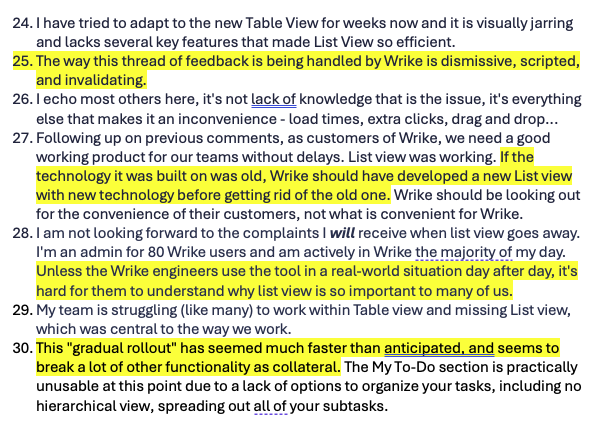
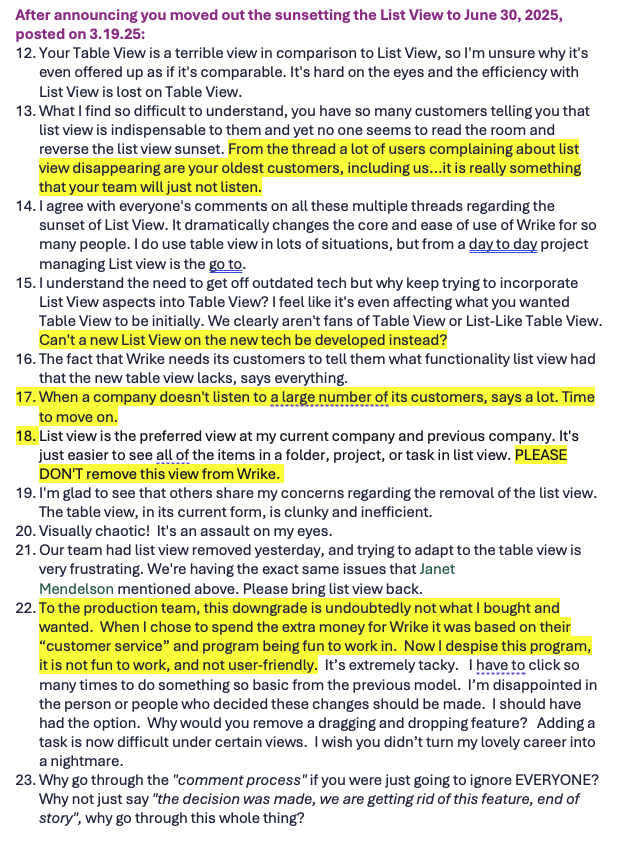
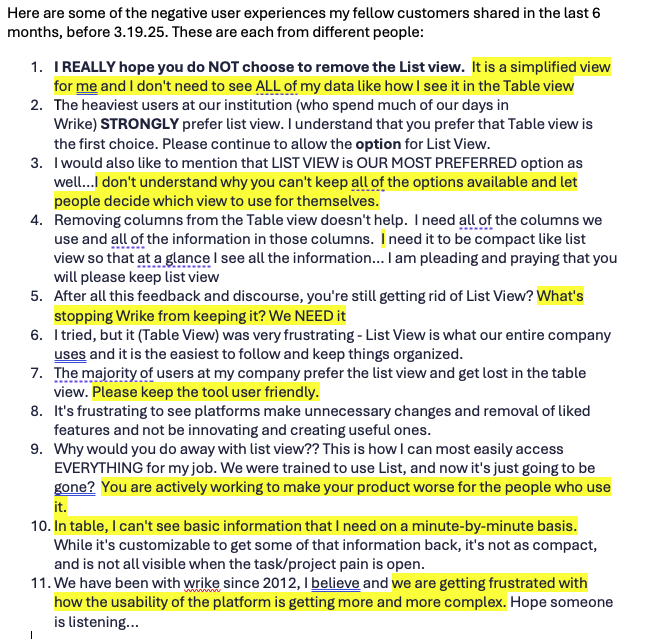
I've collected some of the negative user experiences my fellow customers shared in the last 6 months (attached). Please share this with your team. I'm also happy to talk with anyone who will listen. Thank you in advance.
Hi again, folks!
Mike Phelan Grouping, filters, and other features are now available in My to-do, did you have a chance to test it? It would be great if you could share more details of your experience with the view!
Meredith Lupa Thanks a lot for posting this feedback! I checked with Slava Kogan and he's aware of all of it as he has been tracking all comments on this topic and continues to do so. We definitely had lots of feedback over the past months, but our team has also released a great number of updates for the Table view. At the moment, all list view features are available in Table. During the live session, we also covered how you can create a very simple Table, among other things.
If you have any other specific concerns, please let me and Slava know here. We really appreciate your feedback!
Lisa Community Team at Wrike Wrike Product Manager Become a Wrike expert with Wrike Discover
Lisa Wrike Team member Become a Wrike expert with Wrike Discover
I would just like to point out that if there is a need for a "session" to explain how to use something... that UX probably ain't great.
Has anyone figured out how to workaround the awful default view (information density and layout) in Table View?
List view was by far the easier way to navigate Wrike's project > task hierarchy and find what you're looking for. Is setting up a Custom View really the only solution here? Can that be applied universally at the Space level?
Hi John Yarbrough! It's possible to create a custom view with the fields and grouping you want, and apply this view to a space. It's also possible to copy this view to other destinations:
Lisa Community Team at Wrike Wrike Product Manager Become a Wrike expert with Wrike Discover
Lisa Wrike Team member Become a Wrike expert with Wrike Discover