Custom Access Roles Visibility Control - Interim Solution

User Case: Large Enterprise Account
I work for a company that has an enterprise account, we have a lot of data in Wrike and a lot of users too. This has resulted in a somewhat bureaucratic lockdown on admin permissions. Consequently, I, as an admin, do not have access to the Custom Access Roles. This is fine, we have a system for formally requesting and ratifying changes to things such as Custom Access Roles (yay bureaucracy!).
The Issue: However, I am (an admin) - and anyone else who might be - trying to set up a new area will need to share folders in a bespoke manner and currently have no way of viewing the current level of permissions for each of the Custom Access Roles. Yes, I could request one of the three people who have permission to send me a screen capture of the access roles page but that's inefficient and wastes my and their time, furthermore, should a change be made, my information is inaccurate as soon as it's sent to me.
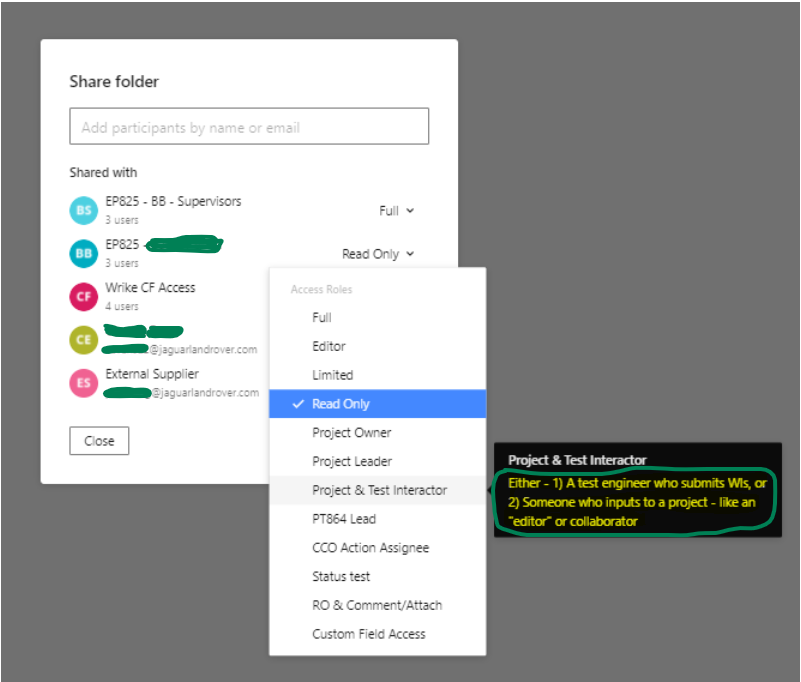
The Interim Solution: Ensure that Custom Access Role descriptions are good, by which I mean as full a list of the settings for that Access Role as a possible. Not a complete solution by any means (due to text box size limit) and the potential for human error e.g. if they forget to change descriptions after changing roles.
Actual Solution: Waiting Product Feature.
Thanks for reading this and I hope it helps.
P.s. Please see the associated Product Feedback Request and give it a 😍 (this was the closest to a heart emoji I could find, maybe I'm just blind):
The highlighted is not a good example:
Hello George Fiveash, thanks so much for posting a suggestion in the Product Feedback forum as well as posting an interim solution here! 🤗 Featuring it now on the Community home page 👍
Lisa Community Team at Wrike Wrike Product Manager Become a Wrike expert with Wrike Discover
Lisa Wrike Team member Become a Wrike expert with Wrike Discover