💚 Releases - Wrike Lightspeed, Automation, New Table View, Custom Item Types, and a BIG Thank You for your Feedback! (04/24/2023)

Announcements
We'd like so say huge thanks to everyone who shared their feedback in the previous release note! Taking this into consideration, we're now back sharing them weekly, and we'll also be looking at all the additional feedback you shared with us. More to come 👀
Feature Updates
Many of you have already started using some of the enhanced functionality that we are gradually releasing under our brand new Wrike Lightspeed experience. Starting today, you will see a new toggle in your settings to enable the whole new experience in your individual account. When the toggle is enabled, you'll get the new navigation, new Board View, new Table View, and new Work item view ⚡️ Try it out and be sure to let us know what you think in this Community thread!
- Automation - Two New Actions Added 2️⃣
There are two new actions in Wrike's Automation! They are called Duplicate item and Duplicate as subitem and they do exactly what their name says 🙂 This will be a welcome update for those of you who rely heavily on templated items.
- Automation - One of the Triggers Updated 🔥
The Direct subitem statuses change to trigger got an update - you can now select if you want the rule to work when not only all subitems' statuses change, but also when the status of any of the subitems changes! This is a great enhancement for data accuracy and reporting and allows to sync the data between subitems and parent items.

- Wrike Assistant - Smart Help Search Added 🔎
We've made our search in Wrike Assistant even better:
Before: you entered the search query and were redirected to the Wrike Help Center to see search results.
Now: we added smart suggestions into the search field - when you click on them you would be redirected to the selected Help Center page.

- New Table View - Mass Editing Cells Added 👍
You can now use the drag-fill option to mass-edit cells in the new Table view. It works the same as it did on the "Classic" Table view. Just pick a cell, drag the dot which appears and there you have it.

- New Table View - Multi-Cell Copy and Paste📍
You can now copy/paste multiple cells all at once. The functionality works the same as in the old Table view - use keyboard shortcuts for that (Ctrl+C, Ctrl+V on Windows and Cmd+C, Cmd+V on Mac).
- Custom Item Types - Set a List of Item Types During Space Creation 📄
When creating a blank space, you can now select which item types will be default for this space. It is possible to replace default tasks/folders/projects with custom item types as well as just add additional options to the existing list.
This way all users will see the options you pre-selected when they try to create a new item.

- Work Item View - Small UX Improvement in the Description Field 🙂
We have recently made it possible to change the width of the Work item view, and now the toolbar is adjusted to the view size (all the options are still there, just hidden). It works the same as in the task view (or project/folder info panels).

- New Toolbar - Share Space Button in Header 🤩
Not so long ago, we added the Share button for spaces in the classic navigation. Now, a similar button is available in the new toolbar. Clicking the button takes you to space settings where you can add members to the space.

- Assigned to Me Available in Sidebar on Team Plan 💌
Now, users on Team plan can open the Assigned to me section using the button in the sidebar. The section displays the same tasks as the Assigned to me widget on the Home page.
Fixes
- Not Possible to Set Zero Value in Numeric Fields
In Work Item View and New Table view, when some of you tried to enter "0" in a numeric custom field (percentage, currency, number), the value wouldn't be saved. Now it's fixed 🔧
- Approvals Not Started When Creating Custom Item Types From Request Forms
When using approvals with custom workflows (starting an approval upon status change) the approval process would not start if the status was applied to a custom item type created via a request form. Now fixed ✅
Lisa Community Team at Wrike Wrike Product Manager Become a Wrike expert with Wrike Discover
Lisa Wrike Team member Become a Wrike expert with Wrike Discover
Hi Nicole DiTrani, our team is planning to add it in the coming weeks, we'll keep you posted. Thank you for bringing it up!
Lisa Community Team at Wrike Wrike Product Manager Become a Wrike expert with Wrike Discover
Lisa Wrike Team member Become a Wrike expert with Wrike Discover
I am no longer seeing "completion" date for projects. Just a start and "due" date like it was a task. A due date is different than a completion date.
I am also no longer seeing the breadcrumb links to the parent tasks and upper level project that used to show up by the description of a task. Our users are starting to complain. Many jump around tasks and used those links to quickly get where they need to go.
Hey Jeanine Lore! The "Completed date" field can be enabled in the New Table view:
The Location field can be found in the list of system fields:
I hope this helps 🙂
Lisa Community Team at Wrike Wrike Product Manager Become a Wrike expert with Wrike Discover
Lisa Wrike Team member Become a Wrike expert with Wrike Discover
Regarding the Completion field. To clarify, my question is regarding the view where the project is in it's own window, not the table that has all the projects, we don't use the table view. When people are adding the completion date it is when they are looking at the specific project window. How can we view the completion date field in the project panel window so they can enter it without having to figure out how to get to where the table view is that lists all the projects, then scroll to find the project, then scroll sideways to find the completion date field?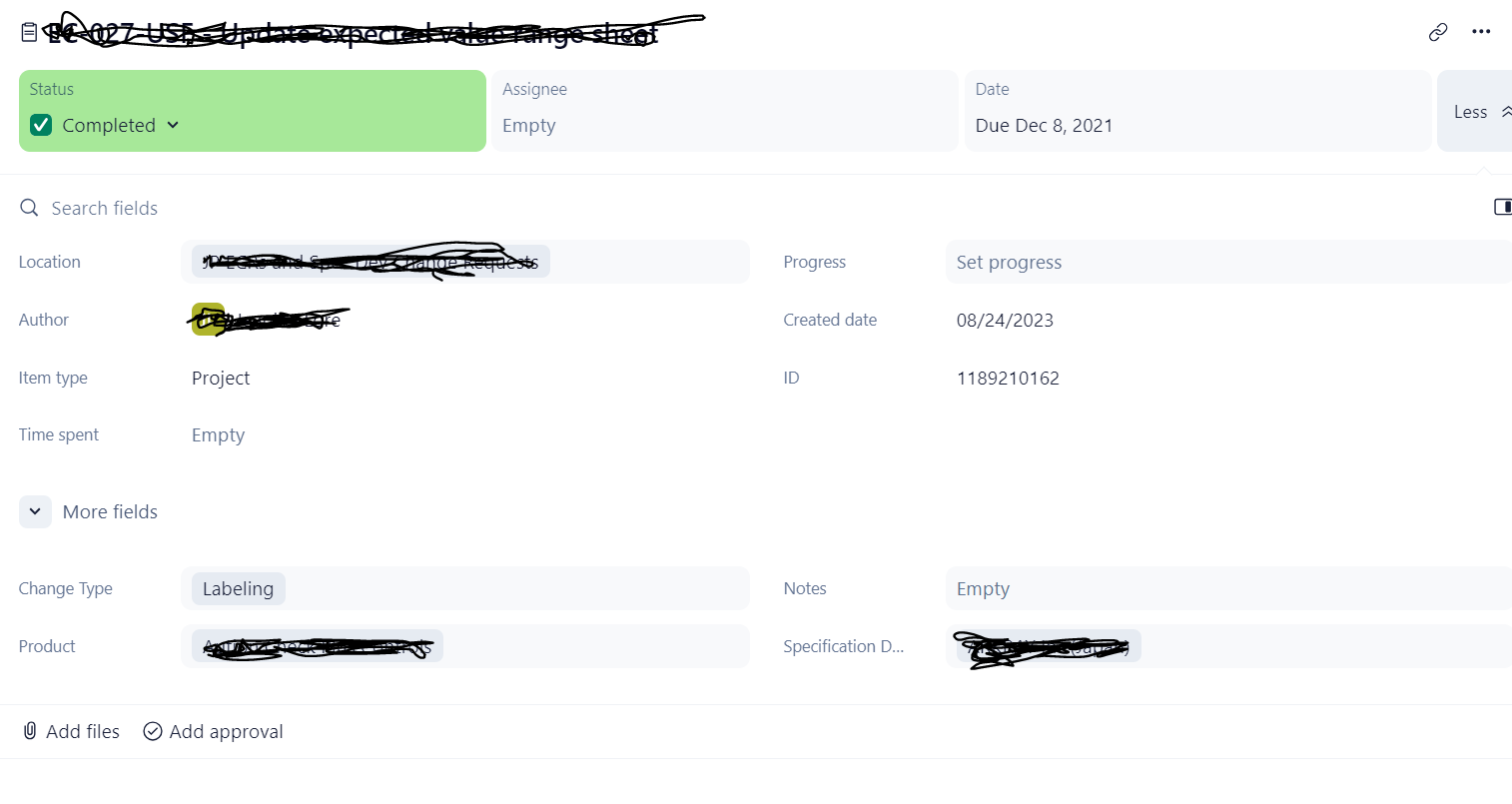
Ok more to add. Just realized that I cannot change the "completed" date in table view either. I appears that the "completion" date in the table is the date that the status was changed to completed. While this may make sense to some it causes huge issues for us since when someone actually updates the status IS NOT necessarily the actual project completion date. I am also entering in old projects so we have accurate reporting capability but I can't add the accurate project completion therefore my reports are inaccurate.
Jeanine,
Just jumping in here for a possible workaround. I have seen clients create a custom field for the project completion date, ie: (company name) Completion Date. That way you can obtain accurate reporting and still maintain when it was actually marked complete.
Thank you David, I appreciate the possible work around suggestion. I am wondering if I were to do that how I can get all the past projects real completion dates updated into a new custom field.
It is also confusing because when designing a report there is a "finish date" that is actually what is now being called the "due date" in the project pane.
Jeanine Lore Unfortunately, the request for Wrike to allow the Completed date field to be modifiable has been a request for quite some time. If you search the community, you will see it going back a few years :(
Thanks for your reply Shelly. It appears to be a disconnect between their naming of fields and the programming. The project panel date was called "Completed" but in the programming code maybe they identified it as the "Due date".
We entered a project completion date into he project pane since that is where the projects are being managed by the project managers. We don't have project managers open the table to scroll through to their project and update it that way so we never had a reason to ask why it can't be edited or to know that what they were entering in the project panel did not align with what was shown in the table. People frequently switch the status to completed days, or weeks, after the project was actually completed. Mostly they are too busy with more important things to worry about changing the status in Wrike on the actual day a project is completed. The table is not an accurate representation of the true completion date and even if we could edit it, that would be extra multiple steps and redundancy that the project managers would definitely not do.
As shown in the image I posted, the "Finished" date used in the reports as a filter as well as a header is what is now called the "Due date" in the project panel. It is very confusing and they should have left the user interface project panel to say "Completed" not "Due date". I will continue to enter the completed date as the due date and I guess just deal with our users constant confusion.