Adding Customized Project Statuses

Hi all!
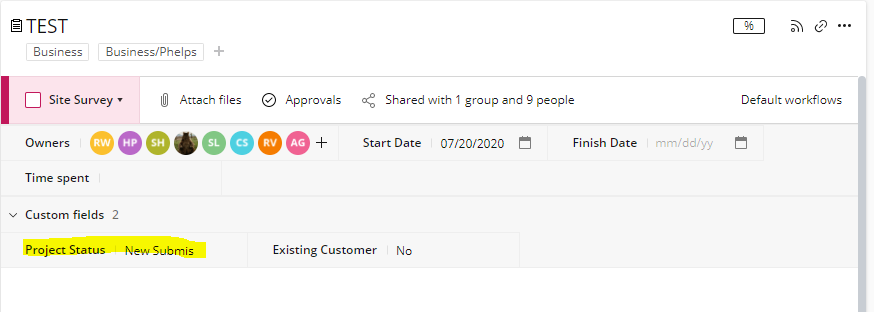
Can someone send me instructions about how to edit my custom project statuses? I just want to add to the highlighted area! Thanks!!!
It looks like we don't have the translated page you're looking for, but we do have other content in English and offer support in English.
What can we help you with?
Learn. Share. Discuss.
Hi all!
Can someone send me instructions about how to edit my custom project statuses? I just want to add to the highlighted area! Thanks!!!
Folllowing List for Post: Adding Customized Project Statuses
[this list is visible for admins and agents only]
Ashley Gustafson The item you've highlighted there is a custom field. If you go to the Table View you'll find that field "Project Status" as a column. If you right click and edit settings (assuming you have access) you can then add to your dropdown list ☺️
https://help.wrike.com/hc/en-us/articles/209603049-Custom-Fields#edit
Hope that helps?
Hi Ashley Gustafson,
This project status is a custom field and can be edited from the project, or folder level. When you have the project or folder open you will want to click on the three dots in the top right hand corner.
A menu will pop up and you will then select Manage Custom Fields.
A mini window will pop up with the list of your custom fields in that project or folder. Find the Project Status in the list and click on it.
The options for the custom field will then open and you will be able to see the list of options for the drop down menu. You can either go to the end of the option you want your new status to appear under, hit enter, and then enter the new status, or scroll to the bottom and enter the new status there.
Hope that helps.
-Ryan