[Status: Not Planned] Setting and locking start / end dates or duration

When setting the start date, end dates or duration of a task, we should have an option of locking any of the 3 parameters.
The app is always defaulting back to changing the start date and this is super counterproductive.
Per instance, If I need a delivery to be done by September, I know if takes 40 days to ship, wouldn't it be great to just enter 1/09/2018, 40 days and BOOM the app sets the date my stuff should ship ?
Thanks,

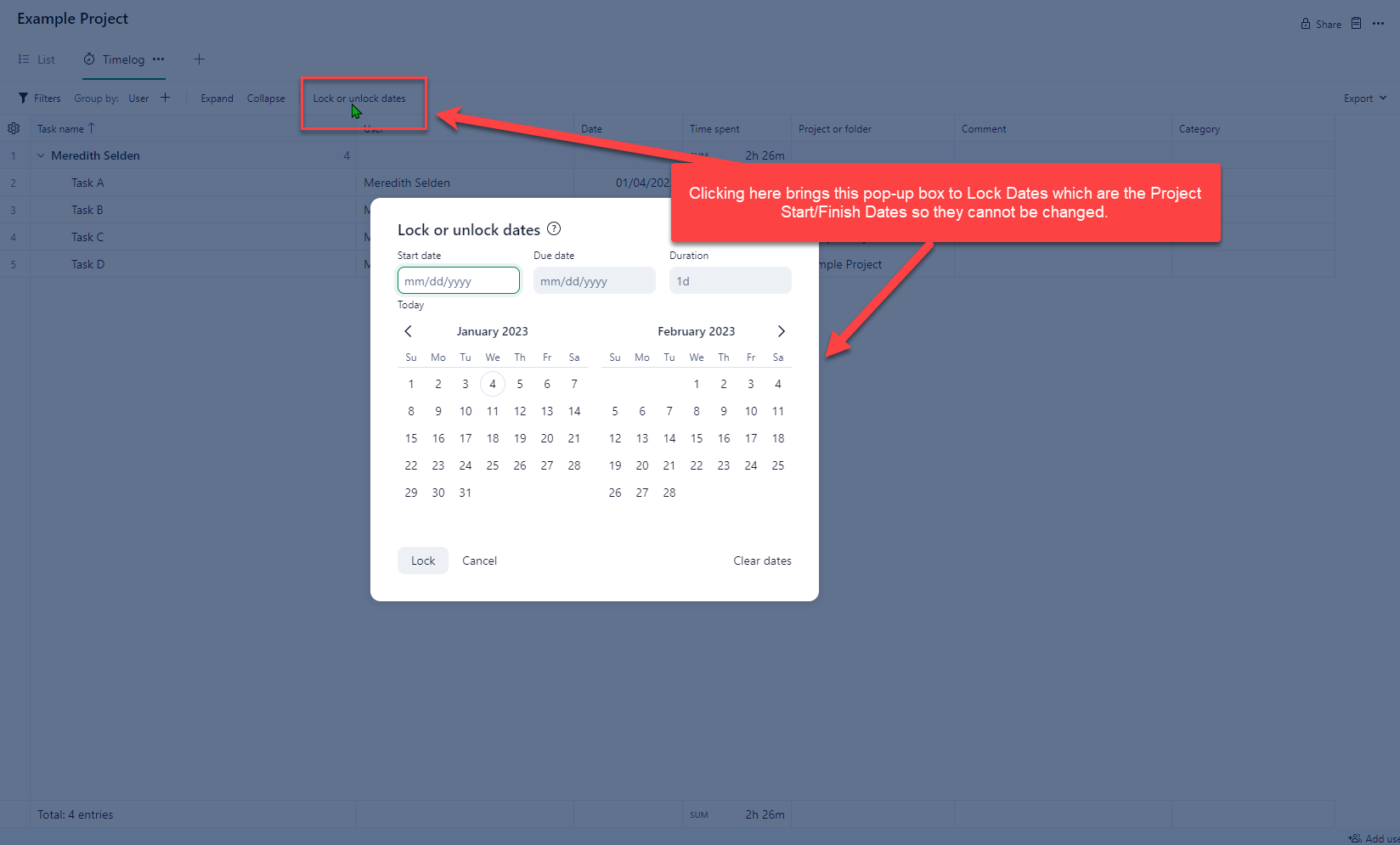
There is a feature that allows you to lock the Project start/end dates so they cannot be changed. Maybe Wrike could consider this feature to also lock the Task dates - make it a drop-down box to either Lock Project Dates or Lock Project and Task Dates. In a Project it's on the Timelog View:
From my experimenting, I don't believe so. When I used a Project custom field, that does not replicate in Table view so the formula only worked at the project level and not at the task level. I believe that the opening date value would need to exist in the entire column.
I believe that the table view does not work like a full spreadsheet approach, in that you can only reference values across the rows. I don't think there is any way to reference a value that is on a different row or at a project level. Each row is like a database record and cannot reference other rows.
The exception would be the system integrated aggregations like SUM or AVERAGE. I don't think the aggregations would help in this case.
Meredith Selden This lock feature is not related to the project dates at all. This is for locking time logs on certain date ranges. For example, if you do billing at the end of the month, you don't want to allow someone to log more time during that month after you have processed billing for the month, so you lock that date range so no TIME LOGS can change.
Here is the help tip description for lock/unlock:
"Lock will disable ability to track time and edit time entries for the selected dates in this and all nested projects or folders."
It does not affect or lock the dates of the project or tasks.
Thanks for explaining that Jason Pontius! I went back to the user who was leveraging this feature and they were doing it in combination with enabling Dates Rollup - so that's why the Project start/end dates were "locked" and couldn't be edited. But if they update the task dates it'll auto-update the project dates so there needs to be a way to lock task dates.
+1
I'm so excited to announce that two weeks ago I purchased smartsheets and moved my whole team to it because of challenges like locking, and managing tasks in Gantt view with Wrike.
We are all so relieved and happy with the change!
Thanks Jeff, we will have to check into Smartsheets as well. It seems the owners of this product were done making core product improvements years ago. Too bad.
Thank you for providing your feedback and sharing your concerns, everyone. I understand that this functionality would be helpful to your teams, and rest assured our team knows about this suggestion as we continue passing your feedback to them. We have recently released multiple updates that our Community members have been asking for, but the team can't commit to releasing every suggestion.
If there's anything I can help you with, please let me know.
Lisa Community Team at Wrike Wrike Product Manager Become a Wrike expert with Wrike Discover
Lisa Wrike Team member Become a Wrike expert with Wrike Discover
I'd like to add another voice to the request for being able to set an end date to a project and having the schedule back out and provide us with the date we should begin work based on our dependencies.
Hi Lauren McClain, thanks for adding your voice here, much appreciated 👍
Elaine Community Team at Wrike Wrike Product Manager Become a Wrike expert with Wrike Discover
Elaine Wrike Team member Become a Wrike expert with Wrike Discover
I also find benefit in locking start and end dates. I like to idea of a lock symbol by the date fields.
Welcome back to the Community Doug Futato, and thank you for supporting this suggestion.
Although it's not planned at the moment, I'll make sure to pass on your feedback to the respective team.
Lisa Community Team at Wrike Wrike Product Manager Become a Wrike expert with Wrike Discover
Lisa Wrike Team member Become a Wrike expert with Wrike Discover
Hi, I see this is listed as a back burner, I would like that feater as well.
Please mover it up and make it happen.
Thanks.
Welcome to Wrike forums Tom Mount 👋 Thank you for sharing your feedback here, I've shared it with the respective Product team.
To get you started in the forums, here's a post explaining how this Product Feedback forum works, and this is our New to Community forum where you can find everything you need to know about the Community.
Let me know if I can help you with anything.
Lisa Community Team at Wrike Wrike Product Manager Become a Wrike expert with Wrike Discover
Lisa Wrike Team member Become a Wrike expert with Wrike Discover
I have this same issue. This wasn't a problem in smartsheet.
Many interfaces keep the UI simple by keeping track of which 2 fields of the 3 (Start, End, Duration) were 'derived' or were 'set' by the user in the last change. For example User Edits duration, Therefore End date is 'derived' and Duration was 'set'. Then, If the Start date is changed, the End date is calculated (since the end date was derived, and the duration was 'set' last time) That results in an intuitive UI. If Start or End date is cleared, they are marked derived; Duration becomes 'set'.
Thank you for your feedback Bruce Hawkins!
Our team has reviewed this suggestion and for now, it's not on their roadmap due to other planned priorities. We'll continue sharing feedback from this thread with them and we'll let you know if there are any changes here in the future.
Let me know if I can help you with anything else!
Lisa Community Team at Wrike Wrike Product Manager Become a Wrike expert with Wrike Discover
Lisa Wrike Team member Become a Wrike expert with Wrike Discover
I continue to be so frustrated with Wrike. "Not on their roadmap" for 6 years? Seriously? When will it ever become a priority if it hasn't in 6 years?
Our entire organization has stopped using Wrike - I had so much hope for it....
I'm sorry to hear that, folks! I'll be sharing your feedback with the Product team and I'll also send your feedback to your Account teams at Wrike.
Lisa Community Team at Wrike Wrike Product Manager Become a Wrike expert with Wrike Discover
Lisa Wrike Team member Become a Wrike expert with Wrike Discover
It's sad that this feature hasn't been developed yet. We have constant issues with due dates and it would be very beneficial if our tasks could have a locked feature on certain blueprints or projects at both the project and task line item. If a task is allowed 7 days or 14 days to complete, I'd like to be able to lock those dates. Please, please, add this to your roadmap.
Hello Michelle Barnes Gideon, thank you for sharing your feedback with us, I'm sorry to hear this is causing issues to your and your team. Rest assured that we will keep you updated if there are any changes.
Please, let us know if there's anything else we can do to help 👍
Thread has been open since 2018.......
I am throwing my name in the hat, this is causing some serious pain points. We should be able to lock this down. Just be more like MS project on the timeline planning and gantt features, and keep the other great stuff yall have added!
Rohan V Community Team at Wrike Wrike Product Manager Become a Wrike expert with Wrike Discover
Rohan V Wrike Team member Become a Wrike expert with Wrike Discover
My team also has had problems with this, mostly around the duration not locking. If a task will take 20 days but someone moves the start date 5 days out the duration changes to 15 days instead of moving the due date 5 days out. I understand why but for us it doesn't work and leaves our teams wondering why there's such a short window to complete their assigned work and it's often not caught until it's too late.
Hi Andrew Parrish! Thank you for sharing your case. 🙋🏻♀️
I checked with our team, and this is not planned at the moment. We will continue to share your feedback and will let you know if there are any changes regarding this suggestion. 👍🏽
Basudha Sakshyarika Community Team at Wrike Wrike Product Manager Become a Wrike expert with Wrike Discover
Basudha Sakshyarika Wrike Team member Become a Wrike expert with Wrike Discover
Basudha Sakshyarika, thanks for getting back to me, even if it is disappointing, I appreciate the direct feedback.
Will add another voice to this feature, it has been requested by many members who are using the tool and looks like it would benefit the wider community.
Thank you,
Alex
Hi Alex Boot 👋 thank you for voicing your support for this suggestion. We will get back to you if there are any further updates in the coming months.
Rohan V Community Team at Wrike Wrike Product Manager Become a Wrike expert with Wrike Discover
Rohan V Wrike Team member Become a Wrike expert with Wrike Discover
+1