🚀 The New Gantt Chart is Here – and We Need Your Feedback!
Pinned Featured
Hello Community!
We’re excited to share that Wrike’s Gantt chart is getting a major upgrade 🎉 Based on your feedback, we’re rolling out a new version that brings speed, power, and a more seamless experience to your project planning.
✨ What’s new right now?
-
One-click switch – Try out the new Gantt and switch back to the classic version anytime
-
Performance boost – Faster loading, especially for large and complex projects
-
Grouping & filters – Organize your data more effectively
-
Fiscal year support – Plan your timelines with more flexibility
👉 You’ll see a “Try new Gantt chart” button directly in your classic Gantt view
📅 Rollout plan & milestones
August 2025
-
Switch option available (classic loads by default)
-
Grouping + new filters
-
Fiscal year support
-
Significant performance improvements
Early October 2025 (Planned)
-
New Gantt becomes default (switch back to classic is possible)
-
Public links for sharing Gantt views
-
Fresh UX updates for a modern look
-
Improved critical path
Early 2026
-
The new Gantt becomes the standard version
-
The classic Gantt will be sunset (based on adoption & feedback)
-
Snapshots & PDF export
-
Baseline columns (compare planned vs. actual dates)
-
Full screen mode
📝 What’s changing
A few smaller features from the current Gantt won’t be carried over:
-
Manual sorting → will be replaced by grouping
-
Item creation directly from canvas → simplified via the new Table
💬 We need your feedback!
This is just the beginning—we’ll continue improving the new Gantt with your input. Please share your thoughts here in the Community:
-
What do you think of the new experience?
-
Which upcoming features are most important for you?
-
What’s missing that you’d like to see carried over?
Please try the new version and share your feedback below 👇
Lisa Community Team at Wrike Wrike Product Manager Become a Wrike expert with Wrike Discover
Lisa Wrike Team member Become a Wrike expert with Wrike Discover
I'm Lynette, a Product Manager at Wrike responsible for Gantt charts. Thank you all for the detailed feedback on the new Gantt Chart! We appreciate the time you’ve taken to share your experience and suggestions so far.
First, I want to reiterate what Andre mentioned already: we are closely monitoring all your comments and we will be prioritising the most critical parity features and requests. Here’s an update on what you can expect next in the new Gantt in the coming weeks based on your feedback:
Lynette Mutungi Community Team at Wrike Wrike Product Manager Become a Wrike expert with Wrike Discover
Lynette Mutungi Wrike Team member Become a Wrike expert with Wrike Discover
I'd like to have the Alt+Shift shortcut added back into the new Gantt, as it operated in the old Gantt in manual order. I see that there is an Alt+Shift+N shortcut, but it isn't allowing me to drop the new task into the chart in the exact folder and timeframe I want, which was something the old Gantt did.
We are missing weekend/holiday slot highlighter, item roll ups, and the setting button which is very important for us.
There is still no horizontal scroll bar on the Gantt chart itself. I have been asking for this for years. It's way too easy to accidently schedule something by trying to grab and move (click and slide) the Gantt chart in order to scroll or navigate along the dates. I feel that this is unacceptable to not have a scrolling mechanism. On a laptop, sure you can use the touchpad to scroll, but at a desktop with a keyboard and mouse this is not possible.
The Workload Chart has a horizontal scroll; there's no excuse for the Gantt to not have a horizontal scroll. Please add this!
I have an issue with filters when switching between Classic and New Gantt charts.
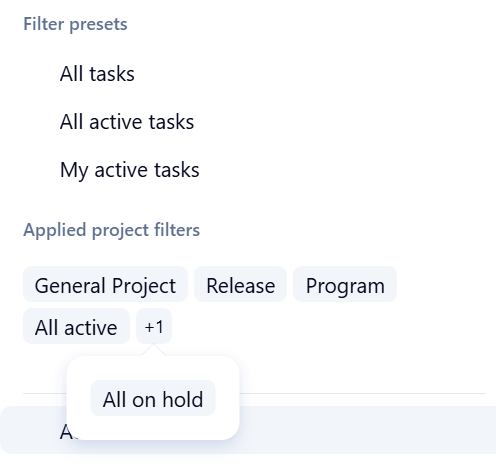
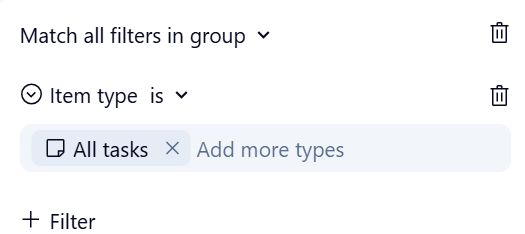
I have a Classic Gantt chart with this filter:
When I switch to New Gantt it creates two filter groups.
and
The new chart shows projects that are completed, not just the active and deferred projects and I have to go in and manually edit the filter to fix it.
Then when I switch back to Classic chart it forgets all filters and just sets a filter to All Tasks.
This is really unworkable if we keep losing filters when switching.
I would love to see the the ability to save Grouping setting in Gantt chart as similar to the ability to save Filters.
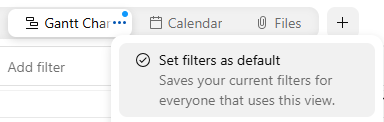
like below:
Thanks all for your suggestions here, I've sent all of them to Lynette 🙌
Lisa Community Team at Wrike Wrike Product Manager Become a Wrike expert with Wrike Discover
Lisa Wrike Team member Become a Wrike expert with Wrike Discover
In the old gantt, there were summaries that showed the time for collapsed group. In the new Gantt that's missing. It's a critical feature for us and we can't do without it. Please add it back.
Afternoon,
Not being able to filter manually could cause some issues for our team, unless we are able to add sort priorities?
Many thanks!
Hello! We’ve added a few important updates to the new Gantt Chart to bring it closer to feature parity with the old one;
Sorting by predecessors
Public link sharing- similar to what you have in Table view, you’ll soon be able to share your Gantt chart outside of Wrike.
Thank you for all your feedback so far.
Lynette Mutungi Community Team at Wrike Wrike Product Manager Become a Wrike expert with Wrike Discover
Lynette Mutungi Wrike Team member Become a Wrike expert with Wrike Discover
So many good bullets and points from many users here!
Pros
Cons (would like to have/missing)
Sherrie Besecker - Would it work to locate (or bi-locate) your related projects into one Folder, and look at a Gantt view from that Folder? That's how we get a view of all projects relevant to one specific Customer.
Hello, i see an option to share external link to new gantt - it works, but there are no filters applied. So its not exactly external link to a "view". Would that be fixed? Do you have any ETA for sorting by predecessors? I would really like to test new gantt further, but its not possible without that sorting implemented. Thanks a lot for your effort, have a nice day!
Jaro
We appreciate the work you're putting into the New Gantt! As our org is maturing and adopting Wrike, we've found that when some users advance a task having a predecessor they inadvertently introduced a Start Constraint to the task. While you do get the vertical bolded line on the left side of the task in the timeline view, we've directed our project teams to display the Start Constraint column in the tabular view for additional visibility. In the New Gantt, I see that you cannot select the Start Constraint field as a visible field in the tabular view. Could that be added as a selection option in the New Gantt (and any other system fields that were only selectable in the Old Gantt)?
I agree with Nate Vail. I would also love the option of turning off the start constraints all together, if a user didn't want to display it in that way.
I completely agree with Nate Vail that this is a big oversight. Now you have access to all of the standard fields, but the start constraint is missing. There is no other way to access this field, so you can't edit this.
I have always found the start constraints to be a thorn in my side. I don't like how they automatically are added when you reschedule a task. Start Constraints have a specific purpose, and it doesn't always apply. I should be able to move a task around without automatically adding start constraints and still have the overall elasticity of the schedule workable. If I need a task to have a hard start constraint, I feel that I should make that choice and add a date for this. I am regularly having to delete these constraints because they are automatically added anytime someone moves some tasks around on the schedule.
And with the new Gantt, there is no way of editing this field so there's no way of getting rid of them. You have to go back to the old Gantt to edit them, making the new Gantt almost unusable.
Hello,
I have a question regarding the public link for the Gantt view. It seems that viewers cannot be restricted from seeing the task status colors, which may expose sensitive internal information.
Would it be possible to make the visibility of this information optional?
Thank you for your response.
Hi,
My team is missing 2 points, so far.
1. Snapshot. Our team update tasks decentralized (any one can change/update it´s own tasks). Snapshot is useful to track back those changes to undersand impacts on the project.
2. 1st columm width. The 1st columm smaller width is 256. If you have a small task description (this is our case), such long colum is not usefull.
I hope this helps you gauys (and us) to have a better sollution.
I'm unsure what changed over night, but all the dates seem to have shifted. I am unable to re-align everything.
Hello everyone! Quick update on the New Gantt Features
Released
Next Up
Planned For Later
Thank you all for your continued feedback and as usual, keep it coming.
Lynette Mutungi Community Team at Wrike Wrike Product Manager Become a Wrike expert with Wrike Discover
Lynette Mutungi Wrike Team member Become a Wrike expert with Wrike Discover
Start Constraints: I'd love to see these not be automatically created when adjusting task dates. I would like start constraints be a conscious decision to create rather than automatic. I wind up going through and removing most all of them that are automatically created.
I'd also like to see them more accessible for editing. Right now, the only place you can even get to that field is by showing that column in the Gantt view. It doesn't show up in the task fields. I find it odd that you can edit the Predecessors/Dependencies in the task details, but the Start Constraint is not even shown. This doesn't make any sense as they are related to each other. They should both be shown at least, if not editable.
Hello,
Happy to hear about the planned updates.
Specifically regarding Critical path: I already mentioned in the past that it would be useful to have the free float per task available, and I hope that this is planned. Adding now that it will be great to have this data displayed within the Gantt chart.
I'll explain the reason: we are working on very complex Gantts. Often a group of tasks, which is not marked as a critical path, has free float that is close to zero. So these tasks are practically a critical path for us, but as their free float >0 they are not marked as such. This feature will allow easy spotting of these.
In addition, adding color coding which is not based on status (e.g. color based on specific field, or manual color coding) would be most helpful.
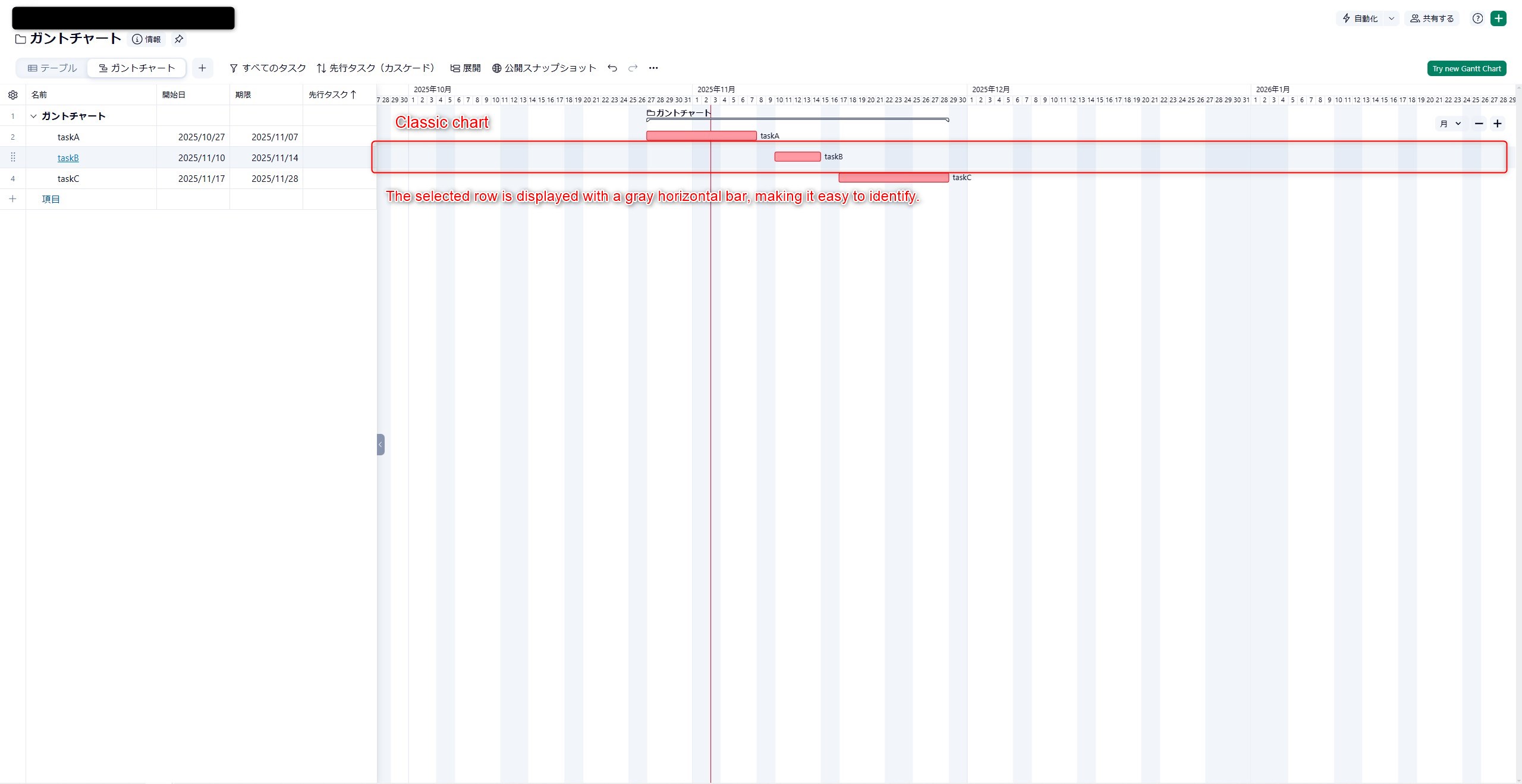
I would like the classic chart feature where the selected row is displayed with a gray horizontal bar to be ported to the new Gantt chart..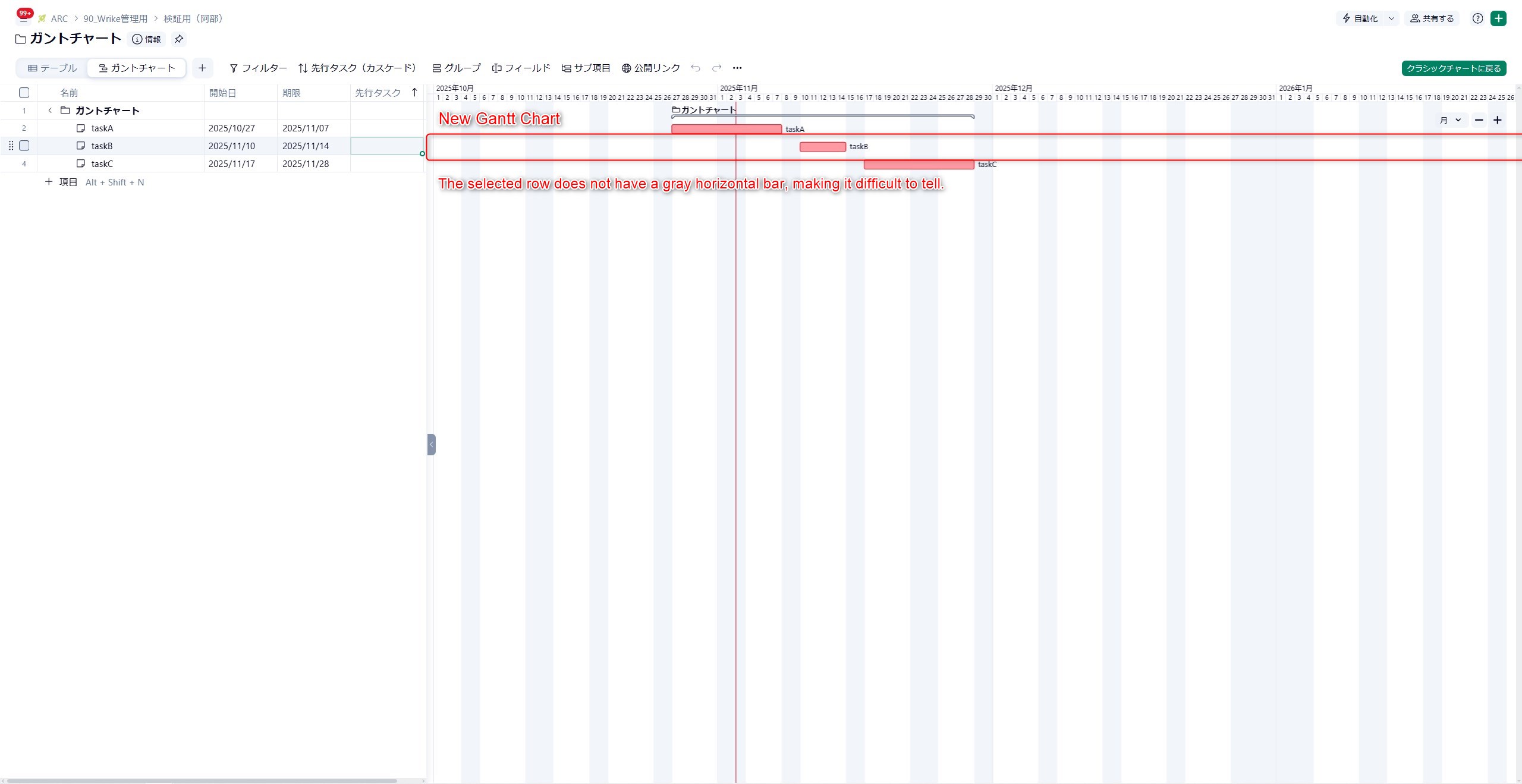
I completely agree with Jason Pontius' comment on start constraints!
Hello, here are a few functions I am missing:
The option to display a selected custom field next to the task name in the Gantt chart timeline.
The ability to create a new task in a specific position by right-clicking a task and choosing “Create new above/below.” Scrolling to the bottom of the page and then manually dragging each task to the correct spot is not efficient. Creating new tasks via the green plus button also requires too many clicks.
The option to share a Gantt chart externally without revealing task status names or colors.
Thanks a lot for your effort!
Jaro
Hi, thanks for keeping us abreast of all the updates and changes with the new Gantt view. Overall, I've been pleased especially with the ability to makes changes, as you can in the Table view but also see the changes reflected in the Gantt view. I have just been waiting for the predecessors option to be implemented, so thank you for that. However, not sure what happened but now the dates no longer align and visually, it looks like start dates are one day off and show up on non-working days. Is this a global issue or is it just happening to our view? If so, why and how can this be fixed? Thanks.
Hey Kyle Martin Karen Van Veldhoven. Thanks for sharing the feedback on the misaligned dates of items on the canvas. This is a bug and we are working on resolving it asap.
Lynette Mutungi Community Team at Wrike Wrike Product Manager Become a Wrike expert with Wrike Discover
Lynette Mutungi Wrike Team member Become a Wrike expert with Wrike Discover
Yes, agreed with Jason Pontius' comment on Start Constraints not being automatically created when adjusting task dates forward which have a predecessor. When you tackle the Planned For Later stuff, I'd like to see a user preference choice to turn off automatic creation of Start Constraints. Another consideration would be to provide a prompt that when a user takes such an action that they're prompted on whether to apply a start constraint or not (though caution should be taken on introducing prompts, as they can quickly become a nuisance).
Jaro Pcola
Very much agree with you, regarding "The ability to create a new task in a specific position by right-clicking a task and choosing 'Create new above/below.' Scrolling to the bottom of the page and then manually dragging each task to the correct spot is not efficient. Creating new tasks via the green plus button also requires too many clicks."
+1 for this feedback!!!
Wish there's an option on the Gantt chart to show a preview (single click for Preview, double-click to open the Task) that is similar to how it works now on Calendar view with the ability to pick which fields are shown on the Preview.
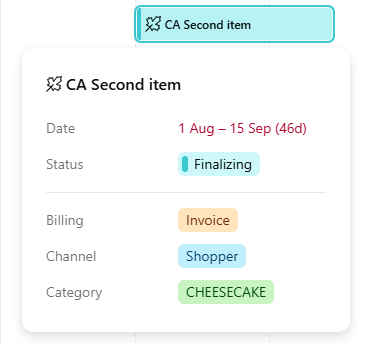
Current Preview feature on Calendar view for reference.