Custom workflow on dashboards

Hi everyone,
Wondering if someone in the community can help shed some light on this.
I have created a custom workflow within our space for one of our teams. I have set this as the default workflow within their team folder. The team is now in the process of updating any old tasks/projects with the new custom workflow. This has been working fine within their team folder however if they go to update the workflow from the dashboard view the new custom workflow is not available within the list. Once the new workflow has been selected within the team folder view the workflow is visible on the dashboard view.
Is there a setting or something I need to select so these space workflows are visible to select for a task in the dashboard view? Or does it have to be updated within the folder?
Hope this makes sense!
Amy Hunter Hi! I'm having trouble envisioning what you are trying to do. Could you upload some screenshots to help me understand?
Hi Ali Moses thanks for your reply. Here's some screenshots from the team experiencing this:
Image 1: Dashboard view
Image 2: Folder view of the same task
Image 3: Dashboard view once the custom workflow (CA workflow) has been set within the folder view
So we are wondering why the custom space workflow is not visible when looking at a task from their team dashboard view? Do they always need to be within their team folder to be able to switch over to the new custom workflow. I'm wondering if it has something to do with the fact that the new workflow has been saved as a Space workflow rather than an account workflow?
Amy Hunter Unfortunately, it doesn't look like the pics came through!
Sorry Ali Moses! I was having issues. let's try again.
Image 1: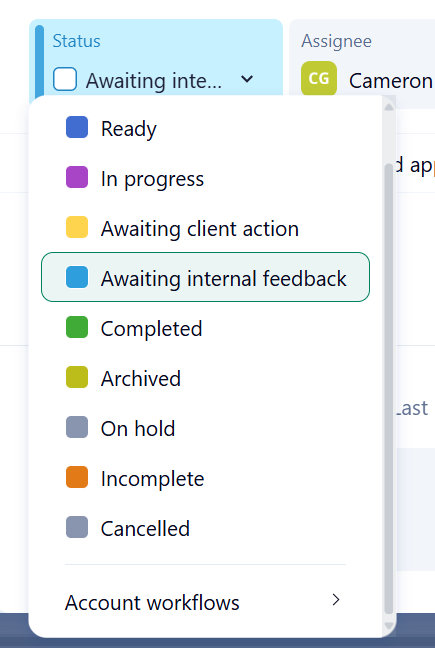
Image 2: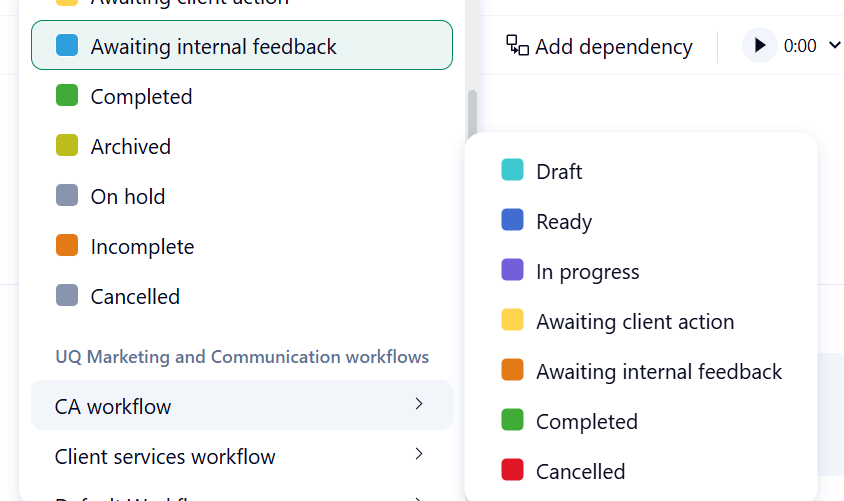
Image 3: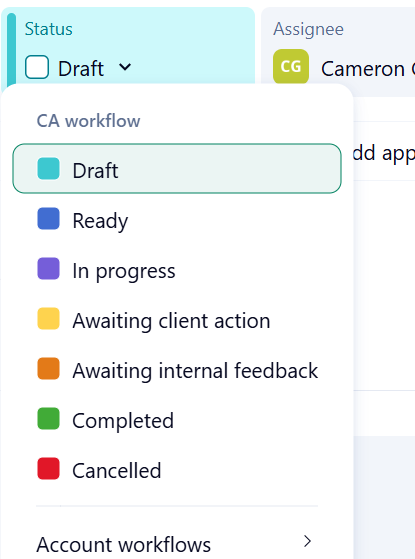
Amy Hunter It may have to do with the location of the tasks in question. Are they all located in the same space? Are they all in a folder that has had your custom workflow added to it?
Hi Ali Moses thanks for your reply. Yes they are all in the same space and it's the space where the custom workflow is. But maybe it is something to do with location. I'll need to dig in further with this. Thank you!