How to set default view , filter and sort for all items in a space

I have a few hundred projects, folders and tasks at varying levels in a space and I need to have the default view when viewing tasks in all of these set to table (since list is being taken away), then filtered by All Active Tasks and sorted by Name. I am creating a few hundred new tasks and need to have them show like this. Setting the view up every time for each folder or whatever they are in is not feasible. How do I do this?
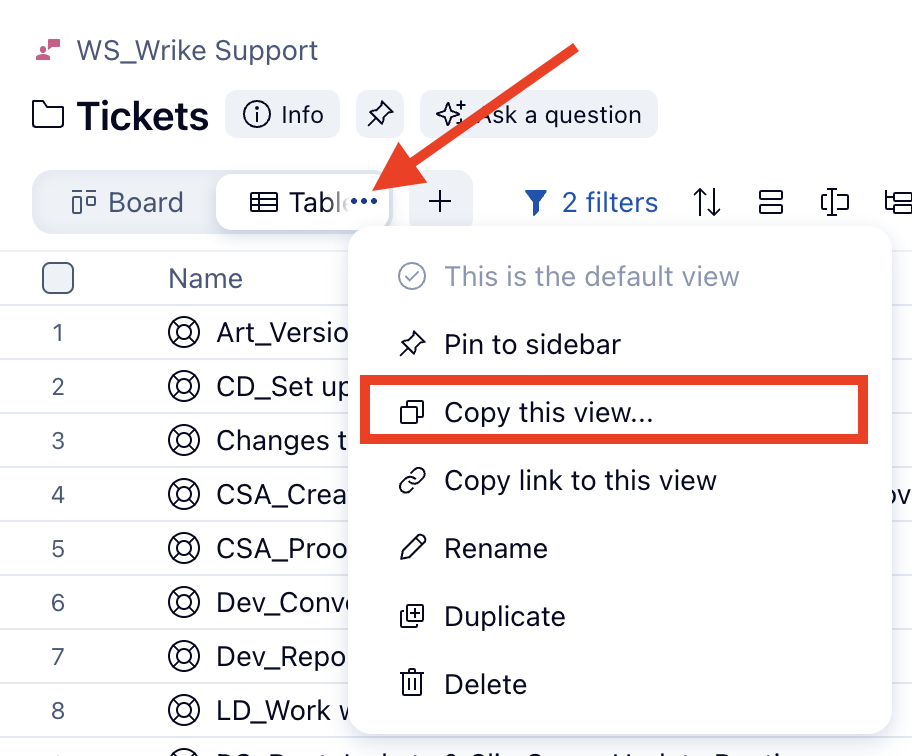
Hi Jeanine Lore! Once you get the view set up the way you want it, you can click the 3dot menu on the view and select "Copy This View." You will then be prompted to select the location where you want to transfer the view. (You can even select multiple locations at once!)
Hope that helps :
see [From Wrike] Copy Custom Views from Another Location 🔥 – Wrike Help Center