FAQ ✍️ How Can I Remove a Folder Tag From a Subtask?

Hi everyone! 👋
We continue testing our new FAQ format and hope to provide you with quick, easy-to-understand answers to some of the most common questions we receive 🙋
❓Q: How can I remove a folder tag from a subtask?
🗣️A: Subtasks in Wrike live under their parent tasks and inherit the location tag of the folder or project that their parent task belongs to. At the same time, they do not directly belong to this folder or project. We call these inherited location tags ghost tags 👻
Ghost tags look like faded-out folder and project tags. They are there to provide useful information: it tells you which folder or project the parent tasks lives in. If the subtask has multiple parent tasks, then it has a ghost tag for each folder or project that the parent tasks are in.

To remove a ghost tag from a subtask, untag it from the parent task 📌
We hope this FAQ is helpful! Let us know if you have any questions about 👻 tags!
Lisa Community Team at Wrike Wrike Product Manager Become a Wrike expert with Wrike Discover
Lisa Wrike Team member Become a Wrike expert with Wrike Discover
You were able to remove Ghost tags by 'Detaching' them from the list view.Now that we have only 'Table' view - seem to have two ghost folders. I don't know how to detach or which view allows us to detach. This happens when I start typing a task name, the suggestion automatically picks a task from the other projects.
THIS!!! I just had this happen. Adding sub tasks and it picked something out of another project when I hit enter. Now I can't delete it or cancel it because that will impact the other project.
When I go into the other project, I can't remove the tag either.
So true, since in Wrike 2025, there is no list view ANY MORE! I could not find a way to remove a ghost tag. The only way is to delete it. However, will affect the task records. Who could tell me a way to do it, please!!
Move the mouse to the subitems name, will appear three dots right click, detch. It works!
Hi folks! it's possible to detach a subtask from its parent in the Item view - the subtask will then become a task (be sure to add it to a different task, folder, or project) Can this be helpful? Also, you can either delete the item that shows as a ghost tag or remove the parent item from it. Would these options work for you?
Lisa Community Team at Wrike Wrike Product Manager Become a Wrike expert with Wrike Discover
Lisa Wrike Team member Become a Wrike expert with Wrike Discover
Very interesting discussion! I'm actually facing this exact issue right now. I have a subtask of a subtask that has two ghost tags (which are actually two different Wrike projects) due to a shift in direction after both projects were created. I need to remove one of them, but the solutions you've suggested don't work for us because we need only one of the project tags to remain associated with this task in the end (after redistributing tasks between the two projects). Do you have any ideas, maybe? Thanks!
Hey Marika Perron 🙋🏻♀️
Ghost tags appear on subtasks to show which folders or projects their parent tasks are in. If your subtask has more than one parent, it’ll have multiple ghost tags. To remove unwanted ghost tags:
- Open the subtask and check which parent tasks are listed.
- Go to the parent task you don’t want the subtask linked to.
- Remove/unlink the subtask from that parent task.
This way, the subtask will only have the ghost tag from its remaining parent project or folder. If you need more help, feel free to reach out to our support team! 😊
Basudha Sakshyarika Community Team at Wrike Wrike Product Manager Become a Wrike expert with Wrike Discover
Basudha Sakshyarika Wrike Team member Become a Wrike expert with Wrike Discover
How do I unlink the subtask. I was trying to add a new task. If by some reason by mistake your mouse points on an already existing task, Wrike creates the task with a ghost link instead of the name of the new task you are typing. That's how I create ghost links even if i don't want to
Hi Mercina Jobin 👋🏼
Sorry for the delay in getting back to you. To unlink the subtask, you can use the Detach option from the three-dot menu 👇🏼.Please give it a try and let me know if you have any questions.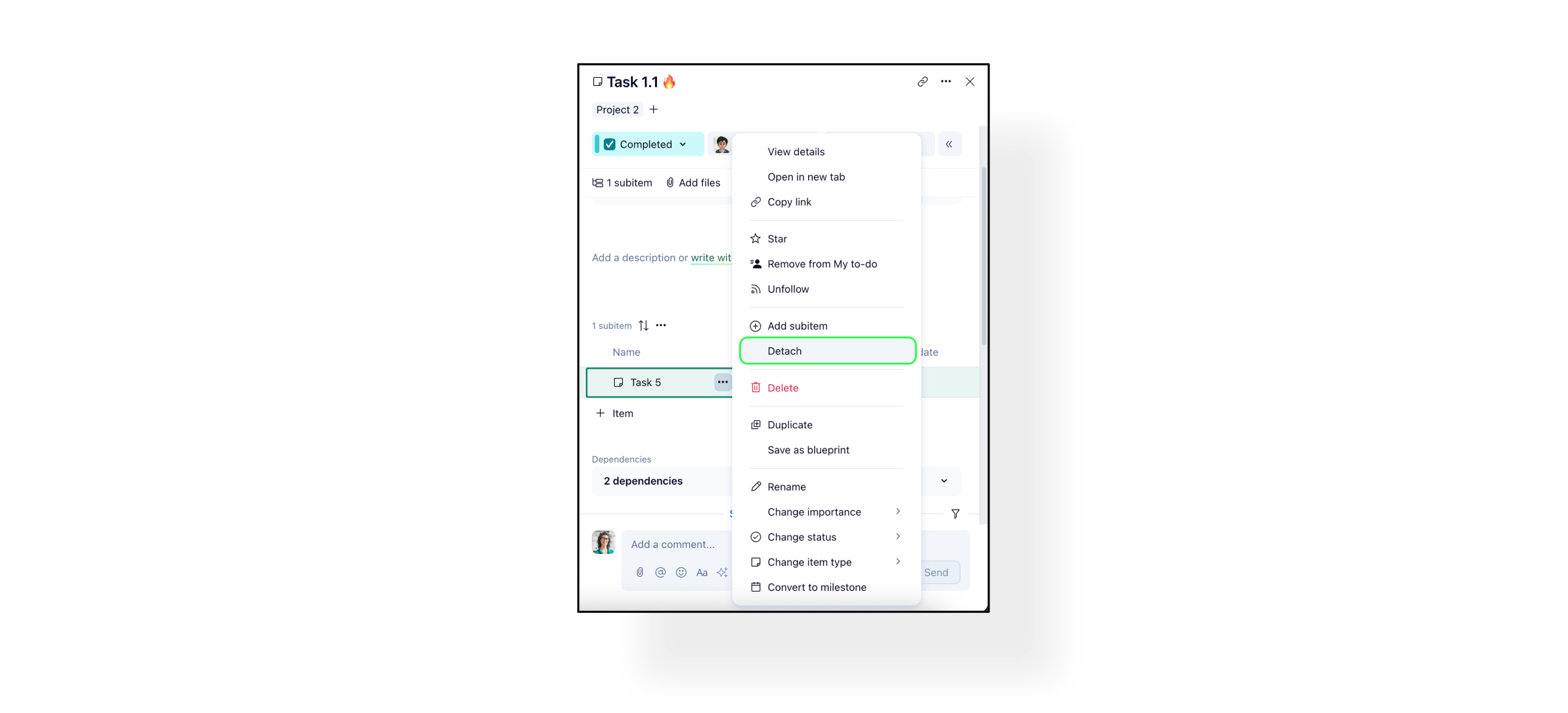
Basudha Sakshyarika Community Team at Wrike Wrike Product Manager Become a Wrike expert with Wrike Discover
Basudha Sakshyarika Wrike Team member Become a Wrike expert with Wrike Discover