Ability to Remove a Picture from Displaying in Board View
Answered
Permanently deleted user
As a user, I need to view tasks without pictures displaying in a Board view, so that I can more easily:
- see what tasks I need to work on,
- track task status,
- change task status by dragging and dropping tasks from one column to another.
These reasons are the stated purposes of the Board View in the Wrike Help Portal.
Displaying a thumbnail of a random attachment in the Board View does not accomplish the reasons stated above.
Improvements to displaying a picture on a task displaying in Board View could include:
- Ability to remove a photo from being the task photo in Board View
- Ability to select a photo as the task photo in Board View
The two above improvement suggestions are features currently available in Trello.com.
Trello.com Screenshot of Ability to Remove Cover Photo from Card in Board View.

Hi Matt, welcome to the Community! 🙂
I can see your point here. Some users do like to have the preview of the attachment shown on Boards but I can understand why these previews might be a little obstructive for some people.
I'll be sure to bring this to the attention of the Product Team and update you here if I have an update to share. You can click the 'follow' button above to get alerts about all comments to this thread.
As an alternative, would a Dashboard with a custom widget (basically building a Dashboard of tasks based on what you want to see) work for you? If it interests you, why not give it a go and reply to me here if you have any questions or need a little help with it - I'm happy to help!
Thanks for sharing and happy posting 👍
Hi Stephen,
Thank you for such a quick reply. To answer your question, no, the alternative Dashboard custom widget would not work as I do not (1) want to go through all the additional steps to create a custom widget to (2) put something on my dashboard that is not filtered to me but displays the entire team's work, and (3) I would not want to advise my team to create a custom widget as well for us all to see the same thing.
I think the Cover Photo on a Task is a great feature to have - for certain scenarios - but a random photo (that I may have no intention of having displaying OR is for reference and isn't key to understanding the task or title from the board view) being forced on the user is not a very user-friendly feature.
I think this is a great opportunity to make an improvement to the Board View!
Many thanks,
Matt
Hi Matt, that's a very fair point, thanks for taking the time to explain your ways of working.
I'll be sure to pass this feedback to our Product Team and if/when I have an update, I'll post back here.
Thanks again and happy posting 👍
I agree with Matt, some images are large and they spread out the column and force uses to scroll the tasks - this is very wasteful. Ability not to display any images is necessary, ability to chose the image is a plus.
I am hopping you can make this happen sooner then later.
Thanks.
FYI
Just found how to remove images from board view If anyone is looking.
Kirill, that's fantastic! Thank you for sharing this.
@Kirill, this is awesome! 👏
Thanks so much for coming back (and I apologize for not realizing that option was available 😇)
I agree with Matt, there should be the way how to manage the pix on/off + selection which one. Half year after this request was raised I would like to ask you, if this simple thing will be added soon. My case is opposite, I need the thumbnails on cards and I need to have direct control of which one is to be shown. Thank you.
Perfect! Thanks, I needed to remove the cover as well.
@David @Raquel Hello! Kirill's answer above goes over how to show/hide images from the Board View. Let me know if you were looking for how to do something else.
@Stephanie yes, I was looking for "Trello" like main card picture management, to have controll which one will be on card and have a possibility to choose selectively for each task if it should display some pic or not.
@... Hey guys, did this feature disappear with the LIGHTSPEED update. This is so annoying! How can i disable pictures on cards???
David Weiss I think it moved to the "Cards" menu (mine is in Spanish, but you can see the place)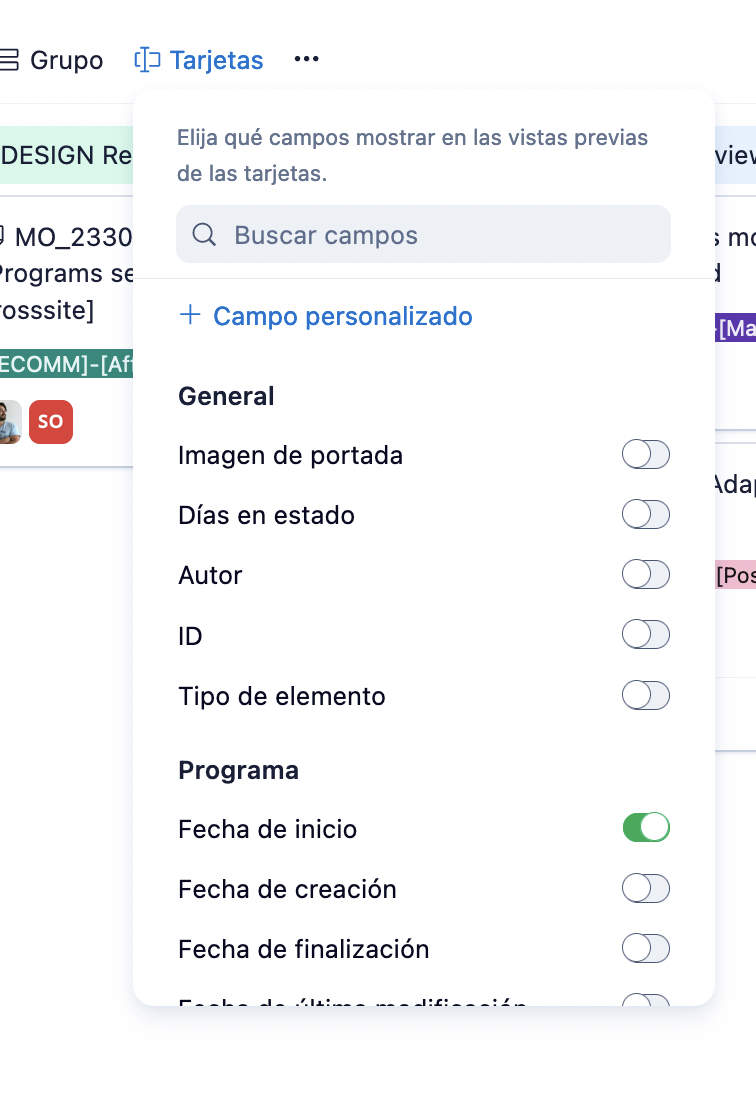
Inma Bermejoyous, you are correct, thank you, i found out it moved there just after commenting. so all is good ;-)