[Status: Backburner ⌛️] Set "Required" custom fields

Currently a user can create a custom field for their projects and tasks.
It would help if, there was a way to set these custom fields as required.
And, if the problem is because the fields are specific to the user, then I would like the ability to make custom global fields that are required.
It's the missing ingredient in custom fields. They're useful for one person. but human nature means they might not get filled out, unless forced.
Maybe there's already a way, or already a suggestion for this
This is a weekly discussion for us. Required fields are a must for our sales and executive teams to get the information they need for accurate data analysis that informs decisions! Would very much appreciate this one!!!
Thank you for taking the time to share your feedback, Samia O'Bryan. As mentioned earlier, it's currently not in the product roadmap for the year. But we will definitely keep you in the loop if there are any updates. 😊
Basudha Sakshyarika Community Team at Wrike Wrike Product Manager Become a Wrike expert with Wrike Discover
Basudha Sakshyarika Wrike Team member Become a Wrike expert with Wrike Discover
I also have a need for "required" fields.
BUMP
Casey Teague and Kristof Vasselon, thank you for your comments and feedback. We’ll keep you informed about any future changes regarding this suggestion 👍
Rohan V Community Team at Wrike Wrike Product Manager Become a Wrike expert with Wrike Discover
Rohan V Wrike Team member Become a Wrike expert with Wrike Discover
Still need this
Hope to see this soon
Hi Julie Plonski, Filip Senjak 👋 thanks for backing this feedback, We'll keep you posted if there are any further updates in the coming months 👍
Rohan V Community Team at Wrike Wrike Product Manager Become a Wrike expert with Wrike Discover
Rohan V Wrike Team member Become a Wrike expert with Wrike Discover
Hi all!
Would like to know when this functionality will be available. Seems like a very basic functionality and should not be very hard to implement...
Same goes for parent values in sub projects - tasks...
Thanks!
Sari
Hi Sari Bijkerk! Thank you for checking in. We don't have an update to share at the moment, but we will keep you posted on any developments. 👍🏽
Basudha Sakshyarika Community Team at Wrike Wrike Product Manager Become a Wrike expert with Wrike Discover
Basudha Sakshyarika Wrike Team member Become a Wrike expert with Wrike Discover
Hi!
Any updates on this post?
Hi! Pietro Poli, I have contacted the responsible team, but there are no new updates at this time. We will make sure to keep this thread updated if there are any developments 👍
Rohan V Community Team at Wrike Wrike Product Manager Become a Wrike expert with Wrike Discover
Rohan V Wrike Team member Become a Wrike expert with Wrike Discover
This request is dragging on since 2017, still not on the roadmap for development. Does the Wrike development team that only 1 in possibly 1000 users actually speak up and bother to engage in these user forums. By ignoring our requests, Wrike furthers the case for us to look at other solutions.
Our teams have been waiting since 2017 - we have deployed many work-arounds since but not ideal. Many of our other BU's and Dept's have went to other task mgmt solutions due to this limitation among others. Hope its on the roadmap soon.
New to Wrike. Would also like to see an easy to implement way of making fields required on the custom items. I have combined custom workflows and automation rules to achieve a level of enforcement, but it would be nice to not require so much effort. In case anyone is interested here is what I did to get some enforcement of field completion.
Create a custom item
I created a custom project-based item. I added the applicable custom fields and created any missing custom fields. The ones I wanted to be required I marked with an * (I added this as a visual reminder to myself for when I was creating automation rules – the * can be removed at the end or left as is).
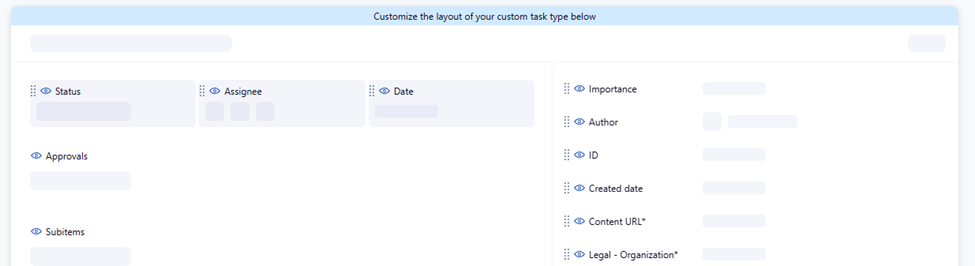
Create a custom workflow
When I first started working in Wrike I thought custom workflows was just for adding specific wording, but unlocking the potential here is what was a game changer for me. I created a special workflow for this custom item, added layers to the Active category. “Needs Information” under Deferred is key. I set the color for this to be red.
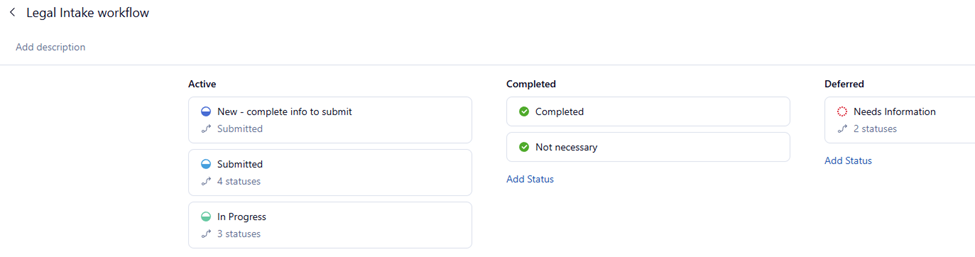
Create automation rules for the custom item based on the specific status
Here’s where enforcement comes in.
Create a couple of automation rules to enforce field entry (I’ll use Content URL* for this example). Open the custom item itself in edit mode, on the left navigation at the bottom of the list click on Manage automation rules. Click on create rule (if none exist) or click on +New rule to open the new automation rule wizard.
The ‘apply rule to’ should automatically be set to your custom item. Click on ‘When this happens…’ and pick ‘Status changes to’. The default workflow appears, click on +Workflow to pick your custom workflow.
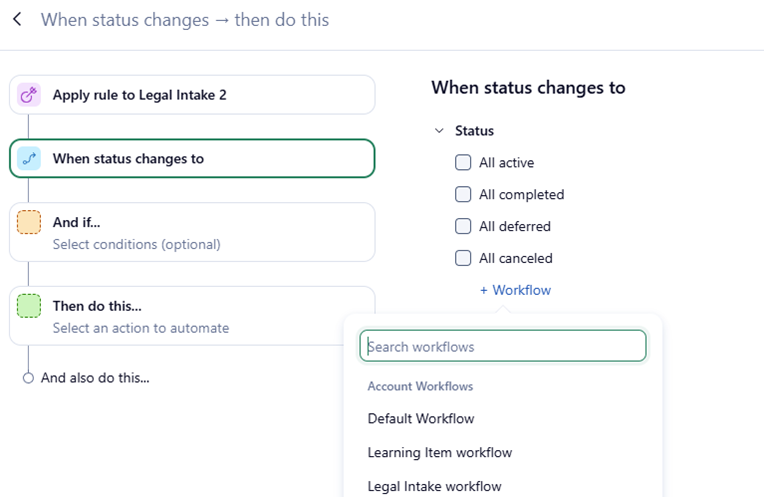
Select the status that would represent all the required fields are completed, in my example it is Submitted.
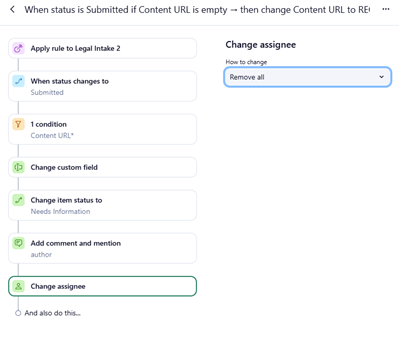
Then click on ‘And if…’ to set your conditions and what you want to happen. Here is where enforcement comes into play.
In this example, I’m looking for a trigger when ‘Content URL*’ is empty.
If these conditions are present, then I change that same custom field to display ‘REQUIRED’ and I set the item status to ‘Needs Information’, I remove all assignees and I have a message sent to the author alerting them to the missing information giving the extra direction to look for ‘REQUIRED’. For text box fields you can just type this in here. For single select or multi-select fields ‘REQUIRED’ needs to be an added choice option. For dates/numbers, I set those to be marked red if empty.
To prevent submissions with REQUIRED as the response. I created another automation rule like the above example, except instead of looking for ‘is empty’, I looked for ‘is exactly’ (in the case of text boxes) REQUIRED or simply looked for REQUIRED for single/multi-select fields. I dropped the ‘Change custom field’ step but continued the same with the rest. NOTE: the automation rules uses AND logic. Without the OR option, you have to create a set of rules for each required field. Depending on the number of required fields, you may end up with many automation rules. I used ‘duplicate’ while creating the rules I needed and kept mindful of adjusting the rule name.
In the end, the custom item winds up not advancing to the next workflow stage until the fields you write automation rules for are satisfied. I hope this helps people.
We have a large team that uses Wrike. We are Enterprise-level customers. We decided in August that we will not renew our contract with the company because of this lack of a feature and literally this alone. We've used Wrike for 8 years but the pain of not having required fields requires us to spend too much time and money cleaning up our data. Therefore, we spent the fall comparison shopping and were surprised to learn how just about all project management software allows one to create required fields. It's quite stunning that Wrike cannot see how important this feature is. When we spoke with a Jira salesperson in October and she said that it's come up "hundreds of times" over the years. One can only imagine the lost potential sales from large clients like us over this issue.
Wrike thought that making fields required in a form would suffice but this shows just how detached they are from how most companies work. Do you really think all clients want to submit a form every time they have a project or an update? That's terrible customer service, particularly with one's largest clients. 50% of our projects are therefore entered in by hand by our 30+ employees. No matter how many times we tell our employees that certain fields are required, there are still frequent errors. Almost everything else is great about Wrike but this has become a deal breaker for us. We will have to migrate over 90,000 tasks and it will be arduous but after 3 years trying to create workarounds and failing we know it's time to leave.
Nick Swisher Thank You for sharing your experience. We too have been using many workarounds due to this restriction of having required fields or views that cannot be frozen by the admin [ using reports does not work as well ] . Would you mind sharing what platform you are migrating to? sv -
Wrike is a capable project management tool and has served us reasonably well in several areas. That said, it does have limitations, particularly around some basic and expected functionalities, beyond just missing required fields.
We have shared this feedback with the Wrike team multiple times. However, their standard approach is to consider enhancements based on customer voting, with no guaranteed commitment to implementation. As a result, certain capabilities that are important for our operations may not be prioritized, even when they are widely needed from a process standpoint.
We also rely significantly on Wrike’s automation features. While they work in some scenarios, the automation rules are primarily designed around manual triggers, which limits their effectiveness for system-driven workflows where projects need to be triggered automatically at multiple stages.
Additionally, Wrike currently has limited audit and reporting visibility-for example, tracking who made date changes in reports or dashboards—which makes governance and troubleshooting more challenging.