[Not planned (Released in Wrike Labs)] Due date-time

I want to be able to define a due time for tasks, not just due date. There are specific , time sensitive, tasks that need to be delivered on a specific time during the day. At the moment we need to enter this information at the task title which is not ideal.
Also using the "duration" doesn't work because the team then needs to agree on a convention i.e. 4 hours of duration means 1pm . And what about 9pm? How would we indicate that?
Hey there,
I'm here as well hoping to find a solution. I was unaware this wasn't possible when signing up my org for Wrike. It seems like a no-brainer, especially for creative services teams. Design work has multiple stages, deadlines, and milestones that shouldn't require another subtask or ticket to implement. We also shouldn't need to create a 'project' anytime an asset has multiple review stages in a production cycle. Having multiple tickets surrounding the same asset creates fragmentation of information.
The ticketing interface works and it's great but we need to be able to set multiple deadlines within the same ticket. Although I overall like Wrike, it tends to over complicates basic project management. It just needs simplification.
Love to help and support this feature implementation because it's crucial to our success.
Hello Murad Peret, welcome to the Community!
Thank you for your feedback, our Product team is currently looking for interviewees for their research on ways to support time indication in Wrike. If you're interested you can find out more about it here.
Any update on when this feature is coming? thanks
Hey Jonny Van Dyck 👋 The research continues; we'll let you know when there's an update 👍
Lisa Community Team at Wrike Wrike Product Manager Become a Wrike expert with Wrike Discover
Lisa Wrike Team member Become a Wrike expert with Wrike Discover
Hoping this time feature gets added soon. We would like to integrate our social calendar with the rest of our team and this is the big thing that's currently holding us back.
If you are still collecting use cases - here's ours: we would like to be able to create schedules to share with our customers that shows what we will be doing at specific times throughout the day. The current 8 increments in the daily view are not sufficient.
Our deadlines and project time scales are usually measured in hours, not days. Thanks for making this happen as soon as possible.
Thank you for your continued feedback and use case sharing here, everyone!
Lisa Community Team at Wrike Wrike Product Manager Become a Wrike expert with Wrike Discover
Lisa Wrike Team member Become a Wrike expert with Wrike Discover
Ideally whether there is a due time for a task or an approval in Wrike that would be fantastic - the option to display the time on dashboards or to-do lists, etc - would also be critical!
Thank you for adding your feedback here Sherrie Besecker 🙌
Lisa Community Team at Wrike Wrike Product Manager Become a Wrike expert with Wrike Discover
Lisa Wrike Team member Become a Wrike expert with Wrike Discover
Hey everyone! I'm very very excited to announce that due time support has been released in Wrike Labs today 🥳🥳🥳
Thank you so much for all your feedback and voting here 🤗 Please find more detail in this post and let us know your feedback!
Lisa Community Team at Wrike Wrike Product Manager Become a Wrike expert with Wrike Discover
Lisa Wrike Team member Become a Wrike expert with Wrike Discover
A agree with the group, the ability to schedule a reminder before the task expires would be awsome
Hi Danick Vanier, welcome to the Community 👋
Can you please let me know if the recent release of due time support in date fields that is available to be enabled in Wrike Labs?
Our Automation Engine also supports this field, so you can get notifications when a task is overdue or a task’s due time is approaching. For that, use the date-time custom field to create an automated alert via Wrike’s Automation Engine.
Could you please check this out and let me know if that helps?
Lisa Community Team at Wrike Wrike Product Manager Become a Wrike expert with Wrike Discover
Lisa Wrike Team member Become a Wrike expert with Wrike Discover
I see that the adding in a time due date has been added to the custom fields options, but has it been added to the main due date area? Screenshot below.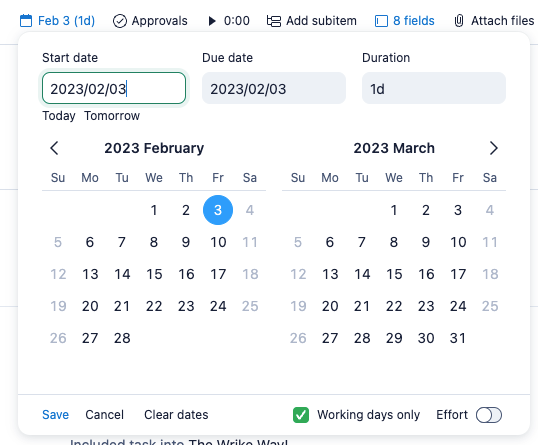
Hey Amber Walthall, thank you for reaching out! You're correct, it's only possible for date-type custom fields at the moment, not the system fields.
Lisa Community Team at Wrike Wrike Product Manager Become a Wrike expert with Wrike Discover
Lisa Wrike Team member Become a Wrike expert with Wrike Discover
Is there any plan to add time stamps in the date system field?
Not at the moment Amber Walthall, but I'll send your feedback to our Product team 👍
Lisa Community Team at Wrike Wrike Product Manager Become a Wrike expert with Wrike Discover
Lisa Wrike Team member Become a Wrike expert with Wrike Discover
Yes please to be able to specify a time for a task would be very benefical, not just date. thanks!
Thank you for supporting here Nina Skantz 🙌
Lisa Community Team at Wrike Wrike Product Manager Become a Wrike expert with Wrike Discover
Lisa Wrike Team member Become a Wrike expert with Wrike Discover
Wondering if their is an update on this feature as of yet? This would be a beautiful options for when we create a meeting notes task, and have to-do's that are relevant to the project but are not necessarily an assigned task. It would be great to be able to set a reminder for myself for instance to follow up with the vendor if we haven't received the item as of yet. Outlook reminders only get me so far as I need to be able to pull it from dashboard or reports as it's more efficient. So I'm looking forward to this being added to Wrike.
Team so after I posted this I had an idea....you could create an automation for this. It's not perfect and couldn't be specific to each task, but you could create an automation for any tasks assigned to a specific folder or space and tell it to remind you within a day via comment or status change etc. Their are a lot of options. This is a great workaround in the meantime.
Example:
Automation (I want it to tell me per this to-do list task from a meeting I have, is 1 day before its due date so I can check in with the vendor to confirm we're receiving it on the correct date)
- Apply to task (selected a folder)
-When due date is within 1 day
-Add a comment (have it send me a notification in Wrike to checkin with the vendor).
--- Then I'm going to make an additional automation to tell me day of as a quality check on myself and the vendor.
Hi Aimee Reistad, thanks a lot for sharing your feedback and also for sharing this workaround!
We don't currently have an update to share in relation to reminders (other than the functionality that has been released to Labs), but we keep a close eye here and continue passing your feedback to our Product team.
Lisa Community Team at Wrike Wrike Product Manager Become a Wrike expert with Wrike Discover
Lisa Wrike Team member Become a Wrike expert with Wrike Discover
I wanted to add if there are any plans to add time into the system date fields? The custom field date / time is only useful for reference but we end up not using it because any system related support such as automation, dependency, etc. does not work with the custom field date/time. I would like to see meeting date/ time so that we can fully work on Wrike to share project timeline/ meeting information.
Hi Sarah Jo, thank you for your comment. I'm afraid that at the moment, the Product Team has not been able to prioritize this suggestion, and it is not included in the current roadmap. I understand this is not the news you were expecting. However, we value your feedback and will continue to pass all your comments on to our relevant team.
Rest assured, if the situation changes, we will certainly keep you posted in this thread about any improvements.
If there's anything else we can assist you with, please don't hesitate 👍
@... Its a basic fundamental feature that it needs to exist I mean even smaller vendors like Getflow has it which helps in so many ways.
In the marketing and communication space requests at times need to be created at a rapid pace especially creating 24hrs offerings and such. @... I agree with Liridon Berisha that most project management systems such as Asana, Basecamp, and Workfront can provide the setting of tasks in hourly intervals. In this day and age, projects are required to be completed quickly some within hours versus days.
Hi Liridon Berisha, thank you for sharing your feedback with us. I understand this feature would be highly appreciated by your team, and I've shared your comment with our Product Team.
Welcome to the Community, Shamika Satterthwaite. Thank you for chiming in and for supporting Liridon's suggestion 👍
I am thinking this request falls into this category, but is there a way to add a start time to certain tasks? I have jobs that we do every month at the same time and it would nice to just be able to add these to my blueprints and not have separate calendar reminders.
Welcome, Hannah LaBar! Great to see you here in the community! 🎉
To add a start time, you can create a date-type custom field, which allows you to enter the time for each item. This will help keep a record of the time associated with each task. 👇🏼
Alternatively, you can include the time in the item name, such as 'Meeting [9:30 AM],' to ensure it is visible and considered when viewing the task. Please feel free to share your thoughts! 👍🏽
Basudha Sakshyarika Community Team at Wrike Wrike Product Manager Become a Wrike expert with Wrike Discover
Basudha Sakshyarika Wrike Team member Become a Wrike expert with Wrike Discover
Basudha Sakshyarika Thanks for your feedback! Unfortunately, at least for my team, this doesn't really solve the problem though since custom date fields can't be added to calendar view.