Filtering in Table View vs creating custom filters

I'd like to be able to have a feature in table view to filter right off the table itself (similar to excel, where it pulls up selection of items in that column that you can filter to) as opposed to having to manually create individual filters every time I need to splice and dice the data. Is that functionality already available in some other view that I'm not familiar with?
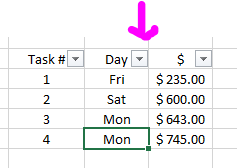
Hi Dana Pelz, thanks for posting, at the moment, I'm afraid not. I've passed on your feedback to our Product team 👍🏼
I would also very much like to have this filter option in columns in the table view. Has this been looked into?
Hi Eva BEQUÉ, welcome to the forums 👋
It's possible to create a custom table view and save all filters as default for this view. You'll then be able to use this view with set filters. Is that what you're looking for?
Lisa Community Team at Wrike Wrike Product Manager Werde ein Wrike-Experte mit Wrike Discover
Lisa Wrike Team member Werde ein Wrike-Experte mit Wrike Discover
Hi Lisa, yes this works. Thank you for the feedback!
Great to hear Eva BEQUÉ 🙂 Let me know if you need help with anything else!
Lisa Community Team at Wrike Wrike Product Manager Werde ein Wrike-Experte mit Wrike Discover
Lisa Wrike Team member Werde ein Wrike-Experte mit Wrike Discover
Dear Lisa,
I added the custom filters, but Wrike doesn't save these. I have to manually add them every time. Am I missing something here?
Hi Eva BEQUÉ, may I kindly ask you to let us know the steps you're following? Also, please feel free to check this Help Center that you might find helpful 👍
Looking forward to your reply!
Dear Juan,
If I add a custom field to filter tasks, for example the country filter below, Wrike doesn't keep this custom filter field in the filter pane once you have closed and opened it again. You can only save presets of a certain filtered result.
Hi Eva BEQUÉ, after setting the custom field value as a filer, have you clicked on the option Save preset?
If you have but the preset is not available for you after you close the view, may I kindly ask you to let us know the steps you're following so we can better understand your case?
Thank you!