There is no plus sign to the left of a task to open a subtask in the table view.

Permanently deleted user
You will see a plus sign to the left of a task (if it has subtasks). Click the plus sign to see that task’s subtasks or click the minus sign to the left of a task’s name to hide the task’s subtasks. If subtasks have their own set of subtasks you will see these same icons appear next to the parent subtask.
I do not have any plus icon to open the subtasks in the table view.
Can someone help, how I can activate the plus sign?
https://help.wrike.com/hc/en-us/articles/210323245-Subtasks
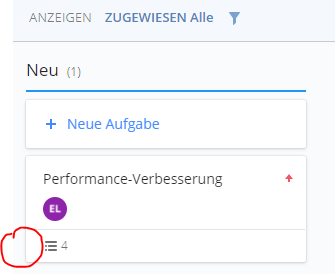
It looks like you are viewing this in a Dashboard, can you see the plus sign when looking at this in List View?
Hi Ryan,
my screenshot is from the Board View.
I have the plus sign in the List View, but I would prefer to check the tasks and subtasks in the Board View.
Is this a bug in my account or do you also not have the plus sign in the Board View?
Ahh, I see. I am not much of a board user myself. It looks like you can create tasks at the top of each status, but it is a quick add. You would still need to open the task and put in the details (assignee, date, etc.). From what I understand about the Board view, that the strength of this view is to view tasks based on status' with the ability to simply drag and drop tasks from one status to another. It is more a less a quick view of what is going on inside a project or folder. The quickest way that I know how to add subtasks quickly is inside the list view. Hopefully, someone else can give some insight into this as well.
Hi Eduard, there is no plus sign to add subtasks in Board View.
The quote you're referring to above is from the subtasks knowledge page, however, it refers to the Table View. Maybe give the Table View a look and see if this view better meets your needs 👍