Conditional markers for only one type of data?

Is it possible to set conditional markers in table view for only one type of data?
For instance, I have a folder containing projects, tasks, and subtasks. Some of our columns pertain to only one type - for instance, tasks have budget data but projects and subtasks don't. Therefore, our custom budget columns are blank in all the project and subtask rows, by design.
These are the conditional markers I would like to set for the task-level data only:
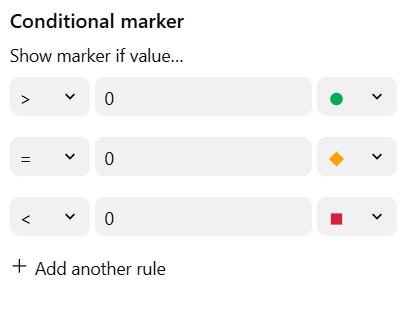
But based on that logic, it of course applies the yellow icon to any empty fields (even our project and sub-task fields that do not have budget data entered).
So, is there any way to make the conditional markers only apply to one type of data (in this case, tasks but not projects or subtasks)? Thanks.
I believe a solution would be to create custom items and add this custom field only to the respective item:
For example:
I created a custom item and added the "budget" field to its fields. This way, every item of this type will have this field by default. For the other items where you don't want this field, simply don't include it.
https://help.wrike.com/hc/pt-br/articles/7777057104663-Como-criar-tipos-de-item-personalizado
Thank you Felipe!