Wrike & Workato

Hi everyone!
I am working on an integration recipe in Workato through which I want to add a comment and mentioning specific user when the task status changes. My problem is that don't know how to write a comment in Workato that triggers @NAME in Wrike comment. I have already tried the formatting below:
- Hey <@user_ID>, can you please review this?
- <a class="stream-user-id" rel="zwXnPb8zrV6l">@User Name</a> hey !
I would highly appreciate it if someone can help on this.
Hi Nojan Moniri,
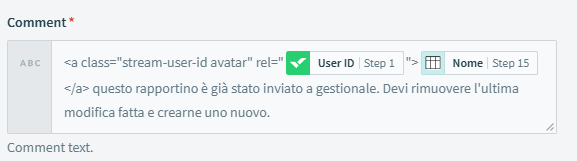
you have to populate both values in rel= "" and @User Name.
I'll show you an example in one of my recipes
Of course the value zwXnPb8zrV6l is the user ID, one of mine is: KX7XP4PT that you can retrieve from the List User call in Workato.

Than @User Name you can add firstname and / or lastname or whatevere you want, like "Hey"
here another my comment
Let me know if you need something else =)
Hi @Pietro!
Thank you very much for your help and useful information you shared with me on this.
By looking at your comment field values, I realized that I can make a lookup list for all users with their name and IDs. I can get the ID of user I want from my step 1 which is a custom field, and find the associated name with that ID from my lookup table and mention the name I want in the comments.
However, I have a tiny issue now.
This seems an infinite loop and the name keeps being mentioned in the comment. I apricate it if you have any ideas to fix this?