AI-Powered Productivity: New Updates for Automation, Request Forms, and Mobile Apps ⚡️
Destacada
TL;DR: New AI updates let you turn natural language requests into automation rules (Wrike Labs), generate draft request forms from a prompt, and get mobile Inbox summaries of Urgent and Important items. See below for more info.
Hey Community 👋
Big news! We’re rolling out new AI-powered updates across Automations, Request Forms, and Mobile apps to boost productivity, streamline workflows, and help your team move faster 🔥
You can now use natural language to create automation steps, build request forms faster with AI, and take advantage of new summary enhancements in the mobile apps. Read on for a quick overview of what’s new in each area and how to start using these updates today 🚀
1. Create Automations with AI (Wrike Labs Release)
Our AI Automation Assistant is now available in Wrike Labs 💯
Tell it what you want to automate, and it turns your request into a ready-to-use recipe, recommends the best-fit template and gathers the properties it needs, so you can launch automations faster! 🚀
What’s new?
- Leverages Wrike’s Automation engine to generate automation recipes from natural language.
- The AI instantly provides best-fit templates or builds tailored automation setups for you to review and finalize.
How to use it?
1. Open Automations, click + Rule / Create automation rule, then use the search bar to describe what you want to automate.
2. Based on your input, the AI suggests ready-made templates or creates new ones from your description.
- If a ready-made template is available, it will be suggested.
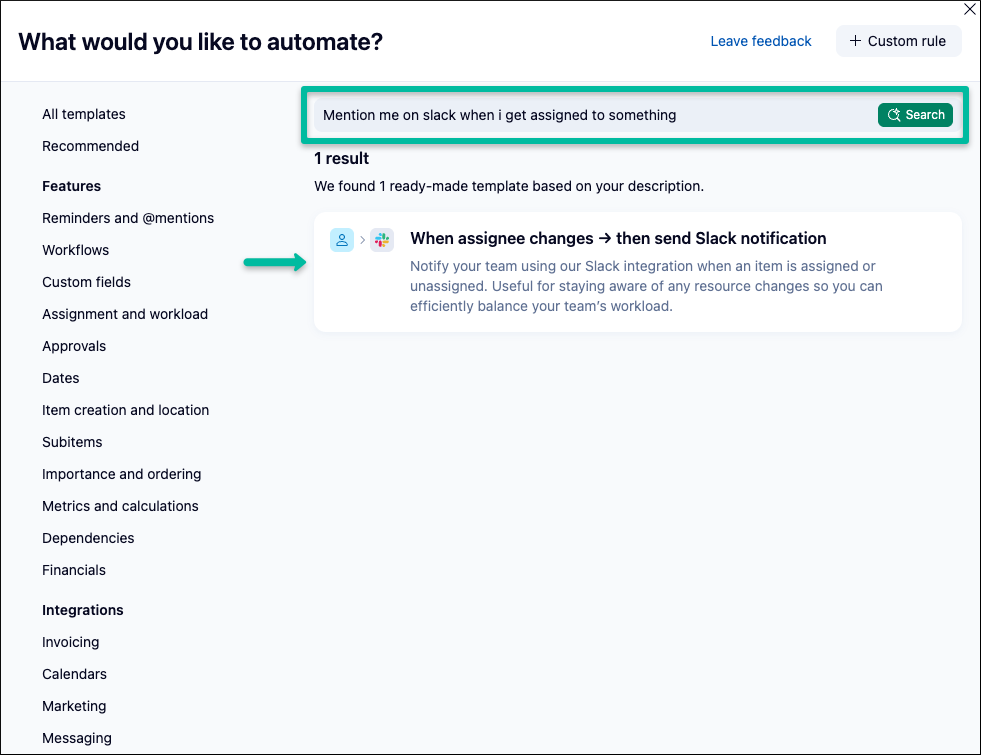
- If no template exists, the AI will generate it for you.
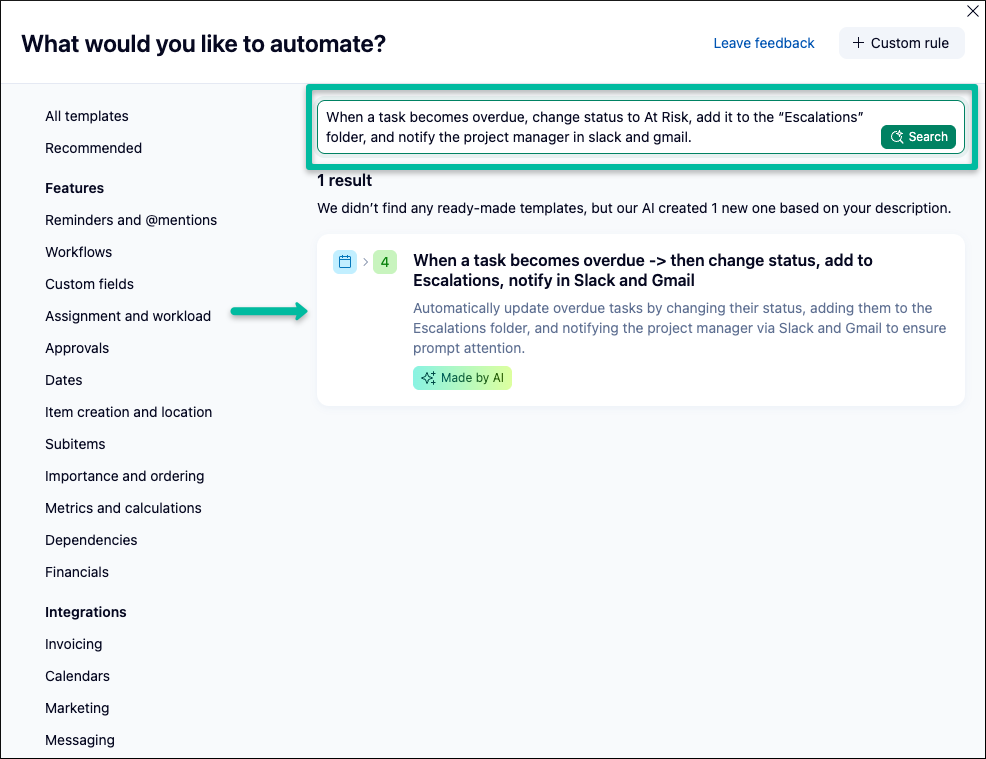
3. Click the suggested result to review the Trigger, Condition, and Actions. Make any necessary changes, then click Create.
Head over to Wrike Labs and enable the Work Intelligence preview bundle to use this feature 💯
2. Build Request Forms with AI
Use natural language to turn simple prompts into comprehensive draft request forms. Start with an AI-generated draft in the builder, then quickly refine, customize, and publish to meet your exact requirements ✔️
What’s new?
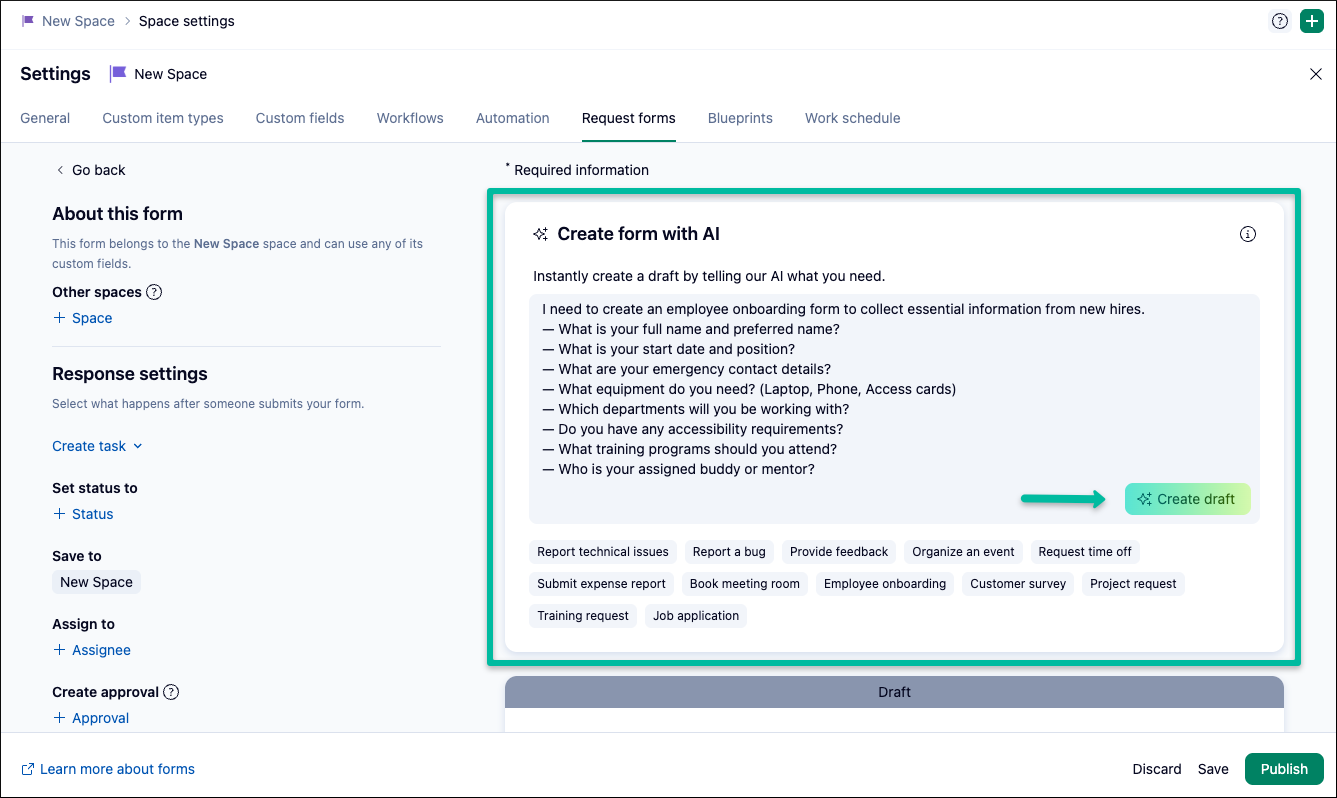
- New natural language prompt field in the Request Form builder that turns simple prompts into comprehensive draft forms.
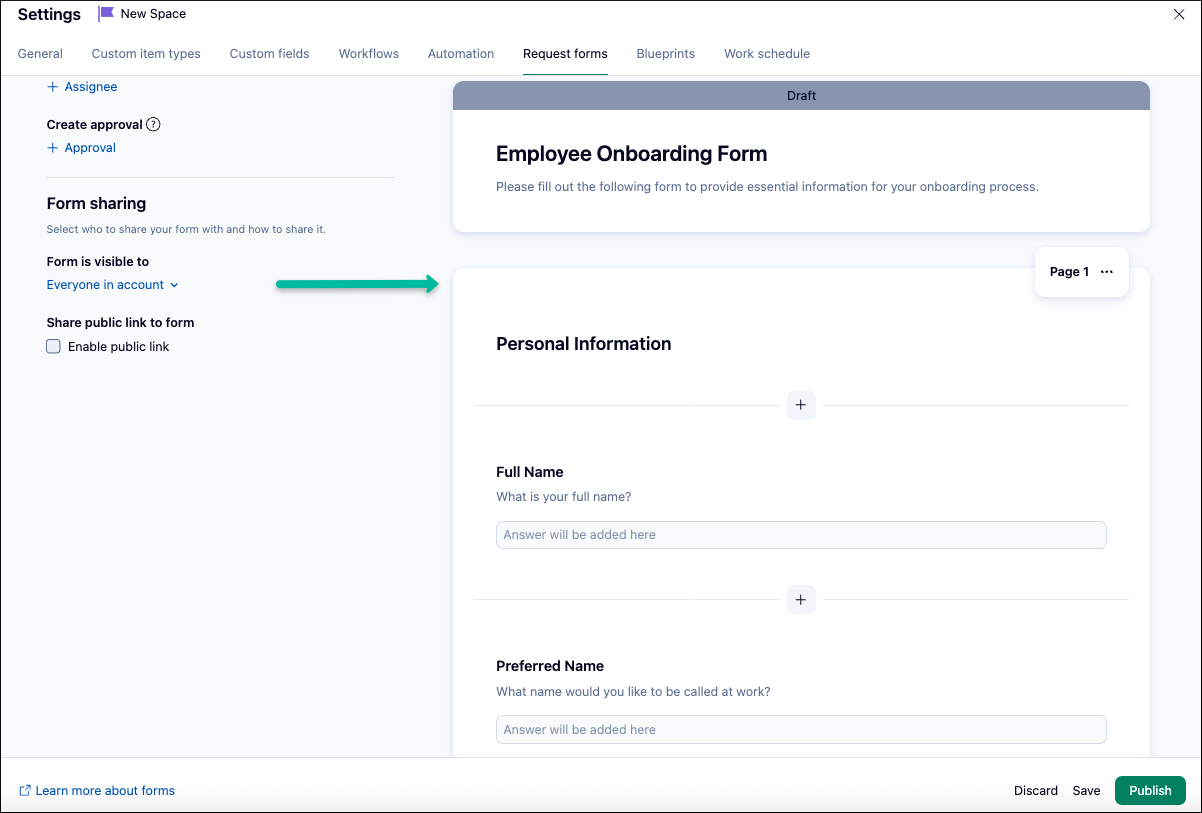
- Drafts stay in the builder for review and refinement before publishing.
- Faster, more accessible form creation for every team member, regardless of technical background.
How to use it?
1. In the Request Form builder, you’ll find a prompt field named Create form with AI. Use it to clearly describe what you want the AI to create, or use pre-suggested prompts such as Employee onboarding, Provide feedback, and click the Create draft button.
2. A draft will be generated that you can review and modify by adding or changing fields. Once you’re done, click Publish.
Learn more in our Help Center article.
👉 Tip: Be specific about your needs, such as the type of content, style, or key points you want included.
📌 Please Note: AI generation is available only for new request forms; previously created forms do not support this feature.
3. AI Priority Inbox for Mobile Apps
AI Priority Inbox helps you focus on what matters most by highlighting your key notifications with the power of AI. You’ll see urgent updates, recommended actions, and high-priority items at a glance, so you can review and take action right from your Inbox 📥
What’s New?
The summary uses Urgent and Important tags to help you spot critical updates quickly:
- Urgent tags mark tasks that need a decision to move forward, are blocking your workflow, or have overdue due dates.
- Important tags highlight tasks that need your input or feedback.
How to use it?
1. Open the Wrike app on your mobile device.
2. Tap the Inbox tab at the bottom of your screen.
3. Tap Prioritize your Inbox with AI at the top of your screen.
4. The AI will summarize your inbox notifications and organize your tasks under Urgent and Important tags.
5. From the settings page, users can choose the date range and the type of notifications (read or unread) they want to prioritize.

For more information, read our detailed article.
📌 Please note: Access to AI features requires Generative AI to be enabled in your settings. For more information or setup instructions, please see our Help Center article.
Give these features a try and let us know your thoughts and feedback in the comments below! 👇
Rohan V Community Team at Wrike Wrike Product Manager Conviértete en un experto de Wrike con Wrike Discover
Rohan V Wrike Team member Conviértete en un experto de Wrike con Wrike Discover
I'm very excited about all of the recent AI updates. I was wondering why the AI Cleanup feature for our inboxes is only available in the Mobile app though. Is there a reason it's not available on Desktop?
Hi Tiffany!
Thanks for your comment. It's nice to see you find value in our recent AI updates.
The AI Priority Inbox is something that we are refining based on user feedback.
Once we see a good level of usage and the feature as refined, we'll make a decision on making this available across Wrike.
I hope you would be willing to fill up a short survey to help us better understand your experience with the AI Priority Inbox.
Arpit Shekhar Community Team at Wrike Wrike Product Manager Conviértete en un experto de Wrike con Wrike Discover
Arpit Shekhar Wrike Team member Conviértete en un experto de Wrike con Wrike Discover