Color of absence in workload charts

Hi,
I am searching for a way to inv´crease the visibility of days off in the workload chart. Days off are standard marked as light grey (see screenshot for the week view with one day off). Unfortunately some people have problems to see this coloring as the background and the light grey are very similar and one day in a week is bery small. 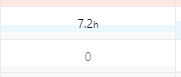
How can I change the colors to a higher contrast (e.g. a more black coloring or a completely other color)?
Hello Sven Passinger, thanks for posting! Currently, it's not possible to change the colors in Workload Charts. I've shared your feedback with our Product team and I'm moving your post as a suggestion to our Product Feedback forum so more members can contribute and upvote the idea.
Please let me know if you have any other questions 🙋🏻♀️
I would love this! Right now they don't even corelate to the status change, it's really frustrating.
Workload has become the primary view for our entire team ... it could use some UX improvements but the basic visualization and functionality is the best in wrike.
One simple improvement would be if the workload bar took on the task status color by default, but then you could customize that color for just that bar so it can stand out amongst others.
Hi Logan Schinbeckler 🙋♂️
Thank you for your honest feedback and for supporting this suggestion! At the moment, there are no updates that I can share, but I will ensure that your comment is forwarded to the responsible team. If there are any further developments, I’ll be sure to keep you posted 👍
Rohan V Community Team at Wrike Wrike Product Manager Become a Wrike expert with Wrike Discover
Rohan V Wrike Team member Become a Wrike expert with Wrike Discover