[Status: Launched 🚀] Add Actual Project Completion Date - Not Just the Date of Completion

Permanently deleted user
I want to see a measurable field with a project Start, Due, and Completion dates within the different views.
Currently, there is not a measurable way to view/report when a project was completed vs. when it was due. This impacts metrics as you'd want to see when a project actually started, when it was supposed to be completed, and the actual completion.
Hi Michael Kelley, thank you for reaching out!
We don't have an update at the moment, but this suggestion is now close to the 60 votes threshold, so we'll be adding a Product status here soon 👍
Lisa Community Team at Wrike Wrike Product Manager Become a Wrike expert with Wrike Discover
Lisa Wrike Team member Become a Wrike expert with Wrike Discover
Lisa Thank you for the update. Is there a delivered field that would allow up to pull the completion date of the project? Currently I am looking for this to use with the Automation Engine to move closed projects from one folder to another. Thanks again.
Hi Michael Kelley! Here's how you can set up an automation rule to move projects to a different location once completed:
Apply the rule to projects, set the trigger to "once the status changes to all completed" and the action to "Move item to". Is that what you were looking to do?
Lisa Community Team at Wrike Wrike Product Manager Become a Wrike expert with Wrike Discover
Lisa Wrike Team member Become a Wrike expert with Wrike Discover
Lisa,
That automation setup is cool, but for me, what I really want is the simple ability use the date a project is marked as complete in my dashboard widget and in the table views.
For example, I have a dashboard I use for meetings with managers showing them the status of projects (Active, In Review, On Hold, etc.) I want to be able to show recently Completed projects AND I want them to display in order of newest completed at the top (obviously).
I also have all of my completed projects in a folder called "Completed" where I would like to use the table view which lets me instantly sort via all of its columns of data, one of which should be that "completed" date showing when the project was actually completed (and as with all columns of data, it's nice to be able to sort by ascending or descending).
Not sure if this is what everyone else needs, but this would help me greatly.
Thanks.
Lisa I apologize. I didn't use the best example here. I believe this is actually two separate issues: 1). We too would like to see a Project Completed date field in Wrike as the OP requested. There is a completion date delivered field, however it only shows the completion date for tasks. Sean Bell's example above is better for this one. 2). Moving projects using Automation: The AI is not working for us as expected (tried this at Acct and Space Lvl). I also demo'ed this to our CSM and Sales contacts yesterday. Maddie was going to open a ticket on our behalf for this issue. Our rule is similar to yours - except we are saying 'When status doesn't change in 360 days', moving from and to a specific folder in the same Space, and only moving projects that belong to a particular Owner (for the moment until we have this working). I have tried both Add item to and Move item to. Neither rule is moving the projects. Thanks!
Hi Sean Bell Michael Kelley, currently it is possible to see the completed date of a project in the New Table View. Would you please confirm this is what you were looking for?
Michael, I've opened a ticket with our Support Team so that one of our agents can investigate this behavior 👍 You will be contacted very soon.
@... - That does work for me in table view. Awesome! is that a new ability with the Lightspeed update? That does not work though in dashboards. Will this ability be added as a function I can use in dashboard widgets? If not, having this in table view is a win for me nonetheless! Thank you.
@... Thank you! I can see the project's completed date in New Table View. Do you know if there is a plan to implement that on other views (including dashboards), along with the Project Detail page, where it would be useful to have it in the top section, along with Created Date. We can see it in the history of comments, but would be helpful to have in the top section. Thanks again!
Hi folks, just jumping in for Juan here 🙂 Thank you for your feedback, I'll share it with the team. At the moment, we don't have an update on whether this will become possible in other views, but we'll let you know if we have news on that in the future!
Lisa Community Team at Wrike Wrike Product Manager Become a Wrike expert with Wrike Discover
Lisa Wrike Team member Become a Wrike expert with Wrike Discover
Hi All, the project start and completed date used to be visible/editable in "project view"! It is no longer viewable with lightspeed "item view" thus I am unsure where it is possible to enter data for this field. Where can I edit project completion date in lightspeed?
Hi Carmen Lea, thank you for your comment. You can edit the start and due date by accessing the "Date" field:
The "Completed date" system field cannot be edited by design - no changes have been implemented to this feature: it was not possible to change this information before.
If you have any additional questions, please let us know 👍
Hi Juan,
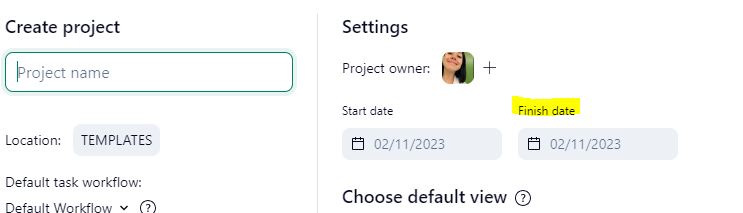

Thank you for your reply. Project finish date was previously an editable field in project view. Additionally, when adding projects in Lightspeed, there is still the option to assign a project owner, start and finish date, even though these now seem to be legacy fields.
Our company uses the finish date field to differentiate between due date and completed date. We need this field to remain editable, as the actual project completion date may not be the date that the assignee updates the Wrike task.
Hi Carmen Lea, thank you for your reply. Sorry for the confusion: the date you'd like to edit is the due date/finish date, correct? And you'd like to see the completed date also displayed?
Looking forward to your reply, thank you!