[Status: Launched 🚀] Add subtasks to the Board View

Right now only parent tasks are visible in the Board View. It would be really great if we could see all the subtasks too. Probably a new advanced filter would do the trick, so that a user could switch between displaying only up level tasks or all tasks including subtasks. It will definitely help in managing complicated goals.
I have look at the new view as well and I will agree with Bo Samreth here. The whole point of this feature was to be able to manage sub-task in a way that is easy to drag-drop them between statuses without being forced to expand everytime the main task.
Forcing the sub-task to stay glued to the main task makes the board really hard to use on a daily basis when the team has multiple members and they all work on sub-task of a bigger main task.
The way sub-task are managed right now makes them hard to be useful in an agile team where team members pick their task for the day.
Hi Alexandre Binet, welcome to the Community, and thank you for sharing your feedback. I'm passing it on to our team👍🏼
I'll echo the same complaint, although I do have a workaround that might be manageable (depending on how many subtasks you have).
–
By default, a subtask's project/folder is sort of "greyed out", which is the reason it doesn't show up on the board view as a regular task.
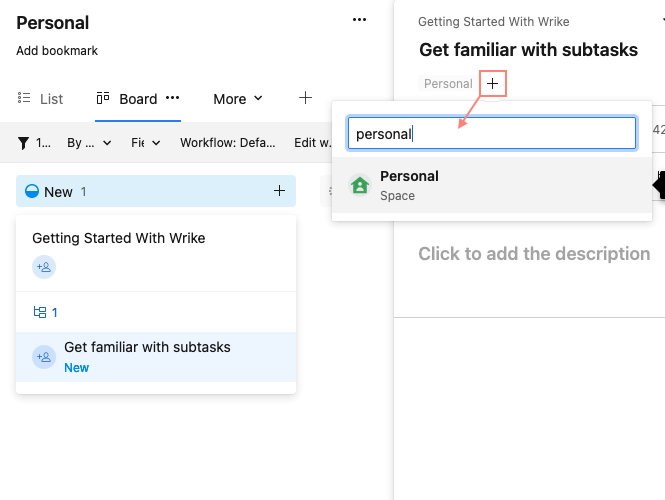
I can manually go to each subtask and use the "+" icon (under the title) to "Add to project, folder, or space". If I manually add the subtask to the same project/folder, then it is no longer greyed out and it will show on the board view as a regular task. It will also still show in the parent task's collapsible subtask list.
That can be a fairly tedious job if you have many subtasks and can't be easily toggled, which is important to maintain the granular control of task visibility that Wrike does so well. With that said, it has been a passable workaround for our team, so I thought it was worth sharing.
–
– –
–
I can't seem to understand why this isn't a priority for Wrike to update since this has been an issue since at least 2018, AND there is 5 pages of people saying the same thing, yet nothing seems to move forward with this. When can we expect to have something usable, where one can move subtasks to the different stages in this view, and stay attached to their parent task in other views?
I echo the sentiments of everyone else. I am also using the manual workaround to tag sub tasks and it is tedious and open to human error. That said, sometimes on the new board view, the ability to see the summary tasks and subtasks nested is helpful. I wish there was a way to toggle so you could see summary tasks or toggle to see all subtasks on the board. As others have stated, not having the ability to drag and drop task status at the sub-task level sort of defeats the purpose of using board view. We are getting around it with manual tagging but that is not a scalable solution. Please invest in this update.
Hi Travis, Renee, and Robyn, thank you all for sharing your feedback and thoughts here.
We’d love to be able to implement all of the suggestions that our customers share with us, but we have to prioritize certain requests over others based on various factors and considerations at the time. The Product team has built the New Board View which has just been released in Labs. The team is very eager for your thoughts and opinions as they continue enhancing the Board View, so please be rest assured that your feedback is passed on.
What's the ETA for this feature?
Without this subtasks are useless. When will this be available?
Hi Shane Powell and Chris Gaskett, may I ask if you have tried our new Board View? You can find how to enable it here: https://help.wrike.com/hc/en-us/community/posts/8578860032023--Wrike-Labs-Release-Wrike-Drop-New-Table-Board-and-Calendar-View-now-in-Labs-
The thing with sub-tasks is that I need to be able to manage from a main task, but then assign sub-tasks to users who can use the boards to manage their execution. This to me is the crux of task-sub-task management across teams.
@Cansu thank you for responding. I have the view with the collapsible subtasks as shown in your image. I didn't realise that was fairly recent. I was expecting that the subtasks would be shown on the board to match their status. For example, if a subtask is completed I should see it in the Completed column on the board, whereas the parent task would be "In Progress" That's the only way I've seen issue tracking/Kanban boards done. At the moment every subtask ends up in the "In Progress" column and it looks like nothing is being done.
Hi Shane Powell and Chris Gaskett, thank you for clarifying the feedback here, I'll pass it on to the team. The new Board View is still a developing feature under Wrike Labs so the team is collecting as many use cases and feedback as possible.
Cansu.... I just noticed that Clickup does this fairly well.... an option in the view to "Expand sub-tasks".
Hi Shane Powell, hope it's OK I'm jumping in here 🙂 Could you please let me know if you've tried using the New Board View where subtasks are available?
Lisa Community Team at Wrike Wrike Product Manager Become a Wrike expert with Wrike Discover
Lisa Wrike Team member Become a Wrike expert with Wrike Discover
Hi Lisa, yes... I played with the show sub tasks feature but it doesn't allow me to have multiple sub tasks in different lanes on different dates assigned to different people. This functionality helps manage a group of related tasks across the team.
Got it, thanks a lot for clarifying Shane Powell!
Lisa Community Team at Wrike Wrike Product Manager Become a Wrike expert with Wrike Discover
Lisa Wrike Team member Become a Wrike expert with Wrike Discover
Hi, it would be great to manage subtasks in different lanes. We are really missing that feature. The subtask should stay in the main task as well. But it should be able to "break out" to get mangaged in differenz lanes.
THX
Thank you for your feedback Thomas Pühringer 131!
Lisa Community Team at Wrike Wrike Product Manager Become a Wrike expert with Wrike Discover
Lisa Wrike Team member Become a Wrike expert with Wrike Discover
Please Lisa, make sure that this feature becomes a priority for the design team. This is a key feature for the workflows of many users. Thank you.
Hi Gianvito Fanelli, welcome to the forums 👋
Could you please let me know if you've tried using our new Board View? It has the ability to show subtasks on it 🙂
Lisa Community Team at Wrike Wrike Product Manager Become a Wrike expert with Wrike Discover
Lisa Wrike Team member Become a Wrike expert with Wrike Discover
Yes, Lisa, but subtask are nested into the main task, while I need to visualize them independently if they are on different lanes
I agree 100% with what Gianvito is saying. Yes the subtasks are shown, but what is needed is for people to be able to move those subtasks around on the board separate from their parent task
I have a similar pain point with the subtasks. I used to get around it by manually tagging the subtasks to the board which would allow me to move them in their individual lanes. The manual workaround was time-consuming and left a lot of room for error. Recently I worked with my CSM who gave me an automation idea that has worked much better for me - as we have a unique use case.
I have 6 resources that I have created a Master project for all of their quarterly work. It's "their name Commits" and the default view is the new board view.
I created a custom field that is a single-select called "custom tagging" and the options are each of the 6 resources names. I created an automation that when that field is populated, add item to (that resources commits board). The automation had to be set up separately, one rule for each resource. Then I use the original table view, show the "custom tagging" field and drag the appropriate entries down. It took me less than 5 minutes to set this up with all of the automation and I used it for our beginning of quarter assignments - in a minute 90 automation had run to tag the tasks to the appropriate boards. It is a huge time saver for me.I know our use case is unique so not sure if it would be helpful to anyone else but wanted to share just in case.
Thanks a lot for your feedback folks, I'll make sure our Product team hears it 👍
Robyn Jackson Special thanks for sharing that workaround! 🙌
Lisa Community Team at Wrike Wrike Product Manager Become a Wrike expert with Wrike Discover
Lisa Wrike Team member Become a Wrike expert with Wrike Discover
Do we know when ?
Add subtasks to the Board View
PINNED
Hi Gregory Metzger, welcome to the Community, it's great to have you here 🙂
QQ - Have you tried using our new Board View? It has the ability to show subtasks on it. If this is not what you're looking for let me know and we'll be happy to assist further 👍
Elaine Community Team at Wrike Wrike Product Manager Become a Wrike expert with Wrike Discover
Elaine Wrike Team member Become a Wrike expert with Wrike Discover
Hey y'all - if you read through the use case son this forum it's painfully obvious that the new board view doesn't solve the problem everyone is seeking to solve. Here is an exmaple:
I have a task called "Create Validation Processes for THING". There are 5 subtasks, each is a seperate specific validation build and each must go throught review.
Current state, as they move to review there is no way for a reviewr to go to the board view and see a list of the subtasks in that status. Meaning we either cannot group the main tasks into reviewable isubtasks or must wait and review the whole batch of subtasks at once.
Or build a weird manual work around.
Thanks for the update here. If you've ever worked on a Scrum team, or in many Agile environments, being able to organize tasks/cards under a grouping, in a board view is critical. It doesn't matter if you use Projects/Tasks, or Folders/Tasks, or Tasks/Subtasks - but if the board view doesn't allow easy grouping of tasks within a 'feature' or 'story' in some visual way, that can easily be added-to, edited, or updated, then it won't work well.