How do you delete Custom Fields

Permanently deleted user
I have multiple columns that I would like to delete but when I try to delete them that option is grayed out.
Any suggestions on how to make the delete column button work?
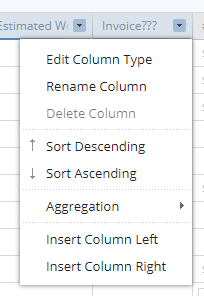
Hi Rachelle, great question for your first post on the forums! One quick thing about Custom Fields: when you add a field at the Folder level, it cascades down to Subfolder/Subprojects. The field can only be deleted from the top-level where the Field was added. That said, you can always hide the field from view when you don't want to see it. To hide a Custom Field: 1) switch to the Table View 2) click the gear icon on the left-hand side 3) uncheck the box next to the field you don't want to see.
Let me know if that helps!
I cannot find the top-level at which the custom field was added so I can enable the delete selection. How I find where it was added ?
Hey Bill, at the top of the task you should see the parent Folders and Projects the task lives in. Click the tag to navigate there until you locate where the Custom fields are. It might be easier to use the Table view for this as all values as visible then.
Here's what I mean about Tags 👍 The task 'Chase bugs' belongs in the Cat Folder, by clicking the Cat tag it will take me to that Folder.