Hide "more fields" on generic task, project, and folder item types

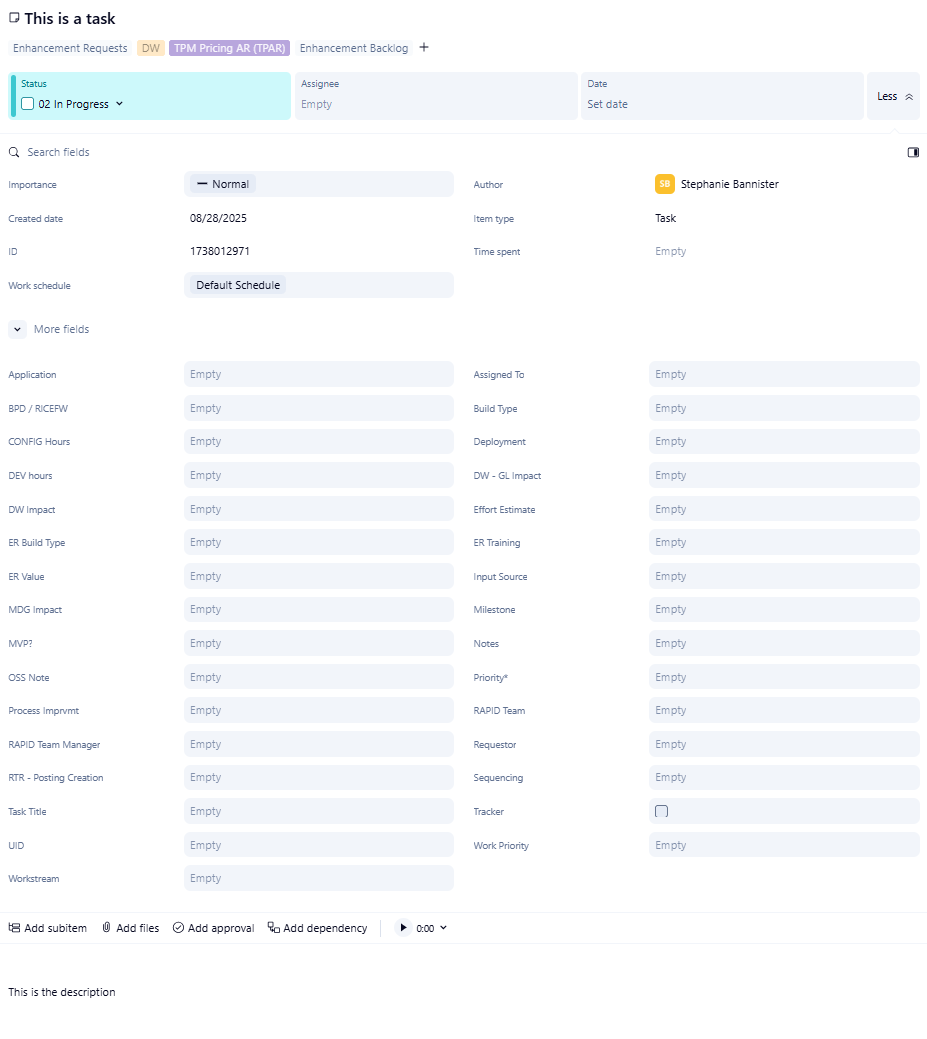
We are expanding our use of Wrike into other departments and are facing a consistent issue: In order to have a custom field available in Analyze, or even available in 2 different spaces, it needs to be account-wide. However, when we do that, everyone sees it on regular tasks / projects / folders that aren't Custom Item Types. This has resulted in our PMO getting feedback that Wrike is "too technical", "too complicated", and "overwhelming".
It would be a game-changer for us when we're trying to onboard new users if we could set the custom fields that should show in the panel on all standard tasks and then choose to "hide more fields" like we can on CITs.
Below is what a new user will see by default on a new task - all before they get to the description. I know we should clean up our custom fields, and we're working on that. I also know we can train people to collapse the "more fields" section and toggle to the side pane view which will help them get to the meat of the item faster. But first impressions are everything. When people encounter an overload of information as they're trying to learn a new system while also getting their regular work done, it's overwhelming and discouraging. We have a wide range of users in Wrike and being able to control this would go a long way in helping teams both inside and outside of IT be comfortable with the tool.
Thanks for considering! :)
Hi Stephanie Bannister!
Thanks for sharing your detailed feedback along with the screenshot. I’ll pass your post along to our Product Team for visibility 👍
Rohan V Community Team at Wrike Wrike Product Manager Become a Wrike expert with Wrike Discover
Rohan V Wrike Team member Become a Wrike expert with Wrike Discover
Agreed this is a huge issue for us as well. Our tasks look disorganized and we have to scroll up and down to see the fields that are actually needed.
Being able to set the visible fields by status would also be very helpful.I previously started a post on that here: https://help.wrike.com/hc/en-us/community/posts/30946050378775-Visible-Fields-Based-On-Task-Status
Thank you for sharing your feedback, Tiffany, and for referencing your previous post! 👍
Rohan V Community Team at Wrike Wrike Product Manager Become a Wrike expert with Wrike Discover
Rohan V Wrike Team member Become a Wrike expert with Wrike Discover
I just checked this issue in our account. I don't see all account wide field in a generic task. I know that it was possible to choose what fields are visible in the task view by changing the visible fields in the default table view of the according space or folder.
But since views have changed, and there's no default table view anymore, things seems to be messed up. I'm still able to add custom fields to the item view by adding them to a table view, but I can't remove them anymore!
Futher investigation appreciated :-)
Hi Rohan V,
any updates so far? The issue I descibed above is still persisting.
And like Stephanie Bannister requested, it would be really helpful to be able to choose the standard fields that show up in generic item types, like it is already possible for CIT's!
Florian
Rohan V Community Team at Wrike Wrike Product Manager Become a Wrike expert with Wrike Discover
Rohan V Wrike Team member Become a Wrike expert with Wrike Discover