Wrike Datahub Database Setup
Featured
I have built an ERD (entity relationship diagram shown below) to help me define a relational database structure in MS Access. I would rather use Wrike Datahub, but need to build the business case to justify the expenditure. I am looking for other Wrike admins/users that are using Wrike Datahub that have suggestions on how to structure databases in a given space. Do you simply create the core tables as separate databases, or do you load all fields into the same database? Would this limit the way common fields can be referenced across entries?
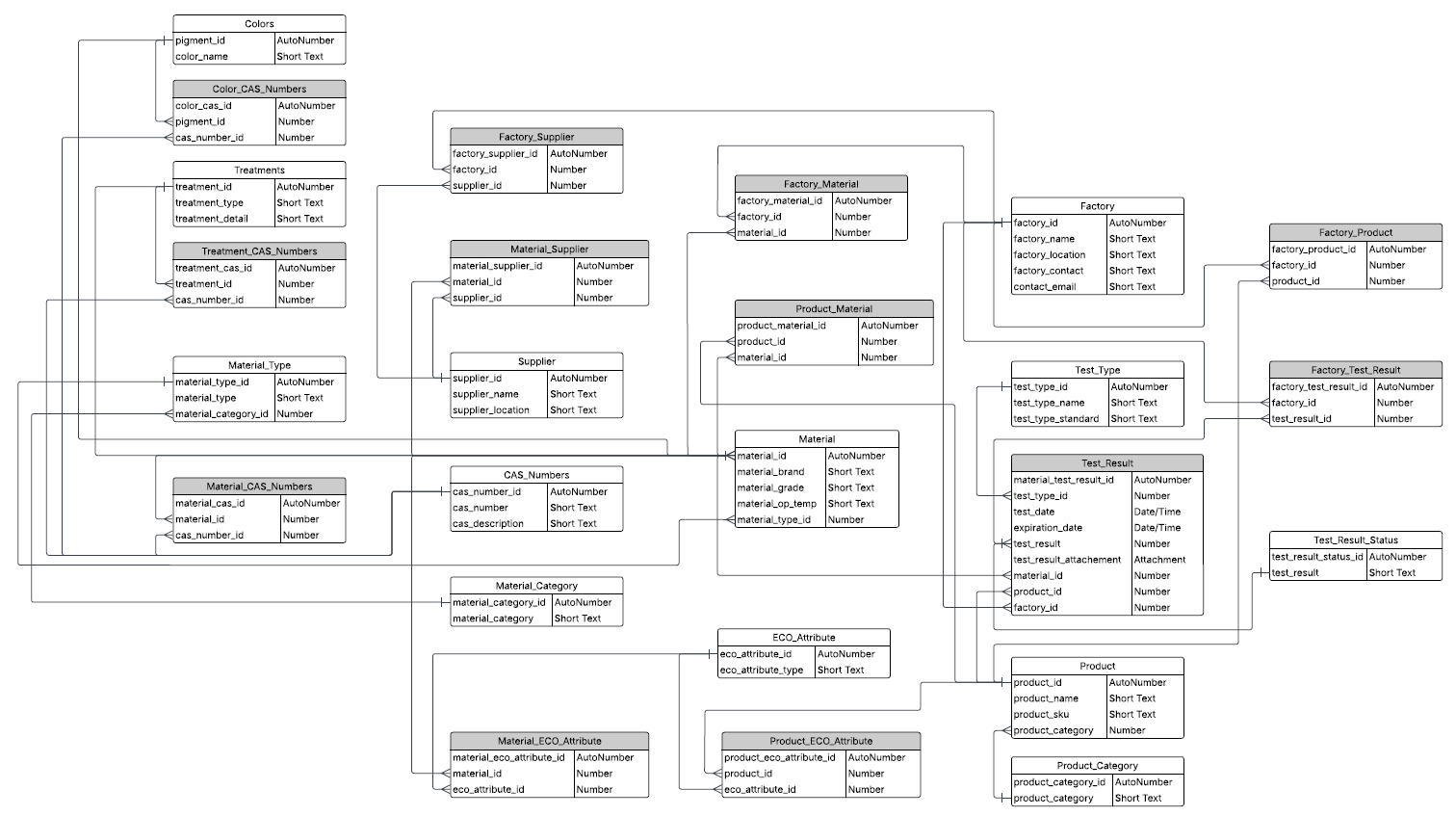
I recognize I am not suggesting a best practice here, yet I hope the conversation that is generated will become the best practice. Thank you anyone and everyone that chooses to participate in this discussion!
Hi Wrike Community, I have an update. After working with our Wrike CSM, I've come to understand that multiple databases are necessary to prevent duplicate entries. The best aspect is that there are not nearly as many "tables" (aka databases) needed as there is in a relational DBMS. Here is my new list of databases/tables:
However, a new question has come up about the use of "Link multiple records" checkbox when adding fields to one DB that is linked from another DB. The best example I can give is the following scenario:
Where I need help is the following:
You can see an example of a product below that has multiple materials assigned to a single product entry in the products database.
Hi Trevor,
I suspect what you're hoping to do is beyond the capabilities of Wrike Databases.
From my understanding they're not much more than elaborate drop down lists from which you can select an item in order to retrieve additional data from the specific record for that item.
e.g. You could select a specific Material Type, and it could bring along any other fields in the record that contains that Material Type such as Category, Brand, etc.
This data goes into an item type - which you would then report on the same as if someone had entered the data manually.
There's no option for relations between databases, or the ability to run reports using information from a database.
In fact calling them Databases at all is a poor choice as it implies capability that simply isn't there - they really should be called Lists.
Hi Trevor Tollefsbol, would you like to discuss this with our Support team?
Also, I wanted to mention it's possible to like databases in Wrike, please find more info on it here.
Lisa Community Team at Wrike Wrike Product Manager Become a Wrike expert with Wrike Discover
Lisa Wrike Team member Become a Wrike expert with Wrike Discover
Thanks, Lisa! I'm sure you can see from what I posted above that I already have my databases linked. I've been working with my CSM and Wrike support together. Unfortunately the solution to my woes is not quite what I need. If I come up with a clever way to achieve what I'm after, I will post it here as an update. Thanks for your help, though!