Gantt Chart Blockout Dates

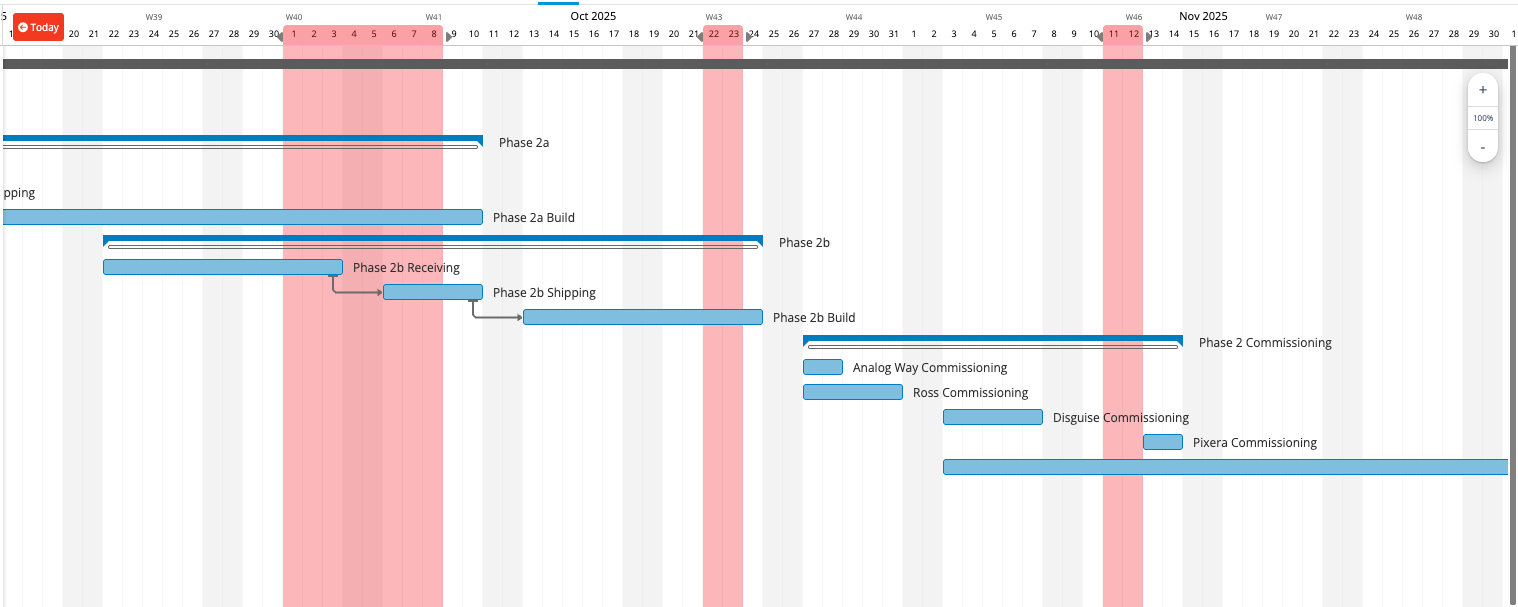
It would be great if the Gantt chart could show date ranges that are considered black-out, or even project phases, or similar, coloring the entire column of dates so that it is clear to see these date ranges no matter how far vertically you scroll. This is done in some competitors' platforms and we find it very useful. Wrike doesn't seem to have a similar feature, but it would be a great add. I have attached a screenshot of an example of this feature from another platform.
At minimum I'd like to see blackout date ranges. But, I could also see defining different date ranges with different colors to signify phases, coordinated date ranges with other 3rd parties, internal company date conflicts (such as a company retreat or something where the entire company is busy), or any other purpose to shade certain date ranges for visual indications.
Be sure to upvote this if you find this helpful and let's try to get it on the developers roadmap.
Hi Jason Pontius, it is possible to mark certain days as "Non working days" which will then show up in the Gantt chart similarly to how weekends do. This can be done through the Work Schedules area in Settings. This feature is available on any of the paid plans. Would this help?
Phil Taylor thank you for the suggestion. Yes, this is a workaround, but it isn't really the same thing. This is a global setting to all employees across the board, and would affect all projects. I am looking for a feature where we can indicate visually certain date ranges in a given project on the Gantt. Most notably, for indicating block outs such as something happening on the job site and therefore no work can occur on site during that time for that specific project. Or, taking it a step further with the option of coloring different ranges, we could indicate the date range of other contractors being on site during a given period so we can easily and visually see where we need to line up with our schedule.
This is a feature that exists on some other platforms, like the screenshot I attached, and would be very nice to have in Wrike.
I will second this. It seems the most common reason in my org that we have to pushback dates in Wrike is because there are no overarching blackout dates that would pre-screen the calendar and adjust deliverable dates to account for holidays or organizational events that would impact that timeline (such as scheduled maintenance/construction or organization events).