Automation rules in Project Blueprint

Within projects, we naturally have many meetings that result in a number of actions and decisions. I already have custom items called Meeting Notes, custom item Decisions, and custom item Actions.
The structure I am looking for is that when I create a sub-item called Decision or Action in Meeting Notes, I would like these last two options to be automatically “tagged” in a folder called Action and Decision list (a standard folder that is located in the same place in every project) containing all the actions for a project. An automation rule in a blueprint would be great.
Hi Cees Bakker,
I like your idea and I've posted some similar some years ago.
Unfortunately till now is not possibile with standard automations.
I've resolved by now using Wrike Integrate and API, let me know if you want to see something.
Pietro Poli I would love to see what your approach is.
Hi Cees Bakker,
we have large blueprints with some tasks and some folders (to organize work).
Into blueprint whe have all possibile task we need, folders and task are tagged with custom fields to recognize them.
Also we use a lot of custom item type to differentiate better tasks.
Here a screenshot for payment options we have.
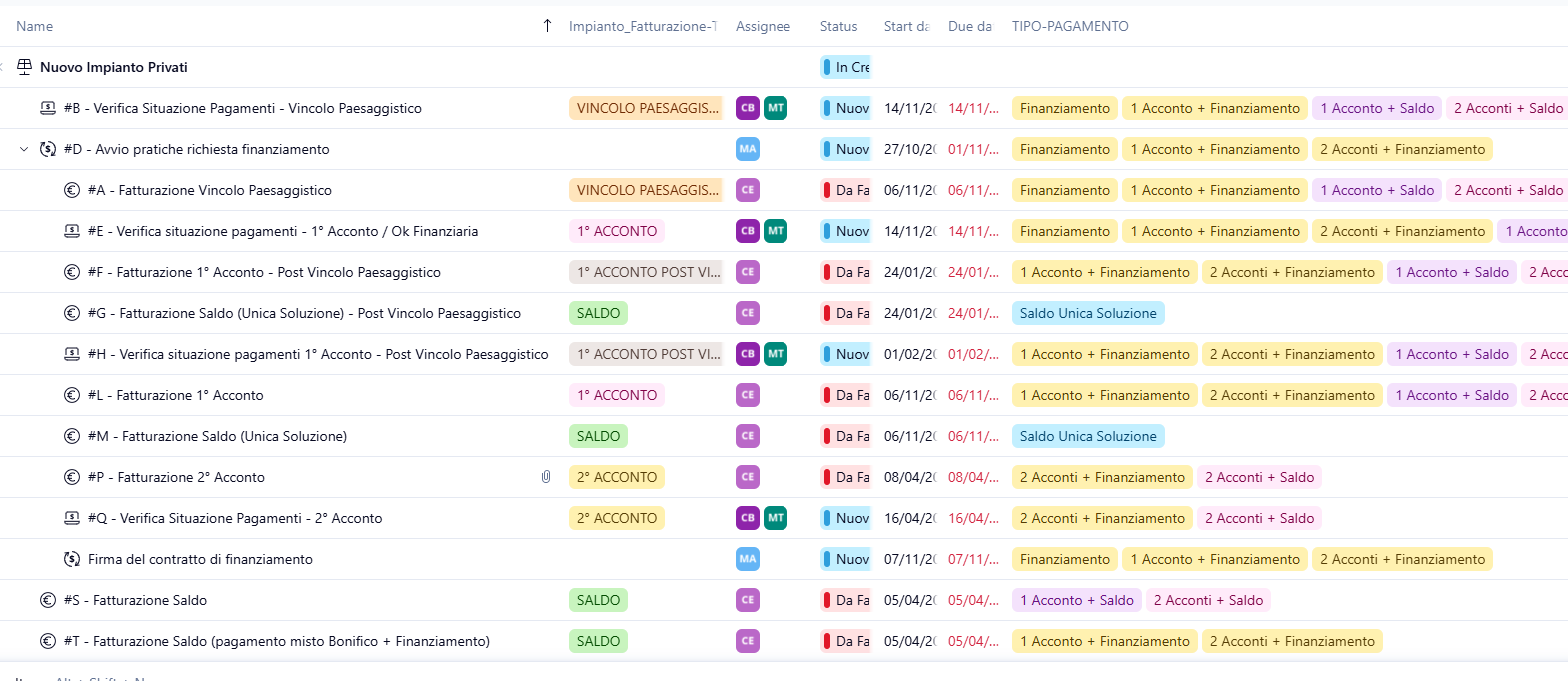
Into the project just selecting (for this case) the payment method for this project and all task unnecessary will be deleted by Wrike Integrate.
I implemented a recipe in WI that start (just one time) when payment method is changed, then I search all task that can be deleted and I delete them.
In the same way for other customer I create elements in specific subfolders (I use custom fields to tag them or I create a Custom Item Type based on project to create a "folder")
I hope this can be useful for you