All cells in Pivot Table dashboard widgets to be clickable (including N/A)

Hi all,
I originally reported this to Support as a bug but was told that a) the engineers are aware of the issue and b) they don't plan on fixing it/considering it part of the feature.
When creating a Pivot Table dashboard widget, you select 2 fields to break and group by - thus creating the pivot table! When setting the location, if an item exists there but is missing 1 of 2 fields, the line item will show as N/A. All other cells in the pivot table can be clicked on and doing so will bring up the filtered work in a popup. Clicking on the N/A cell does not bring up a popup, thus making it difficult to locate these issues.
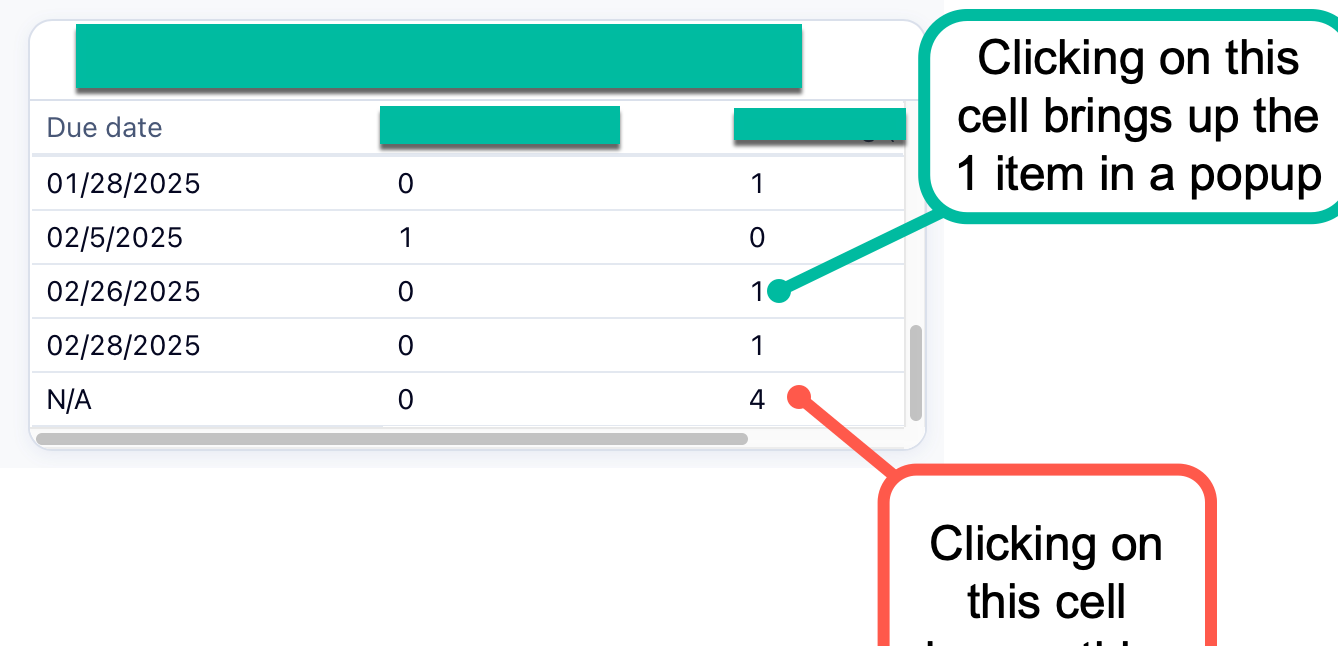
Ideally, clicking on any cell in a Pivot Table should bring up the affected items, regardless if they are N/A or not. Consistency is key for an optimal user experience! 😉
Yes! I agree too
Thanks for highlighting this, Anna Giacobbe! 👍🏽
I played around a bit and noticed that when we use any default date type fields to break items, the N/A line item doesn’t display the popup and item details. It works as expected with other fields and custom date type fields as well. Can you check if it's the same for you and let me know if this helps in any way? 😊
Basudha Sakshyarika Community Team at Wrike Wrike Product Manager Become a Wrike expert with Wrike Discover
Basudha Sakshyarika Wrike Team member Become a Wrike expert with Wrike Discover