Sorting values in Pivot Table dashboard widgets

Hello!
I came across a use case today where we wanted to apply sorting to our header attributes in a pivot table widget in new dashboards.
We have created a widget that first sorts on Due Date (by the day) x a specific Custom Field where there are 2 options. The widget looks like this:

It would be nice if we can apply sorting to the first parameter - in this case, Due Date. Right now, the first date is the earliest recording, with all others ascending. It would be nice if we could change to descending so that we can see the most recent dates first. For now, we are constantly trying to scroll down to find where we left off and we don't want to eliminate past dates as we want to keep record.
Please consider allowing for more sorting capabilities for better displaying our data in dashboard widgets.
Thanks!
Thank you again for posting another suggestion, Anna Giacobbe! We're now forwarding your feedback to the Product Team.
Rohan V Community Team at Wrike Wrike Product Manager Become a Wrike expert with Wrike Discover
Rohan V Wrike Team member Become a Wrike expert with Wrike Discover
Hi - We are preparing to rollout dashboards within our team and are also looking to be able to sort table widges so that the most recent entries are at the top. In our case we have a table tracking created date to determine the number or projects created on a monthly basis:
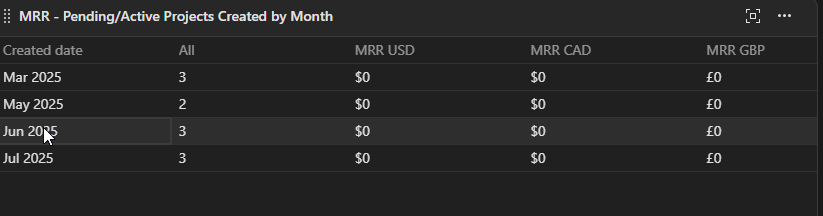
In this case we would like the reverse order of these so that the current month is at the top, working backwards to the oldest. Are there any updates on adding functionality like this or do you have any recommendations?
Rohan V Community Team at Wrike Wrike Product Manager Become a Wrike expert with Wrike Discover
Rohan V Wrike Team member Become a Wrike expert with Wrike Discover