Subitems are not shown in "Single list of tasks" mode of "Subitems" menu

In the table view, under Subitems, the option to "Show in Table: Single list of tasks" is extremely powerful, especially when you are working to do mass changes to workflows or updates of some kind. That view has allowed us to make some mass edits very quickly and easily. However, sub-items of a task are not shown, they simply do not appear in this view.
This seems crazy: The entire point of this view is that folder structure and project structure is removed and you see the tasks in a flat way. This is brilliant and works uniformly EXCEPT it does NOT support sub-tasks. In that view, sub tasks are _not shown at all_. As a result, doing mass updates such as mass change of item types, workflow corrections, or other cleanup require you to painstakingly search for sub-items.
The hierarchy of Wrike including folders, sub-folders, and sub-items is one major strength of Wrike, so this limitation seems really unfortunate.
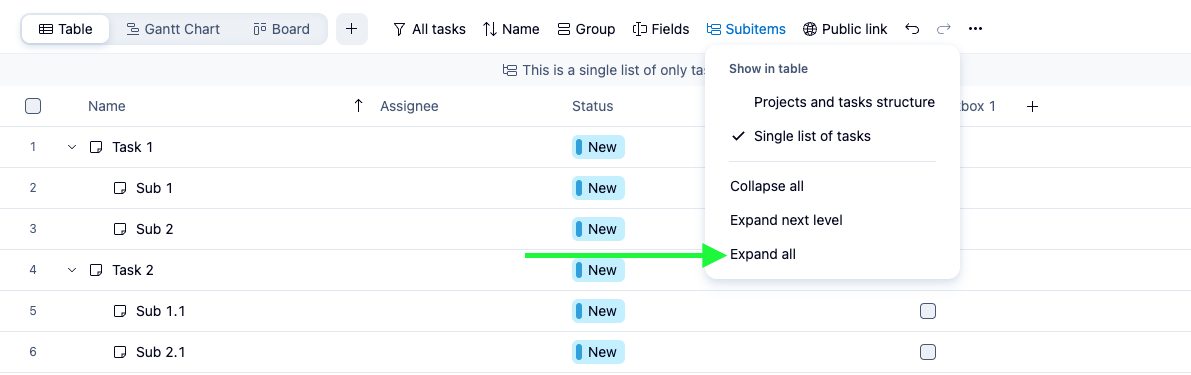
Hi, John Heinlein 👋 Thanks for sharing such detailed feedback! I was curious - have you tried clicking on the "Expand All" option under the Subitems tab? I’ve added a screenshot below where all the subitems are listed. Please let me know if this helps.
Rohan V Community Team at Wrike Wrike Product Manager Become a Wrike expert with Wrike Discover
Rohan V Wrike Team member Become a Wrike expert with Wrike Discover
The issue is that subitems that are tasks are treated flatly in many areas of the tool. Why can't subitems be "Subtasks" or a custom task type by default? It doesn't make sense to me to have a hierarchy but they are all "tasks." This becomes painful when trying to build dashboards or reporting by status.
E.g., I have a task "Update UI on home page" and then three subitems:
Unless ALL of these tasks (main task and subitems) are in the same status, visibility into "Push to Prod" means nothing to the viewer of the report/dashboard. It also leaves us with multiple generic-looking tasks that are indistinguishable unless you click in to see the parent task. (It would also be nice to view parent task in reporting/dashboards as a column. Location, especially when tagged in multiple places, is not helpful.)
Thank you for sharing your thoughts, Julie Plonski. 😊
You are correct that all items—whether they are parent tasks or subitems—are fundamentally the same object type (a "task" or a custom item type). There is no enforced distinction at the system level between a "task" and a "subtask" beyond their position in the hierarchy. So, I have forwarded your feedback to our product team for consideration. 👍🏽
Basudha Sakshyarika Community Team at Wrike Wrike Product Manager Become a Wrike expert with Wrike Discover
Basudha Sakshyarika Wrike Team member Become a Wrike expert with Wrike Discover