Custom Fields in Request Forms Broken?

I am trying to link a field in a request form to a custom field, but the field isn't showing up in the list to path the the form field to.

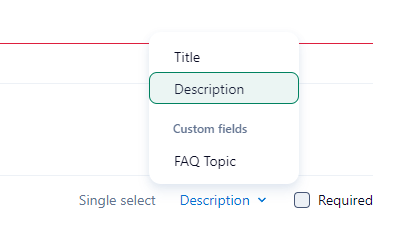
The form belongs to the space, I made sure the custom field is added to the Space. I also set the 'Place project into' to the space. I found if I don't have this set it doesn't show any custom fields.
any suggestions? Is this a bug, or am I still missing a step?
So this is really confusing me. If I open the form to edit from the admin settings rather than the space space settings it shows me more of the custom fields, but still not all of them. I created a field at the space level, and it doesn't show up in either list.
Hello Russell Sprague, thank you for bringing this to us. I have opened a ticket with our Support Team so they can investigate your case and assist you with this. One of our agents will reach out to you soon 👍
Russell Sprague @... was this resolved? I am running into the same issue on our account and I need to set up the request form fairly quickly.
Callan Goodwin I haven't run into the issue since the Forms creation page was updated, but I haven't created a new field while creating a form. The answer support gave me, which wasn't super helpful, was to make sure the field is added to the project you are using in your form.
I am having the exact same issue, the field is not showing up when I try and add it to a request form.
Here are a couple things I have noticed about forms and custom fields, maybe they will help. With the exception of the text field, you can only match to a custom field of the same type. So a number field in the form can only match to number custom fields, etc. For single and multi selects, it seems to only match up to the custom field if you use that custom field as the options. So choose the 'Use custom field as options' option.

Hopefully this helps a little. It would be nice if Wrike had a some detailed docs about the idiosyncrasies of custom fields in forms.
Hello everybody! Thank you for sharing your cases here. May I please ask you to confirm that the field you are trying to use is added to the location where the item will be created upon the request form submission? If not, please kindly add the custom field to the location and refresh your page.
Russell Sprague, it seems that our Support Team was able to find a solution for you 🙂
Hi,
Having the same issue... The form doesn't see any custom items, however, the ones I need are available on the account level and as requested I made sure the custom item types are added to the same location as future tasks from the form.
Yulia Kalinnikova, I've asked our Support team to look into this for you 👍
Lisa Community Team at Wrike Wrike Product Manager Become a Wrike expert with Wrike Discover
Lisa Wrike Team member Become a Wrike expert with Wrike Discover
Yulia Kalinnikova Yulia Kalinnikova
I was having a similar issue with my Custom field not showing up on the Request form I was creating. I realized that the type of question that I selected did not match the Custom field that I created. In your example above it appears that you selected a text field for your question but Airfare was defined as a Currency field. Perhaps this is why it is not appearing in your list of Custom Fields?
Yep, that was a reason [partially]. It's solved now. TY!