A bug?


Hi guys, 

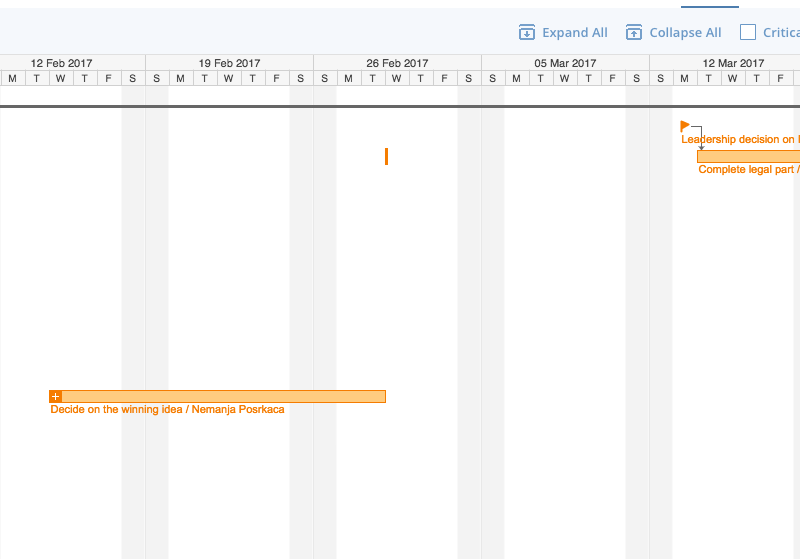
I am trying to figure out what this vertical dash below the week of Feb, 26 stands for and is it a bug.

I would like to remove it and don't know how since it's not clickable 

0
👍 Spot On 💡 Innovative Approach 💪 Stellar Advice ✅ Solved 🪄 Remove Kudos
3 comments
Avatar
Stephanie Westbrook

Hi Nemanja, thanks for reaching out! That marker is actually a date constraint. They appear when you have tasks linked by a dependency and you reschedule the dependent task to a later date. The constraint prevents the dependent tasks from being automatically rescheduled to a date before the one where the constraint it. 

To remove it:

  • Click the task with the date constraint and use drag and drop to reschedule the task so that it begins immediately after (for finish to start) or on the same date as the preceding task (for start to start dependencies).
  • Extend the task’s duration so that it begins immediately after (for finish to start) or on the same date as the preceding task (for start to start).

Let me know if you have any questions!

0
👍 Spot On 💡 Innovative Approach 💪 Stellar Advice ✅ Solved 🪄 Remove Kudos

I don't have a need for date constraints.

Wike needs to provide an option to completely disallow them.

0
👍 Spot On 💡 Innovative Approach 💪 Stellar Advice ✅ Solved 🪄 Remove Kudos
@Stephen Hey! Thanks for posting your feedback 🙂
The Date Constraints are there for more accurate project management. But, as Stephanie explains above, you can remove them manually. I can also suggest adding your post to the Product Feedback section - it will be brought to our Product team's attention that way 🙂
 

Lisa Community Team at Wrike Wrike Product Manager Become a Wrike expert with Wrike Discover

Lisa Wrike Team member Become a Wrike expert with Wrike Discover

0
👍 Spot On 💡 Innovative Approach 💪 Stellar Advice ✅ Solved 🪄 Remove Kudos

Folllowing List for Post: A bug?
[this list is visible for admins and agents only]

Top

Upcoming Live Sessions

Didn’t find what you were looking for? Write new post