Don't populate date field when hovering over calendar

Our use case: We sometimes know the due date but not yet the start date. To populate it in Views, a calendar pop-up appears, but after selecting the day for the Due Date, moving the cursor away hovers over other days which Wrike tries to populate the Start Date with without the user clicking on them.
Our workaround: Type in the Due Date. Or select it, copy it, clear both date fields, then paste only the due date.
Solution: Only populate the date fields when user clicks on them. This will prevent unwanted selection of second date field.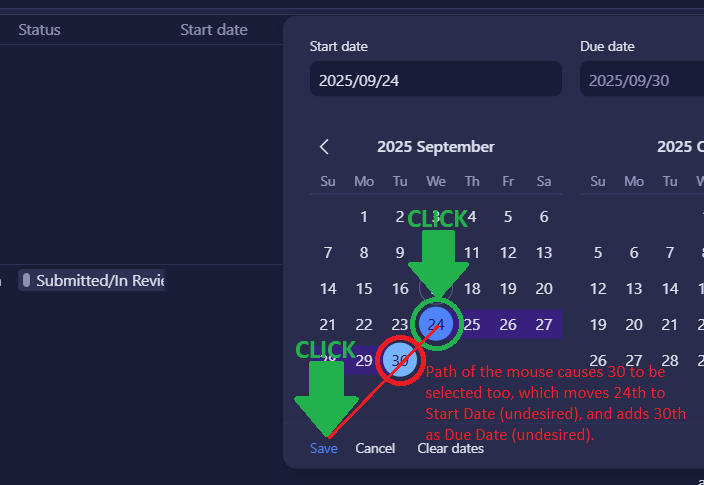
P.S. If you would like to see this request implemented, please upvote it and ask your friends to. Minimum threshold is 60 votes.
Similarly entering the start date without the system populating the due date...
Ashley Fischer,
Yes, thank you. Please consider upvoting my request, and maybe ask your friends to - a request needs at least 60 votes before the Wrike team considers implementing it.
I'm not sure I totally understand this, but if you want to populate a single date, triple-click on the same day and it populates start and end dates with the same date. It needs a date range to operate correctly. You would have to edit the due date when you get that info.
Steve Mruskovic, that's a neat shortcut. I understand that some features require a date range, but we don't use those features. Based on how we use Wrike, we often need to populate only one of the two fields, leaving the other one blank.
Thanks for the feedback, Sergey Lyakh. I will pass this on to our product team. 👍🏽
Basudha Sakshyarika Community Team at Wrike Wrike Product Manager Werden Sie ein Wrike-Experte mit Wrike Discover
Basudha Sakshyarika Wrike Team member Werden Sie ein Wrike-Experte mit Wrike Discover