Table View and Board View Showing different items in same folder.

Wondering if there is something I am missing or a workaround to this. We have a SPACE that has all of our employees folders. All of the tasks they input from their requests automatically populate their folders. Some tasks have different workflows setup (ie, DESIGN workflow and ESTIMATING workflow.) It appears that because there are two different workflows- our TABLE VIEW is showing all projects while the BOARD VIEW (in the same folder) is only showing one of the workflows. Is there a way to make both VIEWS show the same items. Why does one show both tasks but not the other? I am attaching screenshots to show. Thanks!
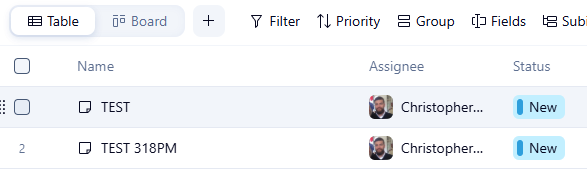
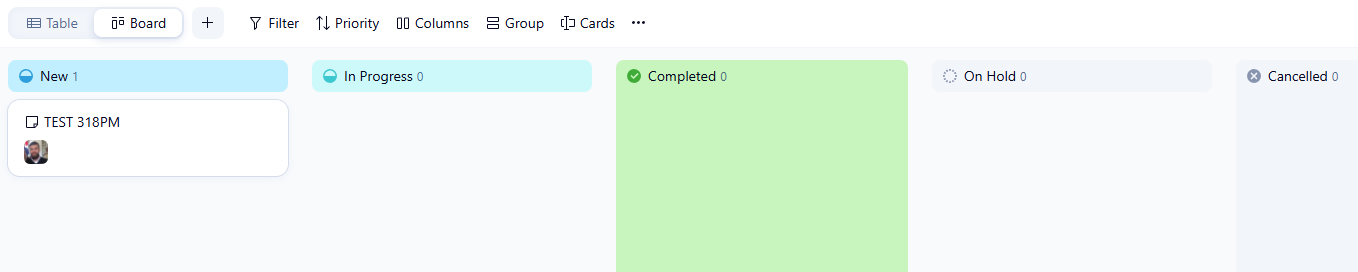
Hi Chris, I don't use the board view often but it seems like a filtering issue to me. I did a quick search and found this: Board view only considers the first layer of subtasks. This means that even if sub-subtasks meet the filter criteria, they will not be displayed in the Board view. Figured I'd share it in case it helps. Here's a link to more info: https://help.wrike.com/hc/en-us/articles/1500005225062-Sorting-and-Filtering-Tasks-in-Board-View
Hi Christopher Lands the board view only allows you to view one workflow at a time. If you want to switch between workflows you can click on the 'Columns' icon in the top menu bar and switch to another workflow. The table view will allow you to view all workflows. You could try creating a dashboard and filter it via all the workflows you wish to see at once.