Notepad dashboard widget issues and feedback

Hi team,
I was so thrilled to see today's weekly release notes for the Notepad widget in dashboards - this is definitely something I (and others) have posted about in this forum, so it's great to see it come to life!
In testing it today, I don't think it was quite ready for release. Here are some issues I encountered and general feedback.
[added 11/14] [Issue] Cannot edit!!!
Once you publish a Notepad widget, you cannot easily edit it. Sure, you can update the icon/background color/text, but the Discard and Save changes button don't appear!!! I can't add screen recordings, so bear with me with screenshots!
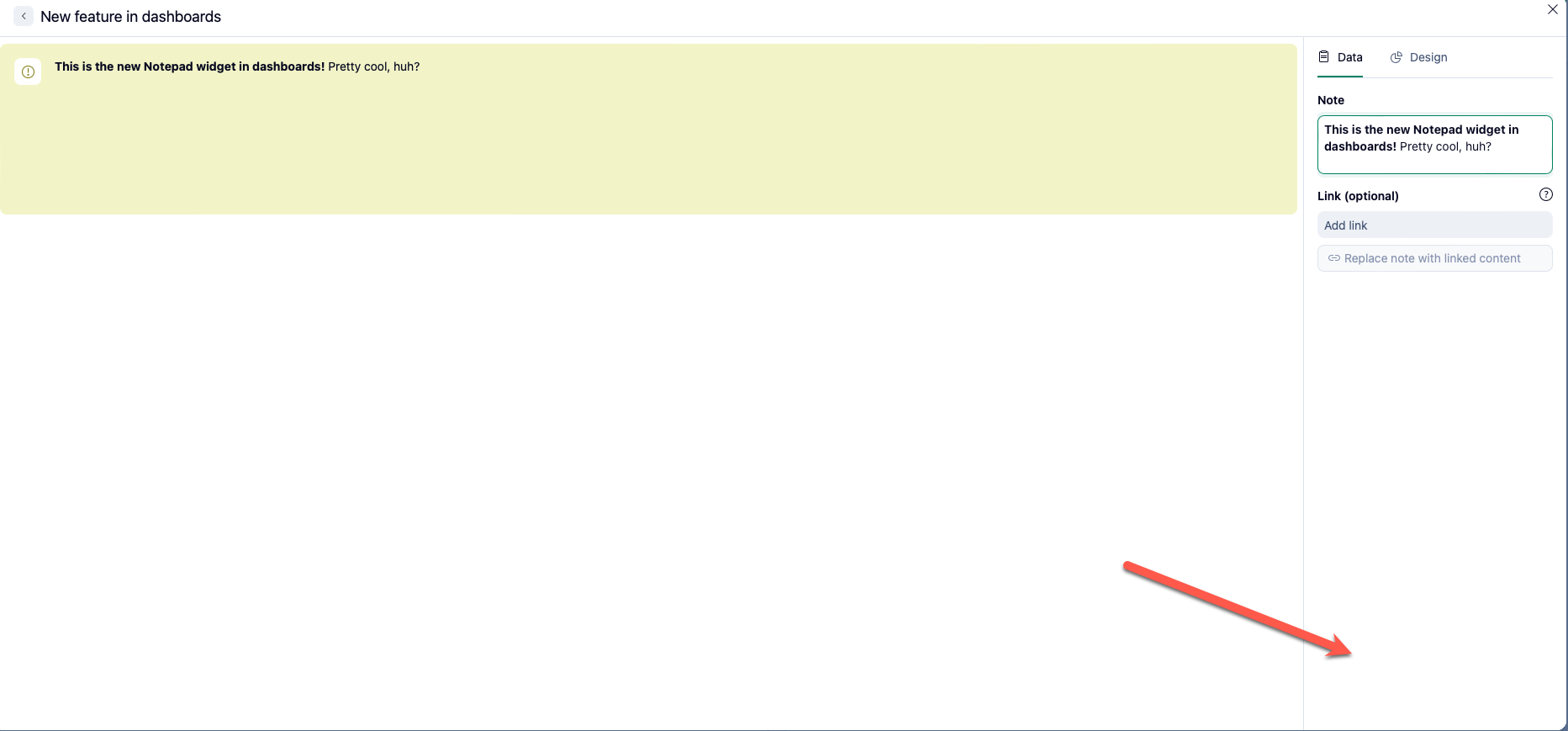
I did some testing and noticed you have to do one of the following to be able to save changes:
- Edit the text box and then click Enter (which again, as you will see below, doesn't add a line break)
- Edit the text box and then click anywhere outside of the text box, but within the widget settings
Ideally, the Discard and Save changes buttons should always be visible, similar to how they behave on other widgets.
[added 11/14] [Feedback] Preview doesn't update as you write or edit content
The preview box doesn't update as you write content in a fresh new widget or if you go back in one to edit. With a newly created widget, the preview will be completely blank as you add text; when editing the text, it will just show the original text and not the changes until you click out of the text box or click Enter (which again, doesn't add a line break as users would expect).

- Note: The only aspect that updates automatically is when you add/remove/change the icon and when you add/remove/change the background color.
Ideally, this widget would behave like other widgets where the preview updates as you update the content/filtering.
[Issue] The link option doesn't work
Other Wrike users mentioned that it doesn't work for them either on the original post that I wrote on.

- The Replace note with linked content button never un-grays for us
- If we click Save and go back into the widget to edit it, the link we put disappears
- Adding a link to the Note box itself doesn't hyperlink it either
[Issue/Feedback] Formatting options could be more apparent
In the release notes post, it said that this new widget can be formatted.
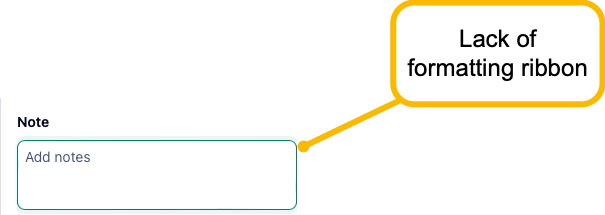
- There are no formatting options that in the UI by default - i.e. there is no formatting ribbon
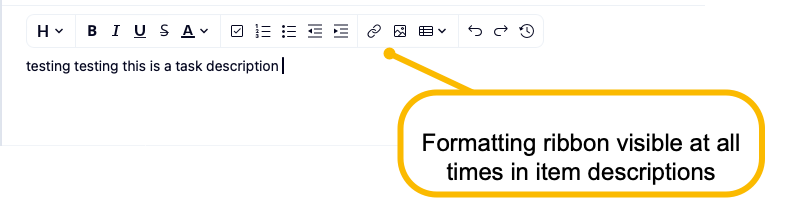
- I realized only after that if you hover over some text, you'll see the formatting options - this should be pinned as a ribbon regardless, similar to how it appears in a description box of any work item in Wrike
- Clicking Enter doesn't skip a line - in fact, nothing happens (that's an issue)
- You can only add a line break if you hit SHIFT+Enter - not apparent that that's the case

[Feedback] Icon causes confusion
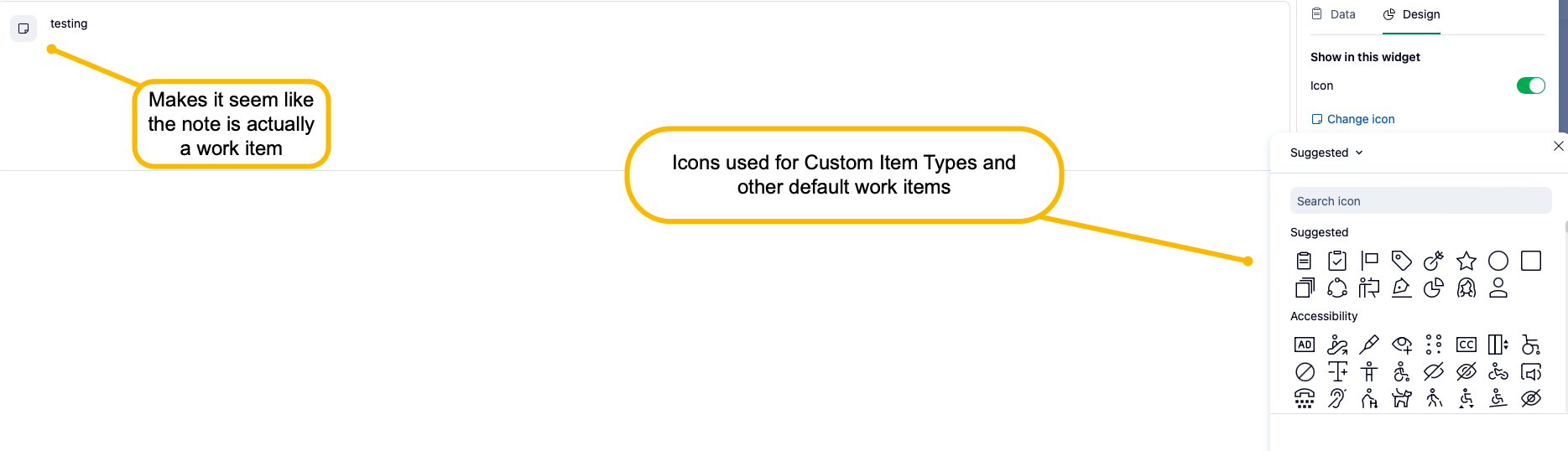
While I think it's neat that you can customize the widget with a background, I don't think the icon brings much value. In fact, I personally feel like it brings a bit of confusion as I am automatically thinking of work items. We normally associate icons with different work items from default (task, project, folder) to custom (custom item types), so seeing this randomly on a notepad - while it is optional - can cause confusion if enabled. I'm not sure what others think about the ability to add an icon, but I think the border of the widget itself and the optional color background help us identify it from the other widgets.
[Feedback] Love the background color option!
Again though, love the fact that you can change the background color of the widget - I think this will help set these note widgets apart from the other widgets that pull data!
Note that I added two more important callouts as I have been testing it further. They are at the top of the post.
Rohan V Community Team at Wrike Wrike Product Manager Werden Sie ein Wrike-Experte mit Wrike Discover
Rohan V Wrike Team member Werden Sie ein Wrike-Experte mit Wrike Discover
Hey Rohan V, thanks as always to you! I had some additional feedback after testing it some more:
Moreover, I encountered several issues where, when linking to a Wrike item and replacing the note with the linked content, the notepad would just say No description. I can't remember exactly what triggered this as I fell upon it last week, but I think it was when I linked to a Wrike Project (again, if we can only link to tasks, it would be helpful to mention that information either in an info bubble or change the wording of the button). I tried it this morning and it seems to work so if I encounter the issue again, I'll add it here.
One other piece of feedback: Once you replace note with linked content, there's no way to remove it. Perhaps it should be a checkbox option instead of a button, or that "Replace note with linked content" can change to something that indicates that it unlinks the content.
Rohan V Community Team at Wrike Wrike Product Manager Werden Sie ein Wrike-Experte mit Wrike Discover
Rohan V Wrike Team member Werden Sie ein Wrike-Experte mit Wrike Discover
I second all of what Anna is saying. I just discovered the Note widget and was also confused by the choice of wording and the lack of clear UI direction. I eventually figured it out, but I would suggest making things more straightforward.
Thank you for your feedback, Ron Grover! 👍🏽
On a different note, welcome to the Wrike Community. 🌟 Please feel free to explore all our available resources here.
Basudha Sakshyarika Community Team at Wrike Wrike Product Manager Werden Sie ein Wrike-Experte mit Wrike Discover
Basudha Sakshyarika Wrike Team member Werden Sie ein Wrike-Experte mit Wrike Discover
I was going to report a bug with this new widget because the hyperlink doesn't work, but I searched the community first, read this post and discovered the link option only works with WRIKE links.
This important bit of information should be added to the widget's description to prevent further confusion.
Feedback from my end is that we would utilize external links more than within Wrike to make this widget useful. A notepad with a rich text editor would be amazing! What I wouldn't give to have a single "quick links" widget with bullet points of hyperlinks! I submitted this idea two years ago in the "bonus" section of my request. :)
Thank you for sharing your thoughts. As you correctly mentioned, it only works with WRIKE-specific links, and our team is aware as this was brought by other users as well. We'll make sure to pass your additional feedback on to the Product Team.
Rohan V Community Team at Wrike Wrike Product Manager Werden Sie ein Wrike-Experte mit Wrike Discover
Rohan V Wrike Team member Werden Sie ein Wrike-Experte mit Wrike Discover
I share a lot of the same thoughts as other posts here. I wanted to add some additional ideas.
First, a bit of background. I have a weekly meeting with my manager to go over the status of each project I'm working on. We discuss the phase a project is in (the task we're on in our workflow), the hours spent on a project, due dates, and notes on the project. I've been using a Google Doc to do this, but naturally that involves a lot of manual translation of data from Wrike.
When I saw the Notes Dashboard, I got excited because I could leverage the data from Wrike directly and hopefully save a lot of manual work for myself. However, Notes is currently quite limited, as others have said.
I'd love to see the following features:
Adding another point:
Sub-bullet points don't retain formatting as they do in the edit screen.
I tried adding a sub-bullet point to an existing notepad widget's bullet point list and while I can see the proper formatting in the text box, once saving, any sub-points don't retain.
Edit window:
Thanks for taking the time to share you valuable in-detail feedback. I’ve made sure to forward them to our Product Team. If there are any further updates, I’ll be sure to post them here.
Rohan V Community Team at Wrike Wrike Product Manager Werden Sie ein Wrike-Experte mit Wrike Discover
Rohan V Wrike Team member Werden Sie ein Wrike-Experte mit Wrike Discover
Rohan V Any update on this?
Hi Colin Hall, thanks for reaching out! A new Text Widget has been released, replacing the Notepad Widget. It allows you to:
Please see this Weekly Release Notes post and Help Center Article for more details. If there are any further improvements or changes, we will share an update 👍
Rohan V Community Team at Wrike Wrike Product Manager Werden Sie ein Wrike-Experte mit Wrike Discover
Rohan V Wrike Team member Werden Sie ein Wrike-Experte mit Wrike Discover