Dates on search popup

Hi,
Can you please put the dates next to every task entry Wrike finds in the search. I can't tell which was the most recent task, & there are often several of the same task title, just different staffers & I need the most recent one.
I hope you understand what I mean. It's a popup box.
Thanks
Hi Michelle K., thanks for reaching out! If you click on the "Search" button next to your search query, you will see the full list of search results that you can sort by "date", "date created", or "date modified":
The date is also visible on the right-hand side (in case it's set for the task). Can this help you?
Lisa Community Team at Wrike Wrike Product Manager Torne-se um especialista em Wrike com o Wrike Discover
Lisa Wrike Team member Torne-se um especialista em Wrike com o Wrike Discover
No, they mean here: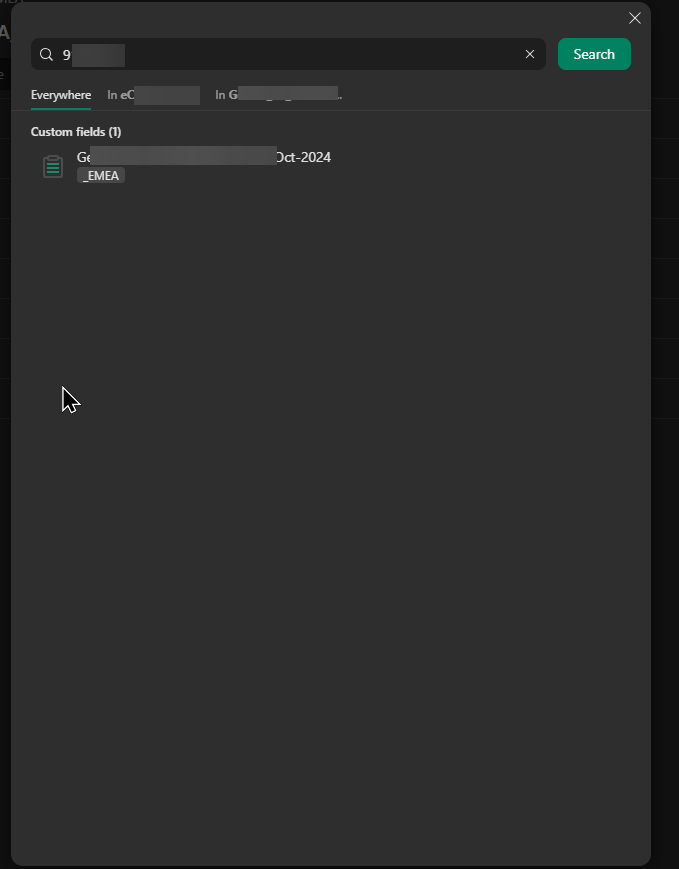
Hi Simon Stacpoole, I’m jumping in for Lisa here. Thanks for clarifying and for sharing the screenshot. We’ll post an update if there are any developments regarding Michelle’s suggestion 👍
Rohan V Community Team at Wrike Wrike Product Manager Torne-se um especialista em Wrike com o Wrike Discover
Rohan V Wrike Team member Torne-se um especialista em Wrike com o Wrike Discover
Hi,
I'm only seeing this now.
I don't see anyting that Lisa showed in her SS.
See, this is what I see when I search. I don't know why you have something different than me. https://nimb.ws/0tiUXBI
Thanks
Hey Michelle K. 🙋🏻♀️! Thank you for sharing the screenshot. To view the full list of search results, please click the "Search" button next to your query. 👇🏼
Since the search results interface in Wrike uses the Table view format, you can rearrange and add date columns for a more tailored display of your data. Hope this helps! Please feel free to let us know if you have any questions. 😊
Basudha Sakshyarika Community Team at Wrike Wrike Product Manager Torne-se um especialista em Wrike com o Wrike Discover
Basudha Sakshyarika Wrike Team member Torne-se um especialista em Wrike com o Wrike Discover