Reordering tasks

Permanently deleted user
I'm trying to reorder the tasks in my project just by the drag and drop method, to see them in a specific order. When I navigate away to another folder or project and then nav back to that project, the task list reverts and doesn't keep the reorder I just made. Help?
help.wrike.com/hc/en-us/articles/210322925-Move-Tasks-Folders-and-Projects
I was able to get this to work. I found the place to "outdent" the items, that was the first part of the problem. Now it's in the order that I need.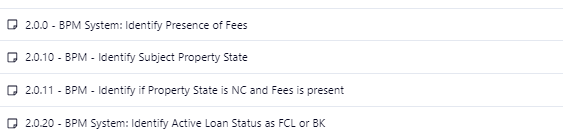
I have no issues now and have learned how it all works
Plz tell me the how you fixed it?
When I'm entering items to a Project, they go all over the place out of order. Cache additionally complicates this.
I've learned that I just have to open the detailed view and add sub items from there.
I do wish that Wrike entered items in order of entry. This would save time and potential human error.
this will not work for me, don use the sub task to often, this is basic feature (reorder the task by drug and drop) which wrike team should fix(
I use numbers to keep them in a specific order. the dragging and dropping does get off sometimes. But I have found that if I move the task from one folder and put it back into the correct folder it will order in the right place. It's the long way around, but it works.
Hey Natik Alaskarzda, it's also possible to choose sorting by "Priority" in the Table view and manually drag and drop tasks - the order will be saved for when this sorting is used:
Lisa Community Team at Wrike Wrike Product Manager Wrike DiscoverでWrikeの専門家になりましょう
Lisa Wrike Team member Wrike DiscoverでWrikeの専門家になりましょう
I also tried the priority but with multiple items I didn't find this helpful for me. Especially for items that are not prioritized yet, but do have an order for completion.
Rohan V Community Team at Wrike Wrike Product Manager Wrike Discover で Wrike のエキスパートになろう
Rohan V Wrike Team member Wrike Discover で Wrike のエキスパートになろう
Yes the only thing that does work is using numbers to sort or prioritize the work. for smaller items I use 01 (and you must use the leading zero I noticed to keep 1 separate from 10 in certain cases since it doesn't read them as a number properly). and for larger items I use 1.0.0, 1.1.0, 1.2.0 and use leading zeros when I have more than 10 items.
i.e. 1.0.00. 1.0.10, 1.0.11, 1.0.20 etc.
My team and I are in shock that a software we purchased to help us automate things is now thinking for us and moving things around based on alphabetical order. Can we not order and reorder the tasks ourselves based on our needs instead of the system's odd alphabetical ordering?
Hi Melissa Wolfe, thanks for reaching out!
This is possible if you have the sorting set as "Priority" - then you can start dragging and dropping tasks to reorder them as you see fit. Can you please try this and let us know how it goes?
Lisa Community Team at Wrike Wrike Product Manager Wrike DiscoverでWrikeの専門家になりましょう
Lisa Wrike Team member Wrike DiscoverでWrikeの専門家になりましょう