How to show the custom fields from a Request form to the table?

Hi,
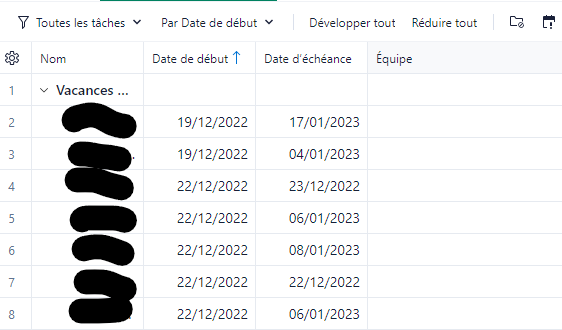
I have trouble from the request form to the table. I want to screen with the team name, but it doesn't show in the table:
The form:
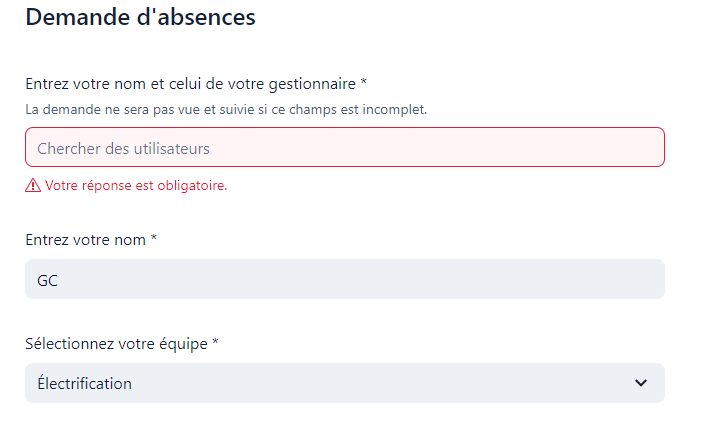
The options:

The result: no team column!
どのようなことでお手伝いできますか?
学ぶ。 共有する。 議論する。
Hi,
I have trouble from the request form to the table. I want to screen with the team name, but it doesn't show in the table:
The form:
The options:
The result: no team column!
Folllowing List for Post: How to show the custom fields from a Request form to the table?
[this list is visible for admins and agents only]
Géraud Chartoire - I think this might be as simple as clicking the gear icon in the table view and adding the column you are looking for.
After clicking the gear icon, you'll get a menu where you can check the fields you want to see in the table.
Hello, yes, indeed the column is here (as shown in the print screen above) but the value I entered in the Request isn't "written" in the column.
Oh yes - I see that now. The column was in your first post. Sorry about that.
On the request form, does the question map to your custom field?