Timelog Glitch: Unsubmitted Entries Disappear While Editing

This year, I have been experiencing a glitch that erases unsubmitted timelog entries that occurs when I edit time on a paused entry from the dropdown menu while another is running in the background (i.e., if I edit time on a task without pressing the play button first). In order to avoid this, I have to press play on every task before editing the time. If I do not, the entry often disappears, erasing all time associated with it.
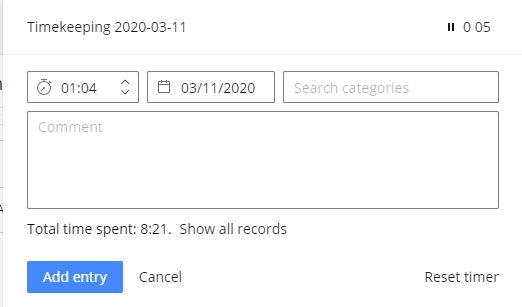
I have attached an example of this occurring. In the example, I had a task ("Timekeeping") running in the background while I submitted entries for the day. When I clicked into the task dropdown menu to edit time on another task (the one with 01:04 logged), the title for the task I was editing disappeared and was replaced with the Timekeeping task (shownhere with 5 minutes of time running).
Afterward, all time logged on the task with 01:04 was erased and the task disappeared from the dropdown menu. I had to revisit the original task and create a new entry.
Hi Andrew Castaneda! I can see that you've also raised a ticket with our Support about this - please get back to the agent there when you can if you're still experiencing this!
Lisa Community Team at Wrike Wrike Product Manager Conviértete en un experto en Wrike con Wrike Discover
Lisa Wrike Team member Conviértete en un experto en Wrike con Wrike Discover